Built for Shops That Run Without Internet Dependency
We build custom desktop auto repair shop software that runs completely offline. No internet connection required for daily operations.
Auto repair software helps shops manage work orders, customer and vehicle records, parts inventory, technician time, estimates, and invoicing from one system. The problem is that many modern shop software platforms depend heavily on an internet connection. Our custom desktop auto repair software takes a different approach: core operations run locally on your computers, so your team can continue working even when internet service is unavailable.
Our non web based auto repair shop software eliminates that dependency entirely. Everything runs locally on your computers.
Your job tracking, invoicing, parts inventory, and customer records stay on your network. Always accessible. Never waiting for a server connection or worrying about monthly subscription fees that keep climbing.
We have seen too many shops struggle with cloud systems that freeze up during busy periods or lose access to their own data when the internet provider has problems. While many shops compare different auto repair shop management software options, we focus specifically on offline solutions that put you in complete control.
The software handles everything locally. Write up work orders, track technician time, manage parts inventory, and generate invoices without touching the internet. Your data stays in your shop where it belongs.
And when you need to run credit cards or send invoices by email, the system connects only for those specific tasks. Then goes back to running independently on your local network.
Most shops tell us they never realized how much their old cloud system was slowing them down until they switched to our custom auto repair shop software development approach. No more waiting for screens to load or losing work when the connection drops.
We build this specifically for independent repair shops, multi-bay operations, and fleet service centers that want reliable software without the headaches of internet-dependent systems.
The right shop software should do more than generate invoices. It should help your team move work orders through the repair process, track parts and technician time, maintain vehicle history, and give your shop owner or manager a clear view of daily operations.
Core Features of Our Desktop Auto Repair Shop Software
We include everything your shop needs to run efficiently without depending on internet connections or monthly cloud subscriptions.
Each module works together seamlessly while running completely on your local computers. No waiting for remote servers to respond. No monthly fees that increase every year. No losing access to your own shop data when someone else’s server goes down.
GET IN TOUCH
Stop paying monthly fees for software that goes down when you need it most. Get your custom quote today
Job & Repair Order Tracking
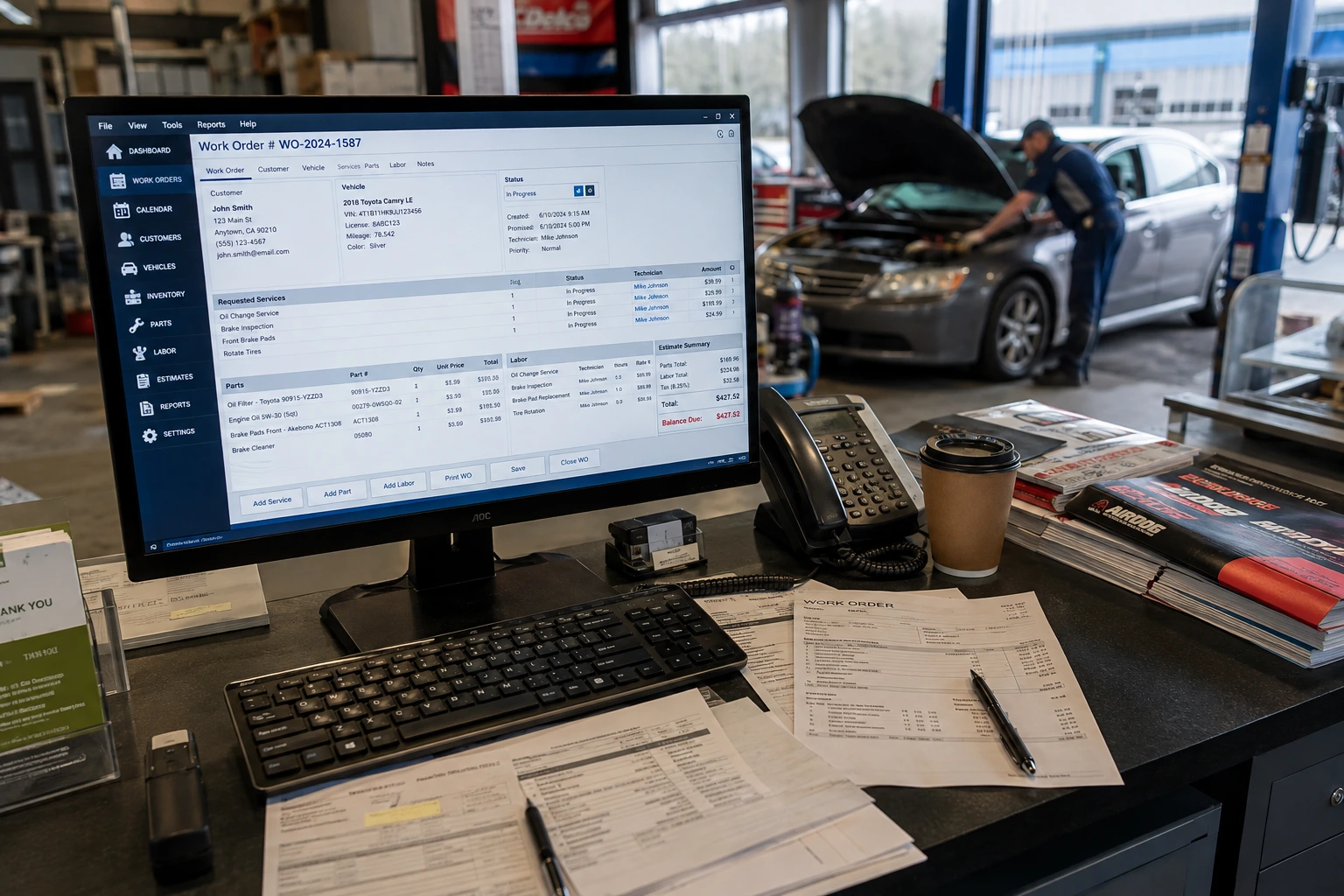
Every repair order gets tracked from the moment a customer calls until final payment. Complete workflow management that keeps jobs moving through your shop.
Do not add more “work orders” occurrences simply to increase keyword frequency. Everything stays organized automatically. No more handwritten tickets that get lost or work orders that fall through the cracks.
Your service advisors can see exactly which jobs are waiting for parts, which ones are in progress, and which vehicles are ready for pickup. Real-time status updates without refreshing screens or waiting for cloud updates.
And the best part? It all runs locally on your shop computers. Even when your internet is down for hours, your team keeps working without missing a beat.
Parts & Inventory Management
Track every part that comes into your shop and goes out on jobs. Our approach builds on proven inventory management system principles but adapts them specifically for auto repair shops that need offline functionality.
The inventory system automatically updates when parts get used on work orders. Set minimum stock levels and get alerts when you need to reorder. Track part costs, markup percentages, and vendor information all in one place.
Most shops tell us they save 2-3 hours per week just by not having to manually count inventory or hunt down parts that should be in stock. The system knows where everything is and what you paid for it.
Works with barcode scanners if you want them. But also works perfectly without any special equipment beyond your existing computers.
Labor & Technician Time Tracking
Accurate time tracking means accurate billing and better shop productivity. Each technician can clock in and out of specific jobs throughout the day.
The system tracks actual time spent versus estimated time for every repair. Shows you which jobs consistently run over estimate and which technicians work most efficiently. Real data to help you price jobs better and schedule work more accurately.
Technicians simply select their current job from a dropdown menu when they start working. Clock out when they finish or move to a different job. No complicated time sheets to fill out at the end of the week.
And since everything runs locally, there is no delay when switching between jobs or waiting for the system to record their time.
Invoicing & Billing
Generate professional invoices that include all labor, parts, taxes, and fees automatically calculated from the work order. Print them instantly or email them directly to customers.
The billing system pulls everything from the completed work order. Labor hours times your shop rate, parts at your markup, applicable taxes, and any additional fees. Takes 30 seconds to create an invoice that would take 10 minutes to write by hand.
Track payment status for every invoice. See which customers still owe money and how long invoices have been outstanding. Send payment reminders without leaving the software.
Integration with most credit card processors so you can run payments directly through the system when customers pay in person.
Customer & Vehicle History Records
Complete service history for every vehicle that comes through your shop. Previous repairs, parts installed, maintenance performed, and recommendations made.
When a customer calls about their car, you can see exactly what work was done last time and when. Makes it easy to track warranty work, follow up on previous recommendations, and provide better customer service.
The system stores multiple vehicles per customer and tracks service intervals for scheduled maintenance. Never lose track of when a customer needs their next oil change or major service.
All customer data stays in your shop on your computers. Not stored on someone else’s servers where you have no control over access or security.
Local Data Backup & Recovery
Complete automatic backup system that protects all your shop data without relying on cloud storage services. Your data stays under your control.
The backup system creates multiple copies of your database daily and stores them on external drives or network locations you choose. If a computer crashes or gets damaged, you can restore everything quickly from local backups.
We set up the backup process during installation and test it to make sure recovery works perfectly. Most shops can be back up and running in under an hour even if their main computer fails completely.
And because everything stays local, you never have to worry about internet outages affecting your backup schedule or someone else’s cloud service losing your shop data.
Digital Vehicle Inspections
Digital vehicle inspections can give technicians and service advisors a structured way to document vehicle condition before and during a repair. Inspection results can be associated with the customer’s vehicle record, making it easier to keep repair recommendations and service information organized alongside previous work.
Offline Auto Repair Shop Management Software vs Cloud-Dependent Systems
We build offline solutions because most auto repair shops lose money every time their internet connection fails or slows down.
Cloud-dependent systems look appealing at first. Lower upfront costs and promises of anywhere access sound great until you experience the reality of running a busy repair shop on someone else’s servers.
Here’s what actually happens with internet-dependent software. Your service advisor is writing up a $1,200 repair estimate and the system freezes because your internet provider is having problems. The customer waits. Your technician can’t clock into the next job because the time tracking won’t load. Parts lookups take 30 seconds instead of 2 seconds because the server is responding slowly.
We have talked to hundreds of shop owners who switched from cloud systems specifically because of these productivity problems. You shouldn’t have to wait for someone else’s server to run your own business.
With our desktop auto repair shop software, your shop runs independently. Everything happens instantly because the software and all your data live on your local computers. Work orders load immediately. Parts inventory updates in real time. Invoices print without delay.
Your internet goes down for 3 hours? Your shop keeps running normally. Your internet provider throttles your connection during peak hours? Doesn’t affect your software performance at all. Another shop’s heavy usage slows down the shared cloud server? Not your problem.
You own your data completely. No monthly fees that double after the introductory period. No losing access to your own customer records if you stop paying a subscription. No wondering if your shop data will be there tomorrow if the cloud company goes out of business.
Keeping core shop data on your local network can reduce exposure to some internet-based risks, but it does not eliminate security responsibilities. Access controls, strong passwords, device security, and reliable backups are still important. Your team can control who accesses customer and business records directly within the shop’s local environment.
Most shops tell us they save 15-20 minutes per day just from not waiting for cloud software to respond during busy periods. That’s 80 hours per year of productivity that cloud systems cost without you realizing it.
And when you do need internet connectivity for specific tasks like credit card processing or emailing invoices, our custom auto repair shop software development approach connects only for those functions. Then immediately returns to running independently on your local network.
The performance difference becomes obvious the first day you use offline auto repair shop management software. No more watching loading screens or explaining to customers why the estimate is taking so long to print.
Your shop runs on your schedule. Not on someone else’s server uptime.
Who We Build This For
Automotive repair businesses have different workflows depending on the vehicles they service, the size of their team, and the type of work they perform. A small independent garage may prioritize quick estimates and invoicing, while a larger operation may need technician scheduling, inventory controls, detailed service histories, and multi-user workflows.
Not every shop needs offline software. But if you have experienced productivity losses from internet outages, slow cloud systems, or rising subscription costs, our desktop approach solves those problems permanently.
Every repair business has its own workflow. Independent garages, multi-bay workshops, fleet operations, and established shops replacing legacy systems may all need different combinations of software features.
Independent Repair Shops
Most independent shops operate with 2-6 bays and cannot afford downtime when cloud systems go offline during peak hours.
For a shop owner, even small delays can add up across a busy day. A slow estimate screen, missing work order, or delayed invoice can affect both technician productivity and customer experience.
Or when you lost an hour of work orders because the internet went down right before lunch rush.
Independent shops also get hurt most by subscription fee increases. What starts at $89 per month becomes $149 per month after the promotional period ends. Then $199 per month when they add “essential features” that should have been included from the beginning.
Our custom software development approach eliminates both problems specifically for auto repair shops. No monthly fees that keep climbing. No waiting for remote servers when you need to write estimates quickly.
You get the same professional features as the expensive cloud systems. Work order management, parts tracking, customer history, and invoicing. But everything runs on your computers at full speed regardless of your internet connection.
Most independent shops tell us the software pays for itself in the first year just from eliminating monthly subscription costs.
Multi-Bay Workshops
Larger workshops with 8-15 bays need systems that can handle multiple technicians working simultaneously without performance slowdowns.
Cloud systems often struggle when 6-8 technicians try to clock into jobs at the same time or when multiple service advisors create work orders during busy morning hours. The system gets sluggish. Wait times increase. Productivity drops.
Our desktop auto repair shop management software handles heavy concurrent usage without any performance degradation. Everything runs on your local network at full speed regardless of how many people use it simultaneously.
The system also scales easily when you add more bays or hire additional technicians. No per-user licensing fees that increase your monthly costs every time you grow your team.
Multi-bay shops also appreciate having complete control over their data. For larger operations that need comprehensive business management, we also develop custom ERP solutions that integrate with auto repair functionality while maintaining offline reliability.
Diesel & Fleet Repair Operations
Commercial truck and fleet operations cannot tolerate software downtime that delays getting vehicles back on the road.
Fleet customers expect fast turnaround times and accurate documentation for every repair. When your shop management system goes down because of internet problems, you lose the ability to track job progress and generate the detailed invoices fleet managers require.
Our offline auto repair shop software keeps fleet operations running smoothly even when internet service fails completely. Work orders, parts usage tracking, and invoice generation continue without interruption.
The system also handles the more complex documentation requirements that fleet work demands. Detailed labor descriptions, parts specifications, and compliance reporting that commercial customers need for their records.
Fleet shops often work with multiple locations or mobile service units. Our desktop approach lets you install the software at each location without ongoing connectivity requirements or per-location licensing fees.
Diagnostic Information & Wiring Diagrams
For shops that handle electrical diagnostics and more complex automotive repair, access to accurate vehicle information can be an important part of the workflow. If included in your configuration, the system can organize diagnostic resources such as wiring diagrams alongside vehicle records and repair information, helping technicians find the information they need without switching between disconnected systems.
Shops Replacing Legacy Desktop Tools
Many established shops still use older desktop programs that work reliably but lack modern features like integrated credit card processing or email invoicing.
You want to upgrade to modern functionality without switching to a cloud system that creates new problems you never had before. Internet dependency, monthly fees, and performance issues that your old desktop software never caused.
We build custom replacements that give you modern features while maintaining the reliability and independence you are used to. Credit card integration, email invoicing, and mobile access when needed. But everything still runs locally like your current system.
The transition process includes data migration from your existing software so you do not lose years of customer and vehicle history. Most shops are fully operational on the new system within 2-3 days of installation.
And because the new system runs offline like your old one, your team adapts quickly without learning completely new workflows or dealing with cloud-system complications.
GET IN TOUCH
Ready to eliminate internet dependency? Call now for a free consultation on your offline auto repair software.
Custom Auto Repair Shop Software Development Process
We follow a proven development process that gets your shop running on reliable offline software without disrupting your daily operations.
Every auto repair shop operates differently. Some focus on quick oil changes and basic maintenance. Others handle complex diagnostics and major engine rebuilds. Fleet shops need detailed compliance reporting. Independent shops want simple invoicing and parts tracking.
That’s why we never start with a generic template. Our custom software development process for complex projects ensures we build your desktop auto repair shop management software around exactly how your shop actually works.
Requirement & Workflow Mapping
We spend 2-3 hours at your shop watching how you currently handle work orders, parts inventory, customer check-in, and billing processes.
Most shops have workflows that developed over years of solving real problems. Your way of tracking parts might be different from the shop down the street because you learned what works for your specific customer base and repair types.
We document everything. How service advisors write estimates. Where technicians find parts information. When and how you order inventory. What information customers expect on invoices. Which reports you actually use versus which ones you ignore.
The goal is building software that matches your existing workflows instead of forcing you to change processes that already work well. If your current parts tracking system works perfectly except for the paperwork, we automate the paperwork part and keep everything else the same.
We also identify specific problems your current system causes. Duplicate data entry. Lost work orders. Inventory counts that never match reality. Time tracking that technicians forget to do. These become the priority fixes in your custom system.
Design & Development
Development takes 6-8 weeks for most auto repair shops. We build in modules so you can see progress and provide feedback throughout the process.
Week 1-2 covers work order creation and job tracking. You see exactly how estimates get written, how jobs move through your workflow, and how technicians update status. We adjust the interface based on your feedback before moving forward.
records areWeek 3-4 focus on parts inventory and customer management. Integration with your current parts suppliers if possible. Customer history that matches how your service advisors actually look up previous work. Vehicle records organized the way your shop thinks about them.
Weeks 5-6 handle invoicing, payment processing, and reporting. Invoice templates that match your current format. Credit card integration with your existing processor. Reports that give you the specific information you need for business decisions.
Weeks 7-8 cover testing, refinements, and final integration. Everything gets connected and tested with real data from your shop. We fix any issues and make final adjustments based on how the complete system performs.
You get regular updates throughout development. No waiting 8 weeks to see if we understood your requirements correctly.
Data Migration From Spreadsheets or Legacy Systems
Most shops have years of customer and vehicle data in their current system. We extract all of that information and import it into your new offline auto repair shop software.
Customer contact information, vehicle details, service history, parts usage patterns, and vendor information all transfer over. You don’t lose any of the data you have been building for years.
The migration process depends on what you currently use. Spreadsheets are usually straightforward. Legacy desktop software requires more work, but we can extract data from most older systems. Even handwritten records can be digitized if that’s what you need.
We test the migration with a small sample first. You verify that customer records look correct and vehicle histories are complete. Then we migrate everything and verify the full dataset before going live.
Data migration happens over a weekend, so your shop operates normally on Friday and opens Monday with the new system fully loaded with all your existing information.
Testing & Deployment
We install and test everything at your shop before you switch over from your current system. No surprises on go-live day.
Testing includes running actual work orders from start to finish. Creating estimates, tracking technician time, processing parts usage, generating invoices, and handling payments. Everything gets tested with real scenarios your shop handles daily.
We also test the system under heavy load. Multiple service advisors creating work orders simultaneously. Several technicians clocking time on different jobs. Parts inventory updates are happening while someone runs reports.
Your team gets trained on the new system during installation. Hands-on training with real customer data so everyone knows exactly how to handle their daily tasks. Most technicians and service advisors learn the basics in about 30 minutes because we build the system around their existing workflows.
Deployment includes setting up automatic backups, configuring security settings, and connecting any hardware like receipt printers or barcode scanners. Everything works exactly like your old system but with the modern features you needed.
Ongoing Support & Updates
We provide phone and remote support for any questions or issues after installation. Real people who understand your specific system configuration and can solve problems quickly.
Most shops need occasional support during their first month as they discover edge cases or want minor adjustments to reports or invoice formats. We handle these quickly without charging additional fees.
System updates happen when you want them. Not automatically like cloud systems that sometimes break features you depend on. We develop updates based on feedback from shops using the system and install them at your convenience.
And because your custom auto repair shop software development runs completely offline, you control when and if updates get installed. No forced upgrades that change your workflow without warning.
Security, Data Protection & Offline Reliability
Keeping core shop data on your local network can reduce the number of systems and internet connections involved in storing and accessing that information. It does not make a system automatically secure, so we also configure user permissions, local access controls, and backup procedures to help protect customer and business records.
Cloud-based systems create security vulnerabilities that offline systems avoid entirely. Every time your customer payment information or business data travels across the internet to reach a remote server, it becomes a target for hackers and data thieves.
Our non-web-based auto repair shop software eliminates that risk completely. Customer credit card numbers, personal information, repair histories, and your business financial data stay inside your shop network, where only your authorized employees can access them.
You control access to your own data. Set user permissions for each employee. Decide who can view customer payment information and who can only access work orders. Change access levels immediately when employees leave without waiting for a cloud provider to process your request.
Most auto repair shops handle sensitive information daily. Customer addresses, phone numbers, vehicle details, and payment methods. This information has value to identity thieves and competitors. Keeping it local protects both your customers and your business.
The offline approach also protects against the most common cause of small business data loss. Internet service problems that corrupt file uploads or cause partial data transmission. When everything stays local, file corruption from network issues becomes impossible.
Automatic local backups run daily without depending on internet connectivity. Multiple copies of your complete database get stored on external drives or network locations you control. If your main computer fails, you can restore everything in under an hour from backups stored right in your shop.
We configure the backup system to create rotating copies so you can restore from yesterday, last week, or last month if needed. Most shops keep 30 days of daily backups plus monthly archives going back one year.
And because backups stay local, you never worry about cloud storage companies losing your data or changing their terms of service. Your shop data belongs to you and stays under your complete control.
System reliability improves dramatically when internet dependency gets removed. Your software runs at full speed regardless of what happens with your internet service provider. Slow connections during peak hours don’t affect performance. Complete outages don’t stop your operations.
We have seen shops lose 2-3 hours of productivity per week from cloud system slowdowns and outages. That’s 150 hours per year of lost efficiency that offline systems prevent entirely.
The desktop auto repair shop software continues working during power outages if you have battery backup on your computers. During natural disasters when internet infrastructure fails. During busy periods when your internet provider throttles connection speeds.
Your shop runs independently. Customer data stays protected. Business operations continue normally regardless of external problems you cannot control.
Most importantly, you never lose access to years of customer and business data because you stopped paying a monthly subscription fee or because a cloud company changed their business model.
Engagement & Pricing
Pricing depends on the size of your shop, the number of modules you need, and how many technician or bay logins you require. Since this is a one-time custom build instead of a recurring monthly subscription, most shops end up paying less over time compared to cloud-based platforms that charge $150–$600+ per month indefinitely.
We keep the initial development cost affordable and scale it based on actual features you use, not fixed pricing tiers. A basic single-shop setup with job tracking, billing, and inventory costs less than three months of a typical cloud subscription, and it’s yours permanently after that.
Multi-bay or multi-location setups are priced based on added complexity, not per-user recurring fees, which keeps long-term costs significantly lower as your shop grows.
| Company Details | Information |
|---|---|
| Company Name | Tecveq – Custom Software Development |
| Primary Service | Non-Web-Based Auto Repair Shop Software Development |
| Headquarters | M3CH+JG7, Farid Town, Sahiwal, 57000 |
| International Offices | United Kingdom, Bahrain |
| Contact Email | info@tecveq.com |
| Service Areas | Pakistan, UK, Bahrain, International |
| Specialization | Offline Desktop Software Solutions |
| Target Industries | Auto Repair Shops, Independent Garages, Fleet Operations, Multi-Bay Workshops |
| Project Timeline | 6-8 weeks development + 2-3 days deployment |
| Service Type | Custom Development (Not Template-Based) |
| Software Ownership | The client owns complete source code and data. |
| Backup & Recovery | Local automated backup systems included |
| Training Included | On-site staff training during deployment |
| Support Period | Ongoing technical support and updates |
| Payment Model | One-time development fee (no monthly subscriptions) |
| Key Features | Job Tracking, Inventory, Billing, Customer Records, Offline Operation |
| System Requirements | Windows-based desktop computers, local network |
| Data Migration | From spreadsheets, legacy systems, handwritten records |
| Additional Services | ERP Integration, Custom Reporting, Multi-Location Setup |
Get in touch for a free quote tailored to your shop’s size and workflow.
GET IN TOUCH
Your shop. Your data. Your control. Contact us to build your custom desktop solution in 6-8 weeks
Frequently Asked Questions
Does this software work without an internet connection?
Yes, it runs fully on local machines and doesn’t depend on internet access for core operations. Job tracking, billing, and inventory stay functional even during outages.
Who owns the data once the software is built?
You retain full ownership of your data, source files, and system since everything is stored locally. There’s no third-party server controlling access to your records.
Can it handle multiple bays and technicians at once?
Yes, the system is built to support multiple users, job stations, and technician logins on a shared local network. It scales with your shop without needing cloud infrastructure.
Is customer and repair data backed up automatically?
We set up scheduled local backups and recovery protocols during deployment. This protects your records from hardware failure or system crashes.
What kind of support is available after the software is delivered?
We provide onboarding, staff training, and ongoing technical support after launch. Updates and fixes are handled directly without disrupting daily shop operations.