
Custom B2B eCommerce Solutions Built for Growing Businesses

B2B Buying Has Outgrown Basic Storefronts Your B2B customers expect the same seamless buying experience they get as consumers. But they need account-specific pricing, approval workflows, and bulk ordering tools that no basic storefront can handle. We see this disconnect every day when business owners call us frustrated with their current setup. Their wholesale customers want to place orders online, but the standard e-commerce platform treats a $50,000 industrial equipment purchase the same as a $20 consumer product. The pricing is wrong. The checkout process breaks. The approval chain gets bypassed. This is exactly why businesses need custom B2B e-commerce solutions built specifically for complex business transactions. B2B buyers now research vendors online, compare options independently, and expect to complete purchases digitally without constant phone calls to sales reps. They want account dashboards that show their contract terms, order history, and custom catalog. They need bulk pricing that updates automatically based on volume tiers. Most importantly, they want this to work reliably every time. Basic storefronts were built for simple consumer transactions. Add a product to the cart, enter payment information, and ship to one address. But B2B transactions involve purchase orders, net payment terms, multiple shipping locations, and managers who need to approve orders before they process. When you force complex B2B requirements into a consumer-focused platform, everything becomes a workaround. You end up with pricing that doesn’t match your contracts, checkout flows that confuse business buyers, and manual processes that should be automated. Your B2B customers notice these problems immediately. And they start looking for vendors who have figured out how to make B2B buying as smooth as B2C buying, but with all the business features they actually need. Why Off-the-Shelf Platforms Fall Short for B2B Sellers We see the same pattern every month. Business owners call us after spending months trying to make a standard e-commerce platform work for their B2B operations, only to realize these systems were never designed for business-to-business complexity. Off-the-shelf platforms work perfectly for simple retail transactions. But B2B sales involve account-specific pricing, multi-level approvals, complex product configurations, and real-time data sync with existing business systems. These requirements don’t fit into the one-size-fits-all approach that most e-commerce platforms offer. ⚡ GET IN TOUCH Ready to replace platform workarounds with a custom B2B ecommerce solution? Call us for a free consultation 💬 Chat on WhatsApp 📞 Call 0307 3319555 Pricing That Can’t Adapt to Every Account Standard platforms assume every customer pays the same price for the same product. But your B2B customers have negotiated contracts, volume discounts, regional pricing, and account-specific terms that change based on order history and relationship length. We have clients who sell the same industrial part to three different customers at three different prices. Customer A gets a 15% volume discount, Customer B pays list price plus freight, and Customer C has a locked-in contract rate from two years ago. No standard platform handles this without constant manual price adjustments. The pricing engine needs to check the customer account, verify their contract terms, apply the correct discount tier, and calculate shipping based on their specific zone and delivery preferences. All automatically. Most platforms make you choose between showing everyone the same price or hiding prices completely until they call for a quote. Which defeats the entire purpose of online B2B selling. Approval Chains Bolted On, Not Built In B2B purchases require approvals before orders process. A purchasing manager places a $25,000 equipment order, but their supervisor needs to approve it before the order goes to fulfillment. Some companies have three-level approval workflows depending on the order value and product category. Standard platforms treat approvals as an afterthought feature that gets added later. The approval step breaks the checkout flow, creates confusing status messages, and often fails to notify the right people when orders are waiting for approval. We build the approval workflow directly into the ordering process. The system knows which orders need approval and who needs to approve them and automatically sends notifications to the right managers. Orders sit in a clear approval queue, not in some confusing pending status that nobody understands. Catalogs That Don’t Scale With Complex SKUs B2B product catalogs are nothing like retail catalogs. You might have 50,000 SKUs with variations for size, color, material, voltage, and regional specifications. Some products are only available to certain customer types. Others require technical documentation and compatibility charts. Standard platforms struggle when you have this many products with complex variations. The search function breaks down. Product pages become cluttered with technical specifications. Customers can’t find what they need without calling your sales team for help. And that’s exactly what you’re trying to avoid. We organize complex catalogs with role-based access, advanced filtering, and technical specification search that actually works. Your electrical contractors see different products than your general contractors. Search results include technical specs, compatibility information, and related accessories all in one view. ERP Data That Never Quite Syncs Your ERP system contains real-time inventory levels, customer account information, pricing data, and order status. But getting this data to sync properly with an off-the-shelf e-commerce platform becomes a constant technical headache. The integration works most of the time. But not all the time. Inventory numbers get out of sync, customer pricing doesn’t update correctly, and orders sometimes disappear between systems. You end up with staff manually checking data between systems and fixing sync errors instead of focusing on customer service. We build direct custom API integrations between your e-commerce system and your existing ERP. Real-time data sync means inventory levels update instantly, customer pricing stays accurate, and orders flow automatically into your fulfillment process without manual intervention. Because when B2B customers place large orders, they expect the system to work reliably every single time. When Does a Business Need Custom B2B Ecommerce? Custom B2B e-commerce makes the most sense when your buying process includes requirements that standard platforms cannot handle without extensive customization or manual work. This may include negotiated pricing for individual accounts, multiple approval levels, customer-specific
Non Web Based Auto Repair Shop Software Development
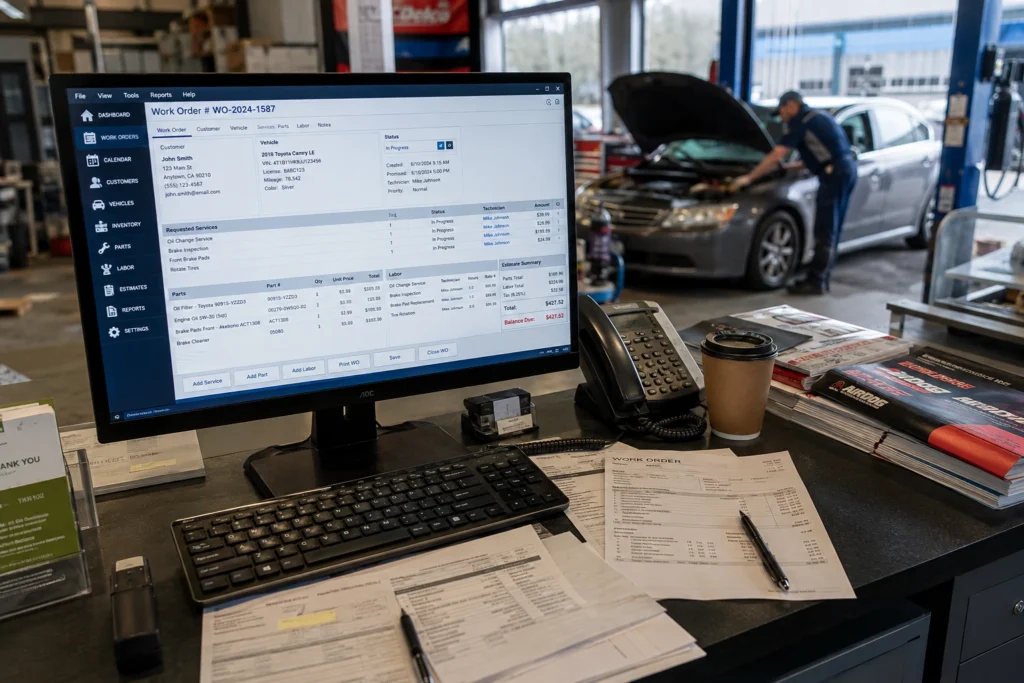
Built for Shops That Run Without Internet Dependency We build custom desktop auto repair shop software that runs completely offline. No internet connection required for daily operations. Auto repair software helps shops manage work orders, customer and vehicle records, parts inventory, technician time, estimates, and invoicing from one system. The problem is that many modern shop software platforms depend heavily on an internet connection. Our custom desktop auto repair software takes a different approach: core operations run locally on your computers, so your team can continue working even when internet service is unavailable. Our non web based auto repair shop software eliminates that dependency entirely. Everything runs locally on your computers. Your job tracking, invoicing, parts inventory, and customer records stay on your network. Always accessible. Never waiting for a server connection or worrying about monthly subscription fees that keep climbing. We have seen too many shops struggle with cloud systems that freeze up during busy periods or lose access to their own data when the internet provider has problems. While many shops compare different auto repair shop management software options, we focus specifically on offline solutions that put you in complete control. The software handles everything locally. Write up work orders, track technician time, manage parts inventory, and generate invoices without touching the internet. Your data stays in your shop where it belongs. And when you need to run credit cards or send invoices by email, the system connects only for those specific tasks. Then goes back to running independently on your local network. Most shops tell us they never realized how much their old cloud system was slowing them down until they switched to our custom auto repair shop software development approach. No more waiting for screens to load or losing work when the connection drops. We build this specifically for independent repair shops, multi-bay operations, and fleet service centers that want reliable software without the headaches of internet-dependent systems. The right shop software should do more than generate invoices. It should help your team move work orders through the repair process, track parts and technician time, maintain vehicle history, and give your shop owner or manager a clear view of daily operations. Core Features of Our Desktop Auto Repair Shop Software We include everything your shop needs to run efficiently without depending on internet connections or monthly cloud subscriptions. Each module works together seamlessly while running completely on your local computers. No waiting for remote servers to respond. No monthly fees that increase every year. No losing access to your own shop data when someone else’s server goes down. ⚡ GET IN TOUCH Stop paying monthly fees for software that goes down when you need it most. Get your custom quote today 💬 Chat on WhatsApp 📞 Call 0307 3319555 Job & Repair Order Tracking Every repair order gets tracked from the moment a customer calls until final payment. Complete workflow management that keeps jobs moving through your shop. Do not add more “work orders” occurrences simply to increase keyword frequency. Everything stays organized automatically. No more handwritten tickets that get lost or work orders that fall through the cracks. Your service advisors can see exactly which jobs are waiting for parts, which ones are in progress, and which vehicles are ready for pickup. Real-time status updates without refreshing screens or waiting for cloud updates. And the best part? It all runs locally on your shop computers. Even when your internet is down for hours, your team keeps working without missing a beat. Parts & Inventory Management Track every part that comes into your shop and goes out on jobs. Our approach builds on proven inventory management system principles but adapts them specifically for auto repair shops that need offline functionality. The inventory system automatically updates when parts get used on work orders. Set minimum stock levels and get alerts when you need to reorder. Track part costs, markup percentages, and vendor information all in one place. Most shops tell us they save 2-3 hours per week just by not having to manually count inventory or hunt down parts that should be in stock. The system knows where everything is and what you paid for it. Works with barcode scanners if you want them. But also works perfectly without any special equipment beyond your existing computers. Labor & Technician Time Tracking Accurate time tracking means accurate billing and better shop productivity. Each technician can clock in and out of specific jobs throughout the day. The system tracks actual time spent versus estimated time for every repair. Shows you which jobs consistently run over estimate and which technicians work most efficiently. Real data to help you price jobs better and schedule work more accurately. Technicians simply select their current job from a dropdown menu when they start working. Clock out when they finish or move to a different job. No complicated time sheets to fill out at the end of the week. And since everything runs locally, there is no delay when switching between jobs or waiting for the system to record their time. Invoicing & Billing Generate professional invoices that include all labor, parts, taxes, and fees automatically calculated from the work order. Print them instantly or email them directly to customers. The billing system pulls everything from the completed work order. Labor hours times your shop rate, parts at your markup, applicable taxes, and any additional fees. Takes 30 seconds to create an invoice that would take 10 minutes to write by hand. Track payment status for every invoice. See which customers still owe money and how long invoices have been outstanding. Send payment reminders without leaving the software. Integration with most credit card processors so you can run payments directly through the system when customers pay in person. Customer & Vehicle History Records Complete service history for every vehicle that comes through your shop. Previous repairs, parts installed, maintenance performed, and recommendations made. When a customer calls about their car, you can see exactly what work was
Best ERP Software After QuickBooks: A Smarter Path for Growing Businesses

QuickBooks isn’t an ERP system. It’s accounting software. And there’s a fundamental difference that matters once your business starts to scale. We’ve watched hundreds of growing companies hit the same wall with QuickBooks. The software that worked perfectly when you had 10 employees and one location suddenly can’t keep up when you’re managing inventory across three warehouses, running payroll in multiple states, and trying to pull real-time reports that actually show what’s happening across your entire operation. Here’s what most business owners don’t realize until it’s too late. QuickBooks was never built to connect your sales team’s data with your warehouse inventory, your HR records, your supply chain, and your finance department all in one system. It handles the books. That’s it. When you need a real enterprise resource planning system that ties everything together, you’re looking at either buying an expensive off-the-shelf platform that forces you into rigid workflows, or building custom software that actually fits how your business operates. That’s the real question most growing businesses are asking when they search for the best ERP software after QuickBooks not which subscription to buy, but which system will actually work the way their business does We build custom ERP systems at Tecveq specifically for businesses that have outgrown QuickBooks but don’t want to spend six figures on bloated enterprise software they’ll only use 30% of. This is not a guide to comparing vendor platforms. This is a frank conversation about what actually happens when you move beyond accounting software into real operational management, and why a custom-built ERP makes more sense than you probably think. Why Businesses Outgrow QuickBooks Most companies outgrow QuickBooks when they need more than basic accounting. QuickBooks tracks income and expenses well, but it doesn’t connect your warehouse inventory with your sales pipeline, your HR data with payroll across multiple locations, or your purchase orders with real-time production schedules. Once you need all your business data talking to each other in one system, you’ve moved beyond what accounting software was built to handle. We’ve built custom ERP systems at Tecveq for companies stuck in exactly this position. They know QuickBooks isn’t enough anymore. But they don’t know if the problem is worth solving or if they should just keep patching things together with spreadsheets and third-party apps. There isn’t one best ERP for every business moving beyond QuickBooks the right system depends on your industry, number of locations, integrations, and how far your workflows differ from a generic template. For businesses with straightforward, standard operations, a configured off-the-shelf platform can work well. For businesses whose workflows, approvals, or reporting don’t fit a standard mold, a custom-built ERP designed around those exact processes is usually the better long-term fit. Tecveq builds the second kind ERP systems shaped around how your business actually operates. ⚡ GET IN TOUCH Outgrown QuickBooks? Get a Free Custom ERP Consultation No Sales Pitch, Just Honest Answers. 💬 Chat on WhatsApp 📞 Call 0307 3319555 Signs Your Business Has Outgrown QuickBooks You know you’ve outgrown QuickBooks when your team spends more time exporting data than using the system. Here are the signs we see most often: None of these problems mean QuickBooks is bad software. QuickBooks does exactly what it was designed to do. The issue is your business has grown past the point where accounting software alone can manage your operations. The Real Cost of Staying on Accounting-Only Software Staying on QuickBooks after you’ve outgrown it costs you more than the monthly subscription. The real cost shows up in hours your team wastes reconciling data, orders that get missed because systems don’t talk to each other, and decisions your leadership makes based on reports that are already two weeks out of date by the time accounting finishes building them. We’ve seen companies lose track of: Every one of these problems happens because QuickBooks wasn’t built to be the central operating system for a multi-location or multi-department business. And every one of them disappears when you move to a real ERP that connects your data across the entire operation. The question isn’t whether you need something beyond QuickBooks. The question is whether you build a custom ERP system that fits exactly how your business works, or whether you buy an off-the-shelf platform and spend the next year trying to make your business fit the software. When Should You Move From QuickBooks to an ERP? There isn’t a specific revenue number or headcount that tells you it’s time. The real signal is simpler: your team is spending more hours working around QuickBooks than working inside it. Here’s when that shift usually becomes obvious. You’re managing multiple locations. Once you’re running more than one warehouse, office, or entity, QuickBooks starts showing its limits fast. You end up with separate files for each location and no clean way to see the whole business in one place. Your inventory and accounting data don’t match. If what QuickBooks shows on the shelf and what’s actually in the warehouse are two different numbers, you’re not dealing with a data-entry mistake. You’re dealing with a system that was never built to track inventory and finance together in real time. You’ve started depending on spreadsheets to fill the gaps. Every time someone exports QuickBooks data into Excel to build a report the software can’t generate on its own, that’s a sign the software has stopped being the source of truth. It’s become a starting point for manual work. Different departments are running different software. Sales uses one tool, the warehouse uses another, and accounting stays in QuickBooks and none of it talks to the others. Nobody has one accurate picture of the business at the same time. Reports take too long to build. If your team spends days pulling numbers together before your leadership can make a decision, the software is slowing the business down instead of supporting it. Manual data entry has taken over. When people are re-typing the same information into two or three systems just to keep everything roughly