Restaurant POS Software Built for Sahiwal’s Food Businesses
We built our restaurant POS software for the exact chaos that happens during a Friday dinner rush in Sahiwal. Orders piling up. A waiter is asking about table four while the kitchen wants confirmation on table two. One missed order and a customer walks out unhappy.
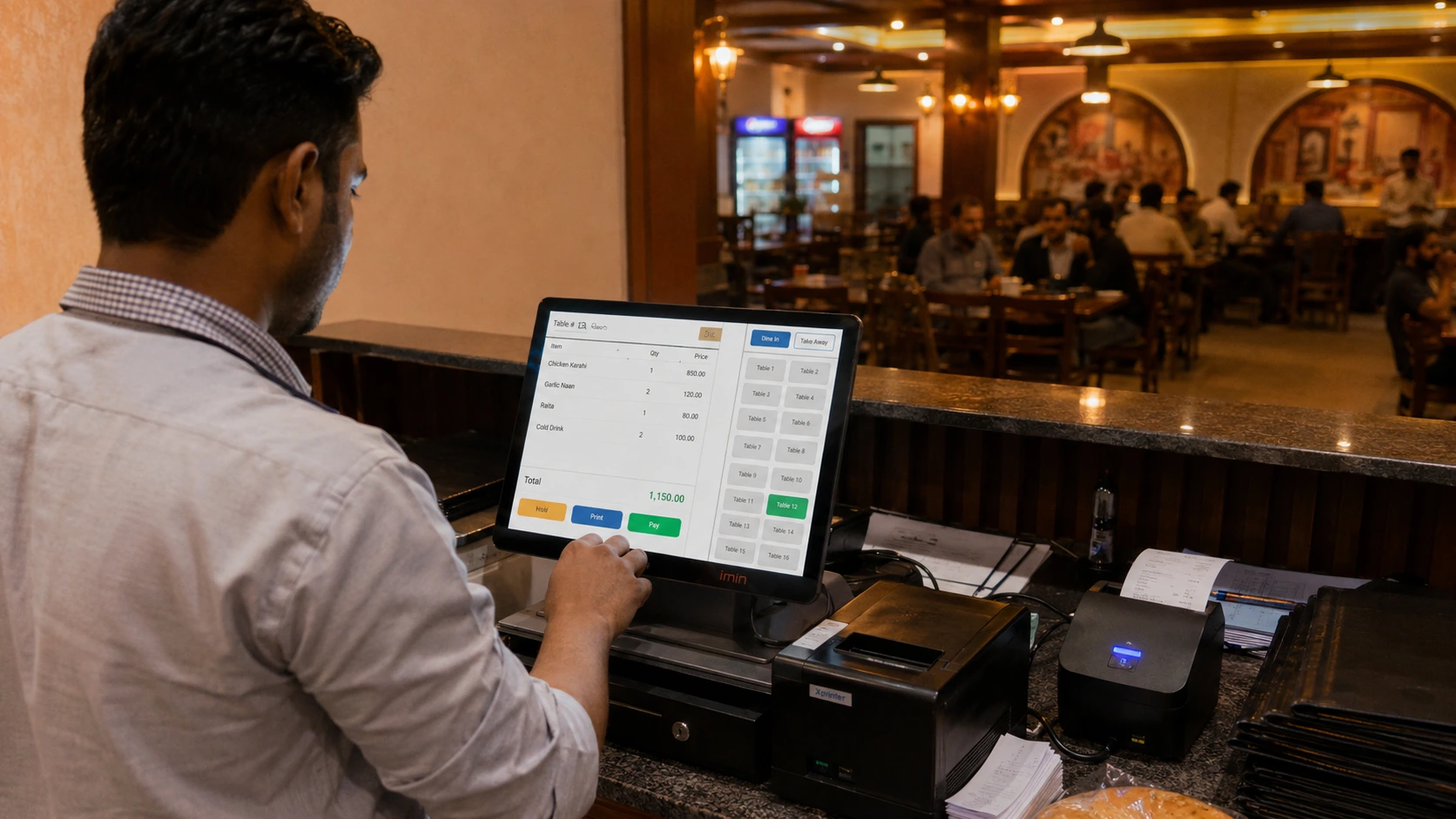
Our POS software for restaurants in Sahiwal handles billing, table tracking, and kitchen order routing from a single screen, so your staff never has to guess what happened where.
It works the same whether you run a dine-in restaurant, a takeaway counter, a delivery-only kitchen, or a small cafe. We set it up around how your business actually operates, not the other way around.
Power cuts are common here. So we built the system to keep working offline, and it syncs your data automatically once the connection comes back.
Some restaurants only need simple billing. Others run three counters and need everything synced in real time. We configure the setup based on what your restaurant actually needs, not a fixed package that forces you to pay for tools you will never use.
And that is the part most POS providers skip. They sell you a license and leave you to figure out the rest. We walk you through setup ourselves and stay available if something needs adjusting after you go live.
What You Get With Tecveq’s Restaurant POS System
Every feature in our restaurant POS software solves a problem we have watched restaurant owners deal with over and over. Here is exactly what comes with it.
Fast Billing & Checkout
A slow checkout line loses customers before they even taste the food. Our billing screen is built for speed, so your cashier can ring up an order, apply a discount, and print a receipt in a few taps.
No hunting through menus. No confusing item codes.
You can also split bills, merge tables, and apply item-level discounts without calling anyone for help. And if the power goes out mid-transaction, billing keeps running because the system works offline first.
Table & Order Management
Your staff needs to know which tables are occupied, which are ready for the next order, and which are waiting on the kitchen. Our table management screen shows all of that at a glance.
Waiters can assign orders to specific tables directly from a tablet or the counter screen. This cuts down on the back-and-forth that usually happens when a table changes an order or asks for something extra.
Not every restaurant needs the same table layout. Which is why we set this up to match your actual floor plan during onboarding.
Kitchen Order Ticket (KOT) Routing
An order placed at the counter needs to reach the kitchen instantly, without a waiter walking back and forth to confirm it. Our KOT routing sends every order straight to the kitchen screen or printer the moment it is placed.
The kitchen sees exactly what was ordered, which table it belongs to, and any special instructions attached. This alone eliminates most of the mixed-up orders that happen during a busy service.
FBR-Integrated Tax Compliance
Tax compliance should not mean extra paperwork at the end of every day. Our restaurant POS system generates FBR-compliant invoices automatically as part of the normal billing process.
Every transaction is recorded the way it needs to be recorded. You do not need a separate tool or a manual entry step to stay compliant.
This matters more than most restaurant owners realize until an audit comes up. We set the compliance settings correctly from day one, so you are not scrambling to fix records later.
Inventory & Stock Tracking
You cannot run a kitchen efficiently if you do not know what is running low until it runs out mid-service. Our inventory tracking updates stock levels automatically as items get sold, so you know exactly what needs reordering.
It tracks ingredients down to the recipe level, not just finished menu items. That means when a dish sells, the system deducts the actual ingredients used, giving you a much more accurate picture of your real food cost.
Restaurants that skip this step usually find out about a shortage the hard way, in the middle of dinner service.
Sales & Profit Reports
Numbers on a screen only matter if they tell you something useful. Our reporting dashboard breaks down sales by item, by time of day, and by staff member, so you can see what is actually working.
You get profit margins per dish, not just total revenue. That is the number that tells you whether your best-selling item is actually making you money once ingredient costs are factored in.
We built these reports to answer the questions restaurant owners actually ask us. Not generic sales totals that look good on paper but do not help you make decisions.
GET IN TOUCH
Orders getting missed? Call us and get your POS set up today.
Multi-Counter & Multi-Branch Live Sync
Running two counters on separate systems is how restaurants end up with mismatched inventory numbers and orders that never made it to the kitchen. Our restaurant POS system connects every counter and every branch to one live system, so nothing gets tracked twice or missed entirely.
Real-Time Sync Across Counters
An order placed at counter one should show up instantly at counter two, not five minutes later after someone manually checks. Our system syncs every transaction across counters the moment it happens.
If a customer orders at the takeaway counter and later adds items at the table, both counters see the updated order immediately. Stock levels update the same way. Sell an item at one counter, and every other counter reflects the new inventory count right away.
This matters most during peak hours, when two or three staff members are ringing up orders at the same time. Without live sync, you end up overselling items that already ran out. With it, everyone is working off the same numbers.
Centralized Reporting for Multiple Branches
Owners running more than one location need one place to see how every branch is actually performing, not separate spreadsheets for each address. Our restaurant inventory and order management software pulls sales, stock levels, and staff activity from every branch into a single dashboard.
You can compare how your Sahiwal location is performing against another branch without asking each manager to send separate reports. Low stock alerts, order volume, and daily revenue all show up in one view, updated as it happens.
Not every owner needs multi-branch reporting on day one. But if you are planning to expand beyond your first location, we set this up from the start so you are not migrating your data later.
Call us to walk through how live sync works for your specific setup, whether that is two counters in one restaurant or multiple branches across the city. We will ask about your current setup and explain exactly what changes for your staff.
Why Restaurants in Sahiwal Choose Tecveq
A POS system that stops working the moment the power goes is not a POS system; it is a liability. Restaurants in Sahiwal choose Tecveq because we build for the conditions this city actually deals with, not the ideal conditions a demo video shows you.
Offline-First Reliability
Billing should not stop just because the internet does. Our restaurant POS software keeps running during power cuts and internet outages, so your staff can keep taking orders and printing receipts without interruption.
Every transaction gets stored locally the moment it happens. Once your connection comes back, everything syncs automatically in the background—no manual upload, no lost orders.
We built this specifically because outages are a normal part of running a restaurant in Sahiwal. A system that only works when everything is perfect is not built for how your restaurant actually operates.
Local Support & Setup Assistance
Buying software is easy. Getting it set up correctly for your specific restaurant is where most providers disappear. We handle the full setup ourselves, from configuring your menu items to training your staff on the billing screen.
If something needs adjusting after you go live, whether it is a new menu item or a pricing change, we are available to make that change with you. Not a support ticket that sits unanswered for three days.
And this is the part most providers will not tell you upfront. A POS system is only useful if someone actually helps you use it correctly. We stay involved after the sale, not just before it.
Affordable, Transparent Pricing
You should know exactly what you are paying for before you commit to anything. We give you a clear price based on what your restaurant actually needs, whether that is a single counter or a full multi-branch setup.
No hidden charges added after installation. No forcing you into a package with features you will never touch.
We ask about your setup first, then quote accordingly.
Custom-Built for Your Restaurant Type
A fine dining restaurant and a fast food counter do not need the same tools. We configure the system around how your restaurant actually runs, whether that means table service, quick takeaway, delivery-only, or a cafe menu with modifiers and combos.
Menu structure, tax settings, and reporting are all set up to match your business, not a generic template every restaurant gets stuck with.
Call us and tell us what type of restaurant you are running in Sahiwal. We will walk you through exactly which features apply to your setup and which ones you can skip.
FBR Integrated POS for Restaurants in Sahiwal
Manual tax records catch up with restaurant owners at the worst possible time, usually during an audit, when a missing invoice becomes a real problem. Our FBR integrated POS system for restaurants in Sahiwal builds compliance into every transaction, so you are never scrambling to reconstruct records after the fact.
Automated Tax Invoicing
Every sale needs a proper tax invoice, and creating one manually for each order is not realistic during a busy service. Our system generates FBR-compliant invoices automatically the moment a bill is closed, whether it is a dine-in table, a takeaway order, or a delivery.
The invoice format follows FBR requirements without your staff needing to know the details of tax law. They ring up the order the same way they always do. The compliant invoice happens in the background.
This removes a step most restaurants used to handle with a separate register or a manual log at the end of the night.
Compliance Without the Manual Work
Staying compliant should not mean hiring someone just to manage tax paperwork. Our restaurant POS system records every transaction the way FBR expects it recorded, so your books stay accurate without extra manual entry.
Not every restaurant owner in Sahiwal realizes this until they are already dealing with an audit or a records request. We set the compliance settings correctly during your initial setup, so the system is doing this correctly from your very first sale.
If tax rules or reporting requirements change, we handle the update on our end. You keep running your restaurant.
Call us to see how FBR integration works with your current billing process. We will explain exactly what changes for your staff and what stays the same.
GET IN TOUCH
Power cuts shouldn’t stop your billing contact us now.
Restaurant Billing Software in Sahiwal Built to Fit Your Workflow
No two restaurants bill the same way, and forcing every order type through one rigid screen is how mistakes happen. Our restaurant billing software in Sahiwal adjusts to how your orders actually come in, whether that is a table service, a walk-in counter, or a WhatsApp message.
Dine-In Billing
A dine-in order changes constantly. A customer adds a drink, splits the bill with a friend, or asks for a dish to be moved to a different table. Our billing screen handles all of that without forcing your staff to void and re-enter the whole order.
Waiters open a table, add items as they come in, and close the bill only when the customer is ready. Splitting a bill two or three ways takes a few taps, not a manual recalculation on paper.
Table transfers work the same way. If a customer moves seats or two tables get combined for a bigger group, the order moves with them instead of starting over.
Takeaway & Delivery Billing
A takeaway order does not need a table number, and a delivery order needs an address and a rider assigned to it. Our system separates these order types from the start, so your counter staff are not stuck using the same workflow built for dine-in tables.
Takeaway orders can be marked ready for pickup with a single tap, so your front counter always knows what is waiting and what is still cooking. Delivery orders capture the customer address and contact number at the point of billing, keeping that information attached to the order instead of scribbled on a separate piece of paper.
Pricing can also differ between takeaway, delivery, and dine-in if your restaurant charges that way. We set those rules once during setup, and the system applies them automatically after that.
WhatsApp Order Integration
Most customers in Sahiwal are already messaging restaurants directly on WhatsApp instead of calling. Our system connects that conversation to your actual billing process, so an order sent over WhatsApp does not have to be retyped by hand into the POS screen.
When a customer sends their order, your staff can convert that message straight into a bill without re-entering every item manually. This cuts out the double work that usually happens when someone takes a WhatsApp order on their phone and then keys it into the POS separately, which is also where most order mistakes come from in the first place.
Order confirmations and receipts can go back to the customer through the same WhatsApp conversation, so they get a clear record of what they ordered and what they are paying. For delivery orders coming through WhatsApp, the address and contact details attached to that chat carry over into the order, so your rider is not calling the customer back to confirm where they are going.
This matters most for smaller restaurants and home-based kitchens that run mostly through WhatsApp and have never had a real POS system tied to it before. Instead of managing orders in a phone’s chat app and billing separately on paper, everything lives in one place.
Not every restaurant runs WhatsApp orders the same way. Some take orders all day through chat. Others use it only for regular customers who prefer texting over calling. We set this up based on how your restaurant actually uses WhatsApp right now, not a generic workflow that assumes every order comes in the same format.
Call us and walk us through how you currently take orders, whether that is a mix of walk-ins, phone calls, and WhatsApp messages. We will show you exactly how the billing screen adapts to each one without adding extra steps for your staff.
Cafe & Restaurant POS System in Sahiwal
A cafe does not run like a full-service restaurant, and forcing cafe orders through a system built for table service creates more clicks than the order actually needs. Our cafe and restaurant POS system in Sahiwal adjusts to a faster, simpler order flow when that is what your business actually needs.
Designed for Cafes, Bakeries & Quick-Service Setups
Most cafe orders happen at the counter, get made quickly, and move on to the next customer within minutes. Our system is built to match that pace, with a billing screen that skips the table assignment and order-hold steps a full-service restaurant needs.
A bakery selling pastries by the piece, a cafe running a small breakfast menu, or a quick-service counter handling a lunch rush all use the same fast checkout flow. Staff ring up an order, take payment, and move to the next customer without extra screens in the way.
Not every quick-service business needs kitchen order routing the way a full restaurant does. We configure the setup based on what your cafe actually serves, not a stripped-down version of a restaurant system.
Menu & Modifier Management
A cafe menu changes more often than people expect, with new seasonal drinks, sold-out items, and combo deals that only run for a few hours. Our menu management screen lets you update items, prices, and availability yourself, without calling anyone to make the change.
Modifiers work the same way. A customer wants oat milk instead of regular, extra shots, or a pastry warmed up. Your staff selects the modifier at checkout, and it shows up correctly on both the bill and the kitchen ticket if one is needed.
Combo pricing and daily specials can be set up once and turned on or off as needed, so a limited-time offer does not require rebuilding your whole menu structure.
Pricing for Restaurant POS Software in Sahiwal
Every restaurant asks about pricing before anything else, and the honest answer is that it depends on what your setup actually needs. A single counter cafe and a multi-branch restaurant with FBR integration and live inventory sync are not the same job, so we do not quote them the same way.
We price based on the features your restaurant actually uses, not a fixed package that charges you for tools you will never touch. A single counter with basic billing costs less than a multi-branch setup with live sync, inventory tracking, and FBR integration across every location.
Which is exactly why we ask about your restaurant first. Table service or quick counter. One location or several. Full inventory tracking or simple billing. Your quote is built around those answers, not a generic price list that does not match how you actually run your business.
Call us for a quote based on your restaurant’s setup in Sahiwal. We will ask a few questions about your counters, your menu, and whether you need FBR integration, then give you a clear price before any commitment.
GET IN TOUCH
Tell us your restaurant setup, get a free quote message us on WhatsApp.
Frequently Asked Questions
How long does it take to set up the POS system?
Most restaurants in Sahiwal are up and running within a few days of contacting us. Setup time depends on how many counters and menu items need to be configured.
Do I need special hardware to run this?
A standard computer, tablet, or POS terminal with a receipt printer is enough to get started. We will tell you exactly what hardware works during your setup call, so you are not guessing beforehand.
What happens if the internet or power goes out?
Our restaurant POS software keeps billing customers even without an internet connection. Once power or internet comes back, everything syncs automatically without any manual work from your staff.
How much does the restaurant POS software cost?
Pricing depends on your setup, whether that is a single counter or multiple branches with FBR integration. Call us and we will give you a clear price after asking a few questions about your restaurant.
What kind of support do I get after setup?
We stay available to help with menu changes, pricing updates, or anything else that comes up after you go live. Support is not a ticket that sits unanswered; it is us actually making the change with you.
Get Restaurant POS Software for Your Business in Sahiwal
You have seen what the system does. Now here is exactly what happens when you reach out.
Call us or message us on WhatsApp, and we will ask a few questions about your restaurant. How many counters do you run? Whether you need FBR integration. What your current billing setup looks like. That call usually takes about ten minutes.
From there, we quote you based on what you actually need, not a fixed package. If it makes sense to see the system in action first, we can walk you through a demo before you commit to anything.
Once you decide to move forward, we handle the setup ourselves. Menu items, tax settings, table layout, and staff training all happen before your first day using the system, not figured out on the fly.
Your restaurant does not stop running while you wait on a POS provider to sort things out. We work around your service hours so setup does not interrupt a single dinner rush.
Call us now or message us on WhatsApp to get started. We will ask about your restaurant, answer your questions, and give you a straightforward price. No pressure, no obligation.