What Is a WhatsApp CRM for Appointment Booking?
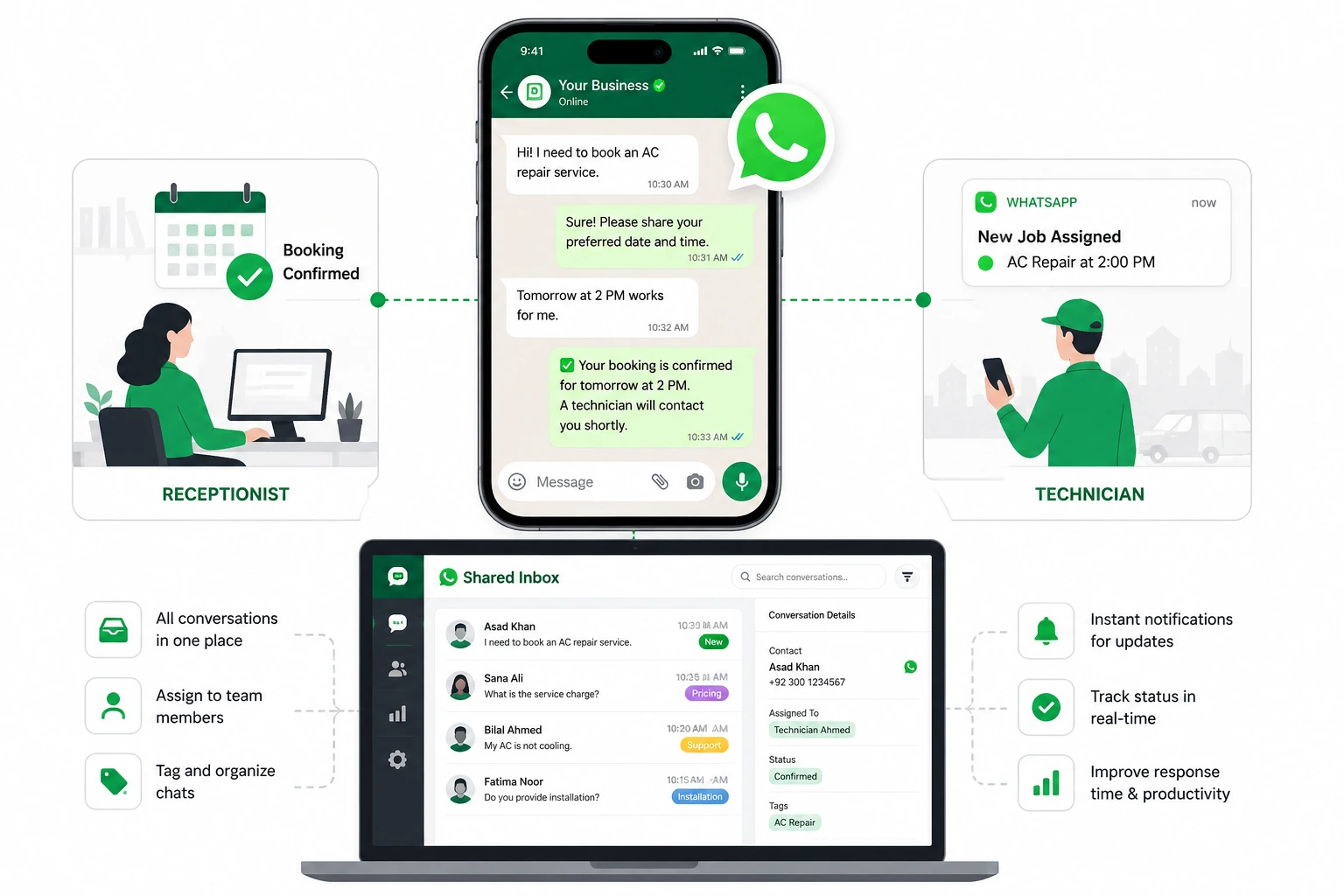
A WhatsApp CRM for appointment booking is a system that lets customers book appointments, confirm their time, and manage changes directly inside a WhatsApp conversation instead of calling your office or filling out a form. The booking gets logged into your calendar and CRM at the same time, so nothing falls through the cracks between reception and your service team.
I’ve watched businesses try to run this off the standard WhatsApp Business app first. It never works for long.
The moment more than one person needs to reply to customers, or you need bookings to sync automatically with a calendar, the basic app runs out of road. There’s no way to assign a conversation to a specific staff member. There’s no way to see who already replied. Two people end up typing to the same customer at the same time, and the customer notices.
That’s the actual problem a WhatsApp CRM solves. Not just booking automation. Coordination.
GET IN TOUCH
Book More. Miss Nothing. Automate on WhatsApp.
How It Differs from the Standard WhatsApp Business App
The standard WhatsApp Business app is built for one person managing one phone. A WhatsApp CRM runs on the WhatsApp Business API, which is a different infrastructure entirely.
Here’s what changes:
- Multiple team members can access one number. Reception and your service team work from the same inbox without passing a phone back and forth.
- Conversations can be assigned. A booking request gets routed to the right person automatically, instead of sitting unread in a shared thread.
- Automated messages work outside the 24-hour window. The basic app can’t send a reminder two days before an appointment. The API can, using pre-approved templates.
- retypingEverything connects to your calendar and CRM. A booking made through WhatsApp shows up in Google Calendar or Outlook without anyone re-typing it.
I usually tell clients this straight: if you’re still using the free app and you have more than one person answering messages, you’re already losing bookings somewhere. You just haven’t traced them yet.
| Feature | WhatsApp Business App | WhatsApp CRM for Appointment Booking |
|---|---|---|
| Customer conversations | Primarily managed through the app | Centralized WhatsApp conversations in a shared inbox |
| Multiple team members | Limited for structured team workflows | Multiple agents can work from the same business number |
| Conversation assignment | No structured assignment workflow | Conversations can be assigned to specific staff |
| Internal notes | Limited | Team members can add private notes |
| Tags | Basic labels | Structured booking and customer-status tags |
| Calendar integration | Limited/manual workflows | Can connect booking flow with calendars |
| Automated reminders | Limited | Appointment reminders can be automated |
| Booking workflow | Mostly manual | Customer can book appointments through a guided flow |
| Team performance tracking | Limited | Response times and booking metrics can be monitored |
| Role-based access | Limited | Access can be controlled by team role |
Why Businesses Are Switching to WhatsApp for Appointment Booking
Businesses are switching because customers read WhatsApp messages. They don’t read email, and they don’t answer calls from numbers they don’t recognize.
That single fact changes how bookings behave. A confirmation sent by email might sit in a promotions folder for two days. The same confirmation sent on WhatsApp gets seen in minutes, most of the time before the customer even finishes their coffee.
And when a customer sees the confirmation fast, they act on it fast. They add it to their calendar. They show up.
vs.Higher Read & Response Rates vs Email or Calls
WhatsApp messages get read far more often, and far faster, than emails or missed calls with a voicemail attached. Email confirmations rely on the customer checking their inbox, which many people do once or twice a day at best. WhatsApp doesn’t have that lag.
Phone calls have a different problem. Most people don’t pick up numbers they don’t recognize, especially during work hours. A missed call turns into a voicemail nobody listens to, followed by a callback that misses the window, followed by a booking that quietly disappears.
A message sitting in someone’s WhatsApp doesn’t get ignored the same way. It sits right next to messages from their friends and family, and people check it constantly through the day.
Reduced No-Shows with Automated Reminders
Automated WhatsApp reminders can help reduce no-shows by giving customers a timely opportunity to confirm, reschedule, or cancel before the appointment.
The pattern that works is simple. Send one reminder a day before the appointment, then a second one an hour or two before. Both should let the customer confirm, reschedule, or cancel with a single tap, not force them to call back.
Most no-shows aren’t customers being careless. They forgot, because the reminder they got wasn’t in a place they check. Fix where the reminder lands, and the no-show rate drops on its own.
The Real Bottleneck: Booking Automation Alone Isn’t Enough
Automating the booking flow fixes one problem and quietly ignores another. The customer books fine. What happens after that message lands is where things start breaking down.
I’ve walked into more than one business where the chatbot worked perfectly, and the team behind it was still a mess. The bot confirmed the appointment. Nobody told the technician. The customer showed up to a service that wasn’t scheduled on anyone’s actual calendar.
That’s not a booking problem. That’s a people problem wearing a booking costume.
Most businesses buy automation expecting it to fix coordination. It doesn’t. It just moves the coordination problem one step further down the chain, where it’s harder to spot until a customer is standing at the door.
Why Reception and Service Teams Still Struggle After Automation
Reception and service teams struggle after automation because the booking gets confirmed automatically, but the internal handoff still depends on someone remembering to check, forward, or update it manually.
Here’s what that looks like on a normal day. A booking comes in through WhatsApp at 9am. The confirmation goes out to the customer instantly. Reception sees it. The service team doesn’t, because nobody forwarded it, or it got buried under twelve other conversations in the same thread.
By 2pm, the customer texts asking where the technician is.
This happens constantly in businesses running WhatsApp through a single shared login with no internal structure. Everyone can see the messages. Nobody owns them.
And that’s the part most automation vendors never mention. They’ll sell you a booking bot and call the problem solved.
Replies, andThe Cost of Poor Handoffs, Missed Bookings, Duplicate Replies, Slow Response Times
Poor handoffs between reception and service teams cost businesses missed bookings, duplicate replies, and slower response times, and all three erode customer trust faster than a slow reply ever would on its own.
Missed bookings happen when a confirmed appointment never reaches the person actually doing the work. The system shows it as booked. The technician’s day shows nothing.
Duplicate replies happen just as often, usually in the opposite direction. Two team members open the same conversation, both see an unanswered message, and both reply within minutes of each other. The customer gets two different answers, sometimes contradicting each other, and starts wondering if anyone actually knows what’s going on.
Slow response times are the quiet one. Nobody notices them building until a customer mentions they messaged three hours ago and got nothing back. In a shared inbox with no tagging or assignment, messages don’t get lost because staff aren’t trying. They get lost because there’s no way to tell, at a glance, who already handled what.
Not every business feels this daily. But once message volume crosses a certain point, usually somewhere around twenty or thirty WhatsApp conversations a day, the cracks show up on their own.
sync, andThis is the piece almost nobody selling WhatsApp booking automation talks about. They’ll walk you through the chatbot, the calendar sync, the reminder sequence. Fair enough, all of that matters.
What they won’t show you is what happens to that booking the moment it lands inside your team.
GET IN TOUCH
Your Customers Are on WhatsApp. Is Your Booking System?
WhatsApp Shared Inbox: Solving Team Collaboration for Bookings
A WhatsApp shared inbox puts every WhatsApp conversation related to a booking in one place, visible to your whole team, with a clear record of who’s handling what. Instead of passing a phone between reception and the service team, everyone can access the conversation history, see the booking status, and know who is responsible for the next step.
Instead of one phone passed between reception and the service team, everyone logs into the same system from their own device. The conversation stays whole. Nobody’s guessing what happened before they joined the thread.
I’ve set this up for businesses running everything from two-person clinics to service teams with a dozen technicians. The size doesn’t change the core problem. Shared visibility does.
Detection:Collision Detection Stopping Reception & Service Teams from Double-Replying
Collision detection stops two team members from replying to the same customer at the same time by showing, in real time, when someone else already has that conversation open.
Picture reception opening a booking message right as a technician opens the same one from their phone. Without collision detection, both start typing. The customer gets two replies, sometimes minutes apart, sometimes contradicting each other.
With it, the second person sees a simple flag. Someone’s already on this one.
That’s it. No confusion, no duplicate replies, no customer wondering which answer to trust.
Small detail. Big difference in how professional the business looks from the outside.
Internal Notes & Tags for Seamless Handoffs
Internal notes and tags let your team leave context on a conversation that customers never see, so a handoff between reception and service doesn’t mean starting from zero.
follow-up.Say reception books an appointment and knows the customer has a tricky scheduling conflict next week. A quick internal note flags that for whoever picks up the follow up. The technician doesn’t need to ask the customer to repeat themselves.
conversation asTags work the same way for organization. Mark a conversation “confirmed,” “needs reschedule,” or “urgent,” and anyone glancing at the inbox knows the status without reading the full thread.
yet?”This is the part that actually saves time day to day. Not the automation. The internal shorthand that keeps everyone on the same page without extra phone calls or Slack messages asking, “Did anyone follow up with this customer yet.”
Role-Based Access for Reception vs Service Staff
Role-based access controls who can view, reply to, or reassign specific conversations, so reception and your service team each see what they actually need without wading through messages meant for someone else.
Reception typically needs visibility into every incoming booking request. The service team usually only needs the conversations assigned directly to them, once a booking’s confirmed and scheduled.
Set this up correctly and a technician opens their WhatsApp CRM and sees exactly their day. Not forty conversations belonging to five other people.
This also solves a problem most businesses don’t think about until it happens. A former staff member with access to every customer conversation is a liability. A WhatsApp team collaboration tool with proper role-based access means you control exactly who sees what, and you can shut off access the moment someone leaves.
None of this replaces good judgment on your team’s part. But it removes the guesswork that causes most of the mess.
GET IN TOUCH
Stop Losing Orders Tonight. Get Your WhatsApp Chatbot from Tecveq
How to Automate Appointment Confirmation on WhatsApp
Automating appointment confirmation on WhatsApp means the customer books a slot, gets confirmed instantly, and the booking lands in your calendar without anyone on your team typing a single word. Four steps make that happen, and each one has a failure point most businesses hit when they set it up wrong the first time.
I’ll walk through all four the way I actually set them up for clients, not the simplified version you see in most explainer videos.
Step 1 Customer Sends a Booking Request
directly orThe customer sends a WhatsApp message to your business number directly, or taps a “Book Now” button from your website, a QR code, or a click-to-WhatsApp ad. That first message triggers the booking workflow, from checking availability and selecting a slot to confirming the appointment and sending reminders.
Most businesses skip thinking about where this first message actually comes from. Big mistake.
If your booking trigger only lives on your website, you’re missing customers who found you through a Google Business listing or a physical location. Put the QR code on your counter. Put the link in your Instagram bio. The entry point matters more than the automation behind it, because a booking flow that nobody starts doesn’t book anything.
Step 2:Step 2 Chatbot Displays Real-Time Slot Availability
Once the customer sends a booking request, the chatbot pulls live availability from your connected calendar and shows only the slots that are actually open. This step is where most WhatsApp CRM for appointment booking setups either work well or fall apart completely.
Here’s the failure I see constantly. A business connects a calendar once during setup, then never checks it again. Six months later, the “available” slots the chatbot shows don’t match reality, because someone’s using a second calendar for walk-ins that never got linked in.
Get this wrong and you’re double-booking customers through the exact automation meant to prevent that.
calendars;The fix is simple, if unglamorous. One calendar. Every appointment source feeds into it. No exceptions, no side calendars nobody remembers to sync.
Step 3 Instant Confirmation & Calendar Sync
The moment a customer picks a time slot, the system confirms the booking inside the WhatsApp chat and writes it to your calendar at the same time, so the appointment exists in both places the second it’s made.
,” notThis is the step that actually earns the word “automated.” Not just sending a message. Writing data somewhere it stays.
A confirmation message alone means nothing if it doesn’t touch your calendar. I’ve seen businesses running booking bots that send a lovely confirmation text and then require someone to manually add the appointment to the schedule anyway. That’s not automation. That’s a chatbot with extra steps.
2pm,”Done correctly, the customer sees “You’re confirmed for Tuesday at 2pm” and that appointment is sitting on your calendar before they’ve locked their phone screen.
Step 4: Automated Reminders (24hr / 2hr Sequences)
Automated reminders send at two points, roughly 24 hours before the appointment and again about 2 hours before, giving the customer enough notice to plan around it without enough lead time to forget again.
Both reminders should let the customer confirm, reschedule, or cancel with one tap. Not a phone call. Not a reply typed out by hand.
The 24-hour reminder catches people who genuinely forgot they booked something. The 2-hour reminder catches the ones running late, still at their last meeting, or needing a quick reschedule before it’s too late to fill that slot with someone else.
Skip the second reminder and you’ll still get no-shows. I’ve tested this both ways. One reminder can help, but using two well-timed reminders gives customers another opportunity to confirm or change the appointment before the slot arrives.
What Happens After a Customer Books?
Once a customer books an appointment, the WhatsApp CRM should do more than send a confirmation. The booking should be recorded against the customer, added to the connected calendar, and made visible to the staff member responsible for the appointment.
From there, the system can send the scheduled reminders, update the conversation status, and give the customer a simple way to confirm, reschedule, or cancel. If the customer replies with a question, the conversation remains available to the team instead of becoming a separate thread that reception has to explain later.
That creates one continuous workflow: WhatsApp message → available slot → booking → calendar update → team assignment → reminder → appointment → follow-up.
WhatsApp CRM for Appointment Booking: Pricing in Pakistan
A WhatsApp CRM for appointment booking through Tecveq starts at PKR 10,000, and what you pay after that depends on your team size, message volume, and whether you need shared inbox collaboration or just booking automation. We don’t hide the number until you’ve filled out a form. Here’s what actually changes the price.
Three things move the cost up or down. How many agents need access? Whether you want calendar sync built in from day one. And how much custom template work goes into your booking and reminder messages.
Starter Setup Starting at PKR 10,000
Built for solo operators and small teams just moving off the standard WhatsApp Business app.
- WhatsApp Business API setup and verification
- One connected calendar (Google Calendar, Outlook, or Calendly)
- Basic booking confirmation and reminder templates
- Single agent access
This tier fits a consultant, a single stylist, or a small clinic with one person answering messages. Not built for a shared inbox. If more than one person needs to reply to customers, this isn’t the right starting point.
Growth Setup For Small Teams
Built for businesses where reception and at least one other team member both handle customer messages.
- Everything in the Starter setup
- Shared inbox for 2 to 5 agents
- Collision detection and internal tagging
- Role-based access between reception and service staff
- Custom reminder sequences (24-hour and 2-hour)
This is where most salons, small clinics, and service businesses running real WhatsApp appointment booking volume land. Pricing here depends on agent count and how much template customization the booking flow needs, so we quote this one after a short call about your actual setup.
Team & Business Setup For Scaling Teams
Built for businesses with higher message volume, multiple departments, or a need for performance tracking across the team.
- Everything in the Growth setup
- Unlimited or higher agent tiers
- SLA dashboards and first response time tracking
- CRM integration (HubSpot, Salesforce, or a system you’re already using)
- Priority support during setup and the first month live
Pricing for this tier scales with agent count and integration complexity, so we walk through your current process before quoting a number that actually reflects what you need.
What’s Not Included in Our Setup Fee
Meta charges separately for WhatsApp Business API messaging based on conversation volume, and that cost sits outside whatever we quote you for setup. We’ll walk you through what that typically looks like for your expected message volume before you commit to anything, so there’s no surprise on your first bill.
We don’t lock businesses into long contracts for a WhatsApp CRM setup. Most clients start with the tier that matches their team today and upgrade later once volume actually justifies it, not before.
Want an exact quote for your team size and message volume? Contact Tecveq and tell us how many agents need access and what your current booking volume looks like. We’ll give you a real number, not a range that could mean anything.
Track Team Performance and Booking Metrics
Performance oversight means you can see, at a glance, how fast your team responds to booking messages, how many appointments convert, and where the bottlenecks are happening before a customer complains about them. Without this, you’re running a booking system blind.
Most businesses never set this up. They automate the booking flow, get it working, and stop looking.
That’s a mistake, because the data sitting inside a WhatsApp CRM for appointment booking tells you things a booking calendar alone never will.
First Response Time & SLA Dashboards
First response time tracks how long a customer waits between sending a message and getting a reply from your team, and it’s the single number most correlated with whether that customer actually books.
A real-time dashboard gives managers visibility into response times and makes it easier to identify conversations that are waiting too long for a reply.
Not because anyone’s watching over their shoulder. Because seeing “average response time: 4 hours” next to a competitor’s likely response time of 4 minutes tends to fix itself fast once someone actually sees it.
Set a target. Somewhere under 15 minutes during business hours is realistic for most service teams running a shared inbox properly. Anything past an hour and you’re losing bookings to whoever answered faster.
Peak Booking Hours & Staff Productivity Tracking
Peak booking hours show you exactly when customers are messaging most, which tells you when to staff up reception and when you can safely run lean. Most businesses guess at this. The data doesn’t require guessing.
A salon might see requests spike every evening after 6pm, when people are off work and finally free to message about a haircut. A clinic might see mornings dominate, right as people wake up and remember they need to book.
Staff productivity tracking sits alongside this. It shows how many conversations each team member handles, how fast they close them out, and whether one person’s quietly carrying the whole booking load while three others sit idle.
Not every business needs to review this weekly. But checking it monthly catches problems long before they become a pattern customers notice.
Best WhatsApp CRM Platforms for Appointment Booking & Team Collaboration
Not every WhatsApp CRM does the same job, and picking based on a “top 10” list without knowing which category you actually need is how businesses end up paying for features they never use. I’ve seen this happen more than once. A clinic signs up for a platform built for enterprise sales teams, pays for seats nobody uses, and still can’t get reception and the service team talking to each other properly.
The real question isn’t which platform has the most features. It’s whether the platform matches how your team actually works.
Platforms Built for Scaling Teams (Shared Inbox + SLA Tools)
Platforms in this category are built around one core idea: multiple people need to work from the same WhatsApp number without stepping on each other. That means shared inboxes, collision detection, internal tagging, and dashboards that track response times across the whole team.
This is the right category if reception and your service staff are both replying to customers, if you need to see who’s handling what, or if you’re tracking performance metrics like first response time and booking conversion. Businesses running more than a handful of daily conversations usually land here, whether they realize it going in or not.
The tradeoff is setup time. These platforms take longer to configure properly because there’s more structure to build, roles to assign, and tags to define. Worth it if you actually have a team. Overkill if you’re a solo operator answering your own messages.
Platforms Built for Simple Booking Automation Only
Platforms in this category focus on one thing. Getting a customer from “I want to book” to “confirmed” without any human involved. No shared inbox. No internal collaboration tools. Just a chatbot flow connected to a calendar.
This is the right fit if you’re a one-person operation or if your team is small enough that everyone already knows what everyone else is doing without a formal system. A solo consultant or a single stylist doesn’t need collision detection. There’s nobody to collide with.
Where this category falls short is exactly where we started this guide. The booking gets automated. The handoff to whoever does the actual work still depends on someone remembering to check. Fine at a small scale. A real problem once you add staff.
Match the platform to your team size, not the other way around. I’ve watched businesses buy the bigger tool too early and pay for complexity they didn’t need yet, and I’ve watched others outgrow the simple tool and lose bookings for months before switching.
WhatsApp CRM for Small Business: Is It Worth the Switch?
For most small businesses handling more than a handful of WhatsApp bookings a week, switching to a WhatsApp CRM pays for itself within the first month through fewer missed messages and fewer no-shows. Below that volume, the standard WhatsApp Business app is genuinely enough, and I’ll tell any client that straight rather than push a switch they don’t need yet.
The decision comes down to two things. What manual booking is actually costing you right now, and whether you’ve hit the point where one person can’t keep up with the messages coming in.
Cost vs. Manual Booking Management
Manual booking management costs more than most business owners realize, just not in a line item you can point to. It shows up as staff time spent typing the same confirmation message over and over, appointments that get double booked because two people were managing the same calendar by hand, and customers who quietly go elsewhere after waiting too long for a reply.
A WhatsApp CRM has a monthly cost, obviously. That part’s easy to see.
What’s harder to see, until you actually switch, is how much time your team was spending on tasks the automation now handles without anyone touching it. Confirmations that used to take five minutes per booking happen instantly. Reminders that used to depend on someone remembering to send them go out on schedule every time.
Not every business needs to run the math. But if you’re paying someone specifically to answer WhatsApp messages and confirm bookings by hand, that’s usually the clearest sign the switch already makes financial sense.
When You’ve Outgrown the Standard WhatsApp Business App
You’ve outgrown the standard WhatsApp Business app the moment more than one person needs to reply to customers from the same number, or when you need reminders to go out automatically instead of someone typing them individually. Both of those are hard limits, not inconveniences you can work around with better habits.
A few signs this has already happened. Staff are passing a single phone back and forth to check messages. Customers are getting replies from two different people who clearly didn’t see each other’s messages. Reminders are inconsistent because whoever’s free that day sends them or forgets to.
None of that is a training problem. It’s a tooling problem, and better habits won’t fix a system that structurally can’t support more than one person at a time.
If none of those signs sound familiar yet, stick with what you’re running. The switch matters when the team outgrows the tool, not before. Best WhatsApp CRM Platforms for Appointment Booking & Team Collaboration
Not every WhatsApp CRM does the same job, and picking based on a “top 10” list without knowing which category you actually need is how businesses end up paying for features they never use. I’ve seen this happen more than once. A clinic signs up for a platform built for enterprise sales teams, pays for seats nobody uses, and still can’t get reception and the service team talking to each other properly.
The real question isn’t which platform has the most features. It’s whether the platform matches how your team actually works.
Platforms Built for Scaling Teams (Shared Inbox + SLA Tools)
Platforms in this category are built around one core idea: multiple people need to work from the same WhatsApp number without stepping on each other. That means shared inboxes, collision detection, internal tagging, and dashboards that track response times across the whole team.
This is the right category if reception and your service staff are both replying to customers, if you need to see who’s handling what, or if you’re tracking performance metrics like first response time and booking conversion. Businesses running more than a handful of daily conversations usually land here, whether they realize it going in or not.
The tradeoff is setup time. These platforms take longer to configure properly because there’s more structure to build, roles to assign, and tags to define. Worth it if you actually have a team. Overkill if you’re a solo operator answering your own messages.
Platforms Built for Simple Booking Automation Only
Platforms in this category focus on one thing. Getting a customer from “I want to book” to “confirmed” without any human involved. No shared inbox. No internal collaboration tools. Just a chatbot flow connected to a calendar.
This is the right fit if you’re a one-person operation or if your team is small enough that everyone already knows what everyone else is doing without a formal system. A solo consultant or a single stylist doesn’t need collision detection. There’s nobody to collide with.
Where this category falls short is exactly where we started this guide. The booking gets automated. The handoff to whoever does the actual work still depends on someone remembering to check. Fine at a small scale. A real problem once you add staff.
Match the platform to your team size, not the other way around. I’ve watched businesses buy the bigger tool too early and pay for complexity they didn’t need yet, and I’ve watched others outgrow the simple tool and lose bookings for months before switching.
GET IN TOUCH
Less Chaos. More Bookings. Built on WhatsApp.
Industries That Benefit Most from WhatsApp Appointment Booking + Team Collaboration
Three types of businesses see the biggest impact from combining booking automation with a shared inbox, and it’s not a coincidence they all share the same underlying pattern. High message volume, more than one person answering, and appointments that fall apart fast when nobody’s tracking the handoff.
Healthcare & Clinics
Clinics run on a schedule that punishes any gap between booking and confirmation. A missed handoff here doesn’t just cost a booking. It costs a patient an appointment slot someone else could have used.
Reception usually handles the incoming message volume. The clinical side needs visibility into what’s actually confirmed for the day without digging through a shared phone. Split those two roles properly, and the front desk stops playing messenger between patients and providers.
Salons & Service Businesses
Salons and similar service businesses deal with a different pressure. Booking volume that spikes hard at certain hours, then goes quiet, then spikes again. A shared inbox with clear tagging keeps that surge manageable instead of chaotic.
The stylist doing the actual appointment usually doesn’t need to see every incoming message. Just the ones assigned to their chair for their day. Role-based access handles that cleanly, and it means the person doing the work isn’t also managing forty unrelated conversations.
Real Estate & Consulting
Real estate agents and consultants run on a slower booking cadence, but each missed handoff carries more weight. A property viewing or a consultation slot that falls through isn’t a minor inconvenience. It’s often a lost client relationship that took real effort to build.
Here the shared inbox matters less for volume and more for continuity. When an agent’s out showing a property, someone else needs to see the full conversation history to answer a follow-up question without the client having to repeat themselves from scratch.
How to Set Up a WhatsApp CRM for Appointment Booking (Step-by-Step)
Setting up a WhatsApp CRM for appointment booking usually takes four stages, and most of the delays I see happen because someone skips the order and tries to build reminder templates before the calendar’s even connected. Do it in sequence, and the whole thing comes together in days, not weeks.
Here’s the order that actually works.
Upgrading from the WhatsApp Business App to the Business API
The first move is getting off the standard WhatsApp Business app and onto the WhatsApp Business API, since nothing else in this setup works without that foundation in place. This isn’t a settings toggle. It’s a different infrastructure entirely, and it usually goes through a verified provider rather than Meta directly.
Expect to submit business verification documents and choose a display name for your WhatsApp profile. Most providers handle the technical setup on their end once you’re approved, so this stage is mostly paperwork and waiting, not building.
Budget a few days for approval. Sometimes faster, sometimes not. Meta reviews every business account, and there’s no way to rush that part along.
Connecting Your Calendar (Google Calendar / Calendly / Outlook)
Once the API access is live, the next step is connecting your calendar so booking slots pull from real availability instead of a static list someone has to update by hand. Google Calendar, Outlook, and Calendly all support this kind of sync, and the right choice usually comes down to whatever your team’s already using.
This is the step I mentioned earlier as the most common failure point. One calendar, feeding every booking source. If your team’s currently juggling two or three calendars for different purposes, consolidate before connecting anything.
Test this stage properly before moving on. Book a fake appointment yourself and confirm it shows up correctly. Small thing. Saves a real headache later.
Building Your Booking & Reminder Templates
With the calendar live, the next stage is writing the message templates your customers will actually receive, covering the booking confirmation and both reminder messages. WhatsApp requires these templates to go through approval before they can send outside the 24-hour conversation window, so this isn’t something you draft and send immediately.
Keep the language simple and specific. A confirmation should state the date, time, and service booked, clearly enough that a customer scanning it quickly gets everything they need. A reminder should do the same, with a clear way to confirm, reschedule, or cancel built right into the message.
Submit these for approval early. Templates typically clear review within a day or two, but starting this stage last just adds unnecessary delay to your launch.
Setting Up Shared Inbox Access for Your Team
The final stage is bringing your team into the shared inbox, assigning roles, and setting up the tagging system reception and service staff will actually use once bookings start coming through. This is where the collaboration piece from earlier in this guide becomes real instead of theoretical.
Start simple. Two or three tags covering the basics, confirmed, needs follow-up, urgent, and works better than a complicated system nobody remembers to use consistently.
Assign role-based access before your first real booking comes through, not after. Reception sees everything incoming. Service staff sees what’s assigned to them. Get this right at launch and you avoid the exact coordination mess we walked through earlier in this guide.
Run one test booking through the whole system, start to finish, before going live with real customers. Confirms everything’s actually connected the way it looks connected.
Frequently Asked Questions
What scheduling tools integrate with WhatsApp CRM?
Google Calendar, Outlook, and Calendly all connect directly to a WhatsApp CRM for real-time slot availability. Most businesses pick whichever calendar their team already uses daily.
How many agents can access a shared WhatsApp inbox?
A shared WhatsApp inbox supports multiple agents logging in from the same number at once, with no fixed limit tied to WhatsApp itself. The actual cap depends on your CRM provider’s pricing plan.
Can WhatsApp bookings sync with my existing CRM?
Yes, bookings made through WhatsApp can sync automatically with CRMs like HubSpot, Salesforce, or a built-in system. The appointment and customer record update the moment the booking’s confirmed.
Does WhatsApp automation reduce no-shows?
Yes, automated reminders sent close to the appointment time cut no-shows because customers see and act on WhatsApp messages far faster than email. Two reminders, one a day before and one a few hours before, work better than one.
What’s the difference between a chatbot booking and a CRM-based booking?
A chatbot booking just confirms the appointment and stops there. A CRM-based booking logs the customer’s history, syncs the team’s inbox, and tracks the appointment through to follow-up.
Ready to Unify Booking Automation and Team Collaboration?
If reception and your service team are still working off the same shared phone, hoping nobody replies twice or misses a booking, that’s the exact gap this guide walked through. Not a booking problem. A coordination problem, and one worth fixing before it costs you a customer who quietly goes elsewhere.
We build WhatsApp CRM systems for businesses that need both pieces working together, the booking automation and the team collaboration behind it. Not a chatbot bolted onto your existing chaos. A setup where reception, service staff, and your calendar all stay in sync from the first message to the follow-up after.
Tell us how your team currently handles WhatsApp bookings, and we’ll walk you through what a proper setup looks like for your specific volume and team size. No generic pitch, no pressure to buy more than you actually need.
Contact Tecveq to talk through your setup, or reach out on WhatsApp directly if that’s easier.