
WhatsApp CRM for Appointment Booking: The Complete Guide to Automated Scheduling & Team Collaboration
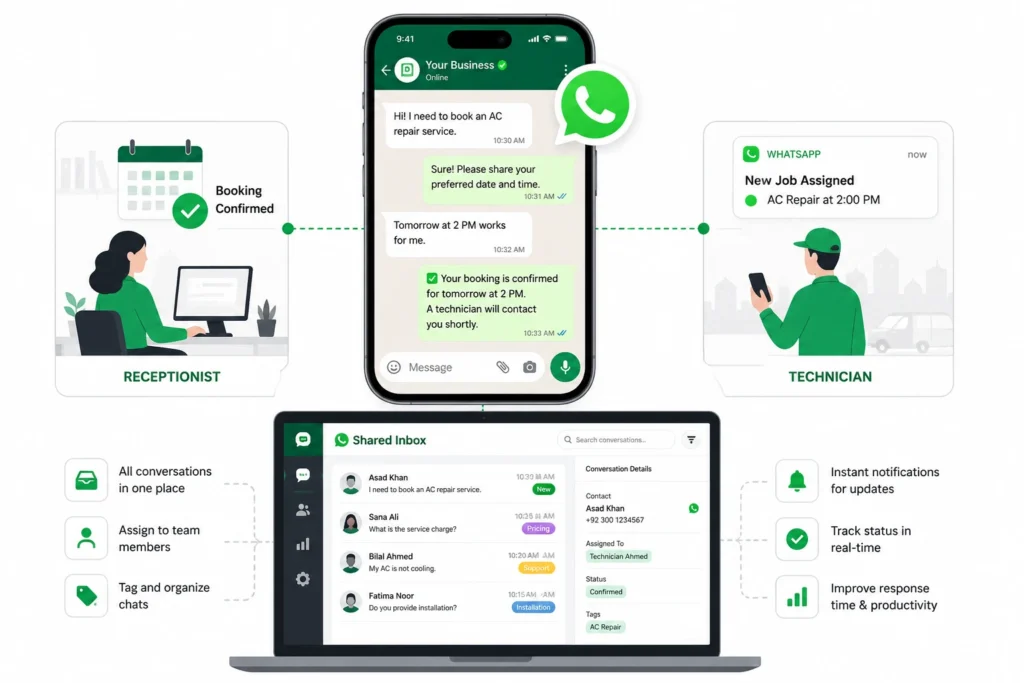
What Is a WhatsApp CRM for Appointment Booking? A WhatsApp CRM for appointment booking is a system that lets customers book appointments, confirm their time, and manage changes directly inside a WhatsApp conversation instead of calling your office or filling out a form. The booking gets logged into your calendar and CRM at the same time, so nothing falls through the cracks between reception and your service team. I’ve watched businesses try to run this off the standard WhatsApp Business app first. It never works for long. The moment more than one person needs to reply to customers, or you need bookings to sync automatically with a calendar, the basic app runs out of road. There’s no way to assign a conversation to a specific staff member. There’s no way to see who already replied. Two people end up typing to the same customer at the same time, and the customer notices. That’s the actual problem a WhatsApp CRM solves. Not just booking automation. Coordination. ⚡ GET IN TOUCH Book More. Miss Nothing. Automate on WhatsApp. 💬 Chat on WhatsApp 📞 Call 0307 3319555 How It Differs from the Standard WhatsApp Business App The standard WhatsApp Business app is built for one person managing one phone. A WhatsApp CRM runs on the WhatsApp Business API, which is a different infrastructure entirely. Here’s what changes: I usually tell clients this straight: if you’re still using the free app and you have more than one person answering messages, you’re already losing bookings somewhere. You just haven’t traced them yet. Feature WhatsApp Business App WhatsApp CRM for Appointment Booking Customer conversations Primarily managed through the app Centralized WhatsApp conversations in a shared inbox Multiple team members Limited for structured team workflows Multiple agents can work from the same business number Conversation assignment No structured assignment workflow Conversations can be assigned to specific staff Internal notes Limited Team members can add private notes Tags Basic labels Structured booking and customer-status tags Calendar integration Limited/manual workflows Can connect booking flow with calendars Automated reminders Limited Appointment reminders can be automated Booking workflow Mostly manual Customer can book appointments through a guided flow Team performance tracking Limited Response times and booking metrics can be monitored Role-based access Limited Access can be controlled by team role Why Businesses Are Switching to WhatsApp for Appointment Booking Businesses are switching because customers read WhatsApp messages. They don’t read email, and they don’t answer calls from numbers they don’t recognize. That single fact changes how bookings behave. A confirmation sent by email might sit in a promotions folder for two days. The same confirmation sent on WhatsApp gets seen in minutes, most of the time before the customer even finishes their coffee. And when a customer sees the confirmation fast, they act on it fast. They add it to their calendar. They show up. vs.Higher Read & Response Rates vs Email or Calls WhatsApp messages get read far more often, and far faster, than emails or missed calls with a voicemail attached. Email confirmations rely on the customer checking their inbox, which many people do once or twice a day at best. WhatsApp doesn’t have that lag. Phone calls have a different problem. Most people don’t pick up numbers they don’t recognize, especially during work hours. A missed call turns into a voicemail nobody listens to, followed by a callback that misses the window, followed by a booking that quietly disappears. A message sitting in someone’s WhatsApp doesn’t get ignored the same way. It sits right next to messages from their friends and family, and people check it constantly through the day. Reduced No-Shows with Automated Reminders Automated WhatsApp reminders can help reduce no-shows by giving customers a timely opportunity to confirm, reschedule, or cancel before the appointment. The pattern that works is simple. Send one reminder a day before the appointment, then a second one an hour or two before. Both should let the customer confirm, reschedule, or cancel with a single tap, not force them to call back. Most no-shows aren’t customers being careless. They forgot, because the reminder they got wasn’t in a place they check. Fix where the reminder lands, and the no-show rate drops on its own. The Real Bottleneck: Booking Automation Alone Isn’t Enough Automating the booking flow fixes one problem and quietly ignores another. The customer books fine. What happens after that message lands is where things start breaking down. I’ve walked into more than one business where the chatbot worked perfectly, and the team behind it was still a mess. The bot confirmed the appointment. Nobody told the technician. The customer showed up to a service that wasn’t scheduled on anyone’s actual calendar. That’s not a booking problem. That’s a people problem wearing a booking costume. Most businesses buy automation expecting it to fix coordination. It doesn’t. It just moves the coordination problem one step further down the chain, where it’s harder to spot until a customer is standing at the door. Why Reception and Service Teams Still Struggle After Automation Reception and service teams struggle after automation because the booking gets confirmed automatically, but the internal handoff still depends on someone remembering to check, forward, or update it manually. Here’s what that looks like on a normal day. A booking comes in through WhatsApp at 9am. The confirmation goes out to the customer instantly. Reception sees it. The service team doesn’t, because nobody forwarded it, or it got buried under twelve other conversations in the same thread. By 2pm, the customer texts asking where the technician is. This happens constantly in businesses running WhatsApp through a single shared login with no internal structure. Everyone can see the messages. Nobody owns them. And that’s the part most automation vendors never mention. They’ll sell you a booking bot and call the problem solved. Replies, andThe Cost of Poor Handoffs, Missed Bookings, Duplicate Replies, Slow Response Times Poor handoffs between reception and service teams cost businesses missed bookings, duplicate replies, and slower response