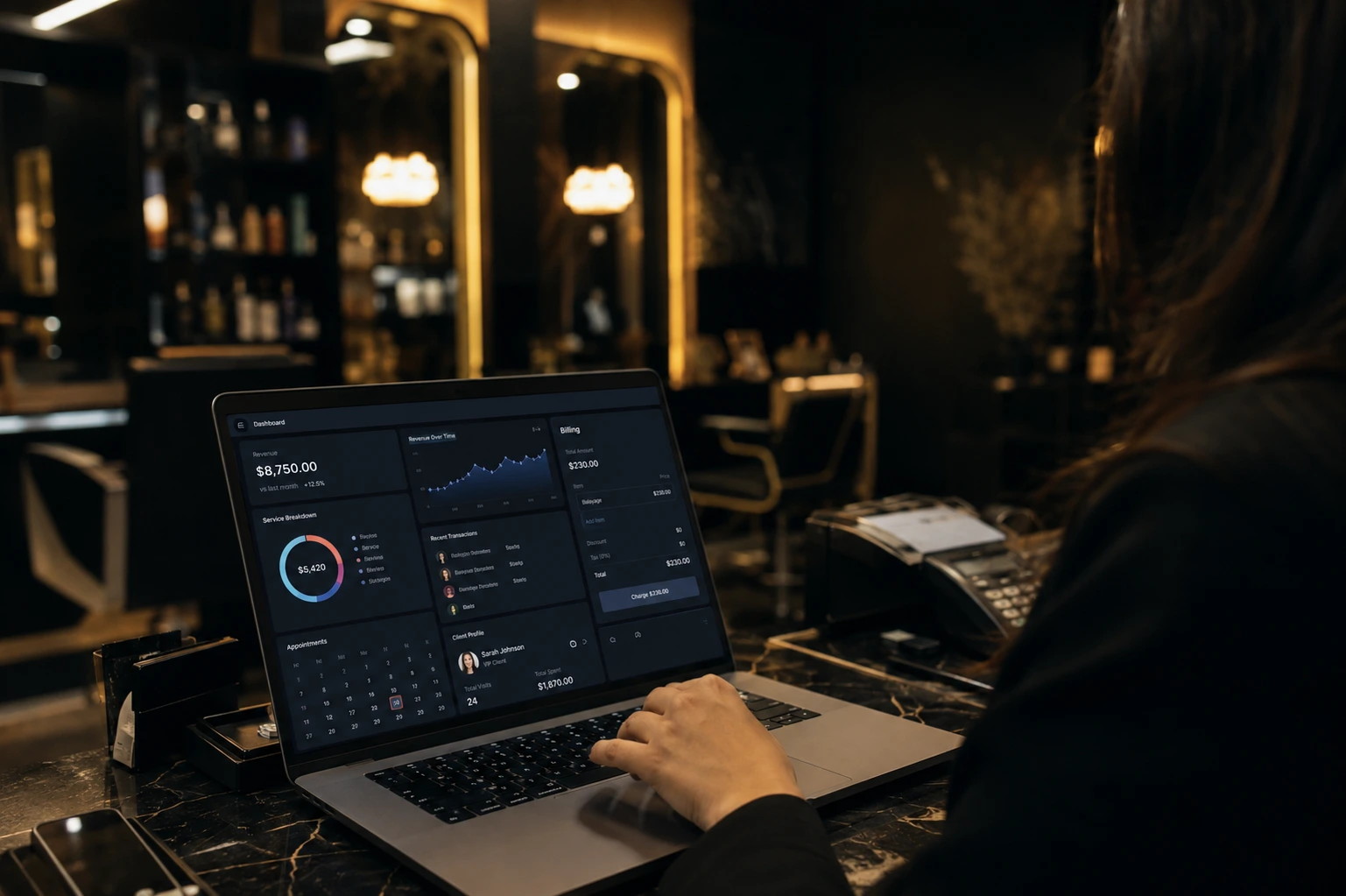
Why Modern Salons Need a Powerful Salon Management System
Running a salon without proper systems is harder than most people admit.
I have seen owners spend hours every day just trying to keep track of appointments, payments, and staff schedules. They use notebooks, WhatsApp messages, and random Excel sheets. It works for a while. Then it breaks.
A modern salon needs a powerful salon management system because the old ways no longer match the pace of real work. Clients expect quick service. Staff need clear tasks. Money needs accurate tracking. When these three things stay messy, the business feels chaotic even on busy days.
I notice the same problems again and again. Bills take too long to prepare. Customer details get lost. Stock runs out without warning. Reports never show the real profit picture. These are not small issues. They slowly eat into time and income.
A proper salon management system brings everything into one place. You can create a bill in seconds. You can check customer history with one search. You can see which services sell best and which staff perform well. You stop guessing and start knowing.
The difference shows up in daily life. Owners who use a solid system spend less time fixing mistakes. They spend more time improving the business. That shift alone changes how the salon grows.
I believe every salon that wants steady growth needs this kind of control. Not because technology is fancy. Because the work itself has become more complex. A strong salon management system simply matches that reality.
Smart Dashboard Real Time Business Insights at a Glance
Key Performance Metrics (Customers, Revenue, Pending Payments, Expenses, Net Profit)
I can see total customers, collected revenue, pending payments, total expenses, and net profit right at the top. These five numbers tell me if the salon is moving forward or standing still. When pending payments rise, I know I need to follow up. When net profit drops, I dig into expenses the same day. The numbers stay current, so I never work with yesterday’s picture.
Inventory Overview & Low Stock Alerts
Below the main metrics sits a clear inventory overview. It shows total items, total stock, and low stock counts in red. I do not wait for a staff member to tell me something has run out. The system flags it early. That small alert has stopped many last-minute shortages during busy hours.
Top Employee Performance Tracking
The dashboard also highlights the top employee. I can see who is delivering the most value without asking around. This helps me recognize strong performers and spot who might need extra support. It keeps the team focused because results are visible.
Custom Date Range Filtering
I often change the date range to check specific periods. Today, this week, this month, or any custom range I choose. Comparing last week with this week shows me patterns fast. The filter works instantly, so I stay in control of the numbers that matter.
The dashboard turns raw data into clear direction. I check it once and know exactly where to focus next.
GET IN TOUCH
Need a Salon Management System Built for Your Business? Let’s Talk.
Lightning-Fast Quick Billing System for Seamless Transactions
I have watched a lot of front desk staff struggle during peak hours, and slow billing is almost always the reason a queue starts forming. A good salon management system fixes this by making checkout fast enough that nobody notices it happening.
That is really the whole point of quick billing. Speed without losing accuracy.
Generate Bills in Under 30 Seconds
The billing screen works the way a busy front desk actually needs it to work. You search a customer, pick the service, and the bill is ready before the client has even picked up their bag.
I have tested slower systems before, and the difference shows up fast. When billing takes two or three minutes per client, a salon with back to back bookings loses time it can never get back. A salon management system built for speed removes that friction completely.
Walk-in Customer Support
Not every client books ahead. Walk-ins happen every single day in a salon, and the billing flow has to handle that without slowing anything down.
Instead of forcing staff to create a full customer profile before billing, the system lets you add a walk-in instantly and move straight to checkout. This is one of those small details that sounds minor until you are the one standing at the counter with three people waiting.
Multiple Payment Methods (Cash, JazzCash, Meezan, UBL, POS & Udhar)
A salon in Pakistan sees every kind of payment on a normal day. Cash, JazzCash, bank transfers through Meezan or UBL, card payments through POS, and sometimes a regular client who wants to pay later.
That last one is called Udhar, and honestly, most software completely ignores it. Real salons deal with credit payments all the time, especially with long term clients, so having it built into the billing screen instead of tracked separately on paper is a genuine improvement.
Here is the full range of payment options a proper salon billing setup should support:
- Cash
- JazzCash
- Bank transfer through Meezan
- Bank transfer through UBL
- POS through Meezan
- POS through UBL
- Udhar for pending or credit payments
Covering all of these in one screen means staff are not switching between a register, a mobile wallet app, and a separate notebook just to close one bill.
Live Bill Summary & Employee Selection
Before the bill is finalized, a live summary shows exactly what is being charged and to whom. Nothing gets added blindly. You can see the services, the price, and the total updating in real time as items are selected.
The system also asks which employee handled the service. This is not just a formality. It is what makes staff performance tracking and commission calculation possible later, without anyone having to remember who did what at the end of the week.
I think this is the part people underestimate the most. Fast billing feels good in the moment. But tying every bill to the right employee is what actually helps a salon owner see who is driving revenue.
Complete Customer Management for Better Client Relationships
I have seen salons keep client records in notebooks, spreadsheets, and even old receipt books. It works until it does not, usually right when a regular client calls asking about their last visit and nobody can find the details fast enough.
A salon management system solves this by keeping every client record in one searchable place. No digging through drawers.
Easy Search by Name or Mobile Number
The search bar is the first thing staff actually use, and it works the way you would expect it to. Type a name, or type a mobile number, and the client shows up instantly.
This matters more than it sounds. A regular customer walks in, gives their number, and within seconds the staff can pull up their history without asking twenty questions. That small interaction builds trust. Clients notice when a salon remembers them.
Add, Edit & Manage Customer Profiles
Adding a new customer takes one click, and that is intentional. Nobody wants to fill out a long form while a client is standing at the counter waiting.
Once a profile exists, it stays editable. Phone numbers change. Names get corrected. Preferences shift over time. Being able to update a record in seconds, rather than deleting and recreating it, keeps the customer database clean and accurate.
And that accuracy matters later. A messy customer list makes reporting useless. A clean one makes every report actually mean something.
Customer Image & Contact Details
Every profile shows an image along with the name and mobile number, laid out in a simple table view. This sounds like a small detail, but it changes how fast staff can identify a client, especially in a busy salon where multiple people share the front desk.
I think this is where a lot of basic systems fall short. They store data but do not make it easy to recognize a person at a glance. Adding a photo next to the name closes that gap.
The result is a customer management setup that feels less like a database and more like an actual memory of every client who walks through the door. Which, honestly, is what a salon management system is supposed to do in the first place.
Dedicated Groom Customers Module for Premium Clients
Bridal and groom clients are not regular walk-ins. They usually book weeks in advance, need multiple sessions, and expect a level of attention that a normal service does not require. Mixing them into the general customer list makes it easy to lose track of who needs what.
A salon management system handles this by giving groom and bridal clients their own dedicated space. Separate from everyone else.
Separate Management for Groom & Bridal Clients
The Groom Customers module keeps premium clients in their own list, away from the regular customer database. This is not just about organization for its own sake.
When a bridal client is booked for a package spread across multiple days, staff need to check her details quickly without scrolling past dozens of unrelated walk-in records. Keeping this list separate means the front desk can find exactly who they need in seconds, especially on a wedding week when timing matters more than usual.
I have noticed that salons offering bridal packages tend to have the most scheduling stress out of any service category. A dedicated list does not remove that stress completely. But it does remove one layer of it.
Quick Search and Add Functionality
Adding a groom or bridal client works the same way as the regular customer flow, one click and the profile is created. No extra steps, no separate forms to learn.
The table view shows the client’s image, name, mobile number, and available actions, all laid out clearly. Staff can search by name or number and pull up the record instantly, which matters a lot when a bride’s family calls to confirm a slot two days before the event.
This is a case where simplicity actually protects the client experience. Nobody wants to hear “let me check” repeated three times during a phone call about a wedding booking.
Easily Manage All Salon Services with Full Control
Every salon offers a different mix of services, and that mix rarely stays the same for long. New treatments get added, some get dropped, and prices shift as costs change. A salon management system needs to keep up with that without making it a whole project every time something changes.
This is exactly what the Services module is built for.
Add, Edit & Delete Services
Adding a new service takes a few fields and one click, nothing more. A facial priced at Rs 1000 is a good example. Name it, set the category, set the price, and it is live for staff to select during billing.
Editing works the same way. Prices change more often than people expect, especially with rising costs of products. Being able to update a price in seconds, instead of removing and recreating the entire service, keeps the system accurate without extra effort.
And when a service is discontinued completely, deleting it removes the clutter. Old services sitting in a list that nobody offers anymore just slow down staff during billing.
Service Categories & Pricing
Grouping services into categories sounds simple, but it changes how fast staff work. Facial services under one category, hair services under another, each with its own pricing shown clearly next to the name.
This matters most during quick billing. When a front desk employee is selecting services under pressure with a client waiting, scrolling through one long unorganized list wastes time. Categories fix that by narrowing the search before it even starts.
I think pricing transparency is the part that gets overlooked. Every service showing its exact price in the same table means there is no confusion, no manual calculation, no room for billing mistakes.
Active / Inactive Status Control
Not every service needs to be deleted just because it is paused. Seasonal services, temporarily unavailable treatments, or services waiting on new stock can simply be marked inactive instead.
This keeps the service history intact while hiding it from the active billing list. Later, if the service comes back, reactivating it takes one click instead of rebuilding it from scratch.
That small distinction between deleting and deactivating is something a lot of basic systems miss completely. It seems minor. But it saves real time whenever a service comes and goes with the seasons.
Create High-Value Groom Packages to Increase Revenue
A single service rarely covers what a bridal or groom client actually needs. Most of them want hair, skin, and grooming handled together, spread across a few days leading up to the event. Selling that as separate bookings creates more admin work than it is worth.
Packages solve this by bundling everything into one offer. One price, one booking, multiple sessions.
Multi-Day Package Creation
A package like GROOM PACKAGE 1 for three days at Rs 8000 is a good example of how this works in practice. Instead of the client booking three separate appointments and paying three separate times, the whole thing is set up once as a single package.
This changes how staff think about scheduling too. A three-day package means the front desk already knows the client is coming back, so they can plan around it instead of treating each visit like a fresh walk-in.
And clients tend to prefer this. Paying once for something spread across days feels simpler than settling a bill every single time they walk in.
Include Multiple Services in One Package
A package is not one service repeated three times. It usually combines different treatments under a single deal, which is what actually makes it feel like value.
GROOM PACKAGE 2, priced at Rs 12000 for three days, is a heavier package built for clients who want more than the basics. More services bundled in, spread across the same three-day window, still managed as one single entry in the system.
I think this is where packages earn their price. A client comparing Rs 12000 against booking each service individually usually sees the bundle as the better deal, even if the total cost ends up close. Perceived value matters here as much as the actual math.
Flexible Pricing & Status Management
Packages need to stay editable, the same way services do. Prices shift, included services change, and sometimes a package needs to be paused without deleting it completely.
Marking a package as active or inactive keeps old packages in the system without cluttering the active list shown during billing. A seasonal bridal package can sit inactive for months and come back with one click when wedding season starts again.
That flexibility is what keeps packages useful long term. Not just at launch, but months later when pricing needs adjusting or a package needs retiring for a new one to take its place.
Attract More Clients with Special Deals and Offers
Regular clients keep a salon running day to day, but new clients usually show up because something caught their attention first. A discount, a limited offer, something that makes booking feel urgent instead of optional.
That is exactly what the Deals module is built for. Short-term offers that push people to book now instead of later.
Time-Limited Special Deals
A deal like SUMMER DEAL SPECIAL, priced at Rs 3000 with a 20 percent discount, works because it feels temporary. Clients know it will not stay available forever, and that pushes the decision along faster than a regular service listing ever could.
Deals get linked to specific services rather than sitting as a vague discount floating around. So when a client asks what is included, staff can point to exactly what the deal covers instead of guessing.
I have noticed that vague offers rarely convert. A deal tied to clear services with a clear price does the actual work of getting someone to book.
Discount Percentage & Validity Period
Every deal carries a discount percentage along with a start and end date. This is not just for the client’s benefit. It controls exactly how long a promotion runs without anyone having to manually turn it off later.
Once the end date passes, the deal simply stops applying. No staff member needs to remember to cancel it, and no client gets a discount that should have expired weeks ago. That kind of automatic control matters more than it sounds, especially in a busy salon where nobody has time to track promotion calendars by hand.
Easy Activation and Management
Deals can be marked active or inactive at any point, separate from their validity dates. A seasonal deal built for summer does not need to be deleted once the season ends. It just sits inactive until next year, ready to be reactivated with one click instead of recreated from scratch.
This is where the Deals module earns its place. Not just as a discount tool, but as something a salon owner can reuse year after year without repeating the setup work every single time a new promotion is needed.
GET IN TOUCH
Get Your Custom Salon Management Software Built Today
Boost Sales Instantly Using Custom Promo Codes
A deal works well when a client is already at the salon or browsing services directly. But sometimes you need something that travels. A code shared over WhatsApp, posted on social media, or handed out to a client’s friend.
That is what promo codes are for. A discount that moves with the conversation instead of sitting fixed on a service page.
Create Unlimited Promo Codes
Setting up a new code takes one click through the Add New Promo button, nothing more complicated than that. A short code, a discount attached to it, and it is ready to share.
This matters for how salons actually run promotions. A referral code for one client’s friends looks different from a code shared in a general social media post, and being able to create as many as needed means each campaign gets its own code instead of everyone sharing one generic discount.
I think this is where a lot of salons lose track of what is working. Without separate codes, there is no real way to tell which promotion actually brought people in.
Set Discount Value & Validity
Every promo code carries its own discount value along with a validity period, the same logic as deals but built for something that moves outside the salon. Once the validity window closes, the code simply stops working.
This removes the awkward situation where a client shows up months later with an old code expecting it to still apply. The system handles the cutoff automatically, so staff never have to be the ones explaining why an expired code no longer counts.
Track Active Promotions
Every code carries a status, active or inactive, visible at a glance. A salon running multiple promotions at once needs to know instantly which codes are still live and which ones have run their course.
This becomes more useful the longer a salon uses the system. Old codes stay in the records instead of disappearing, which means there is always a history to look back on when deciding which type of promotion actually worked and which one did not get much traction at all.
Complete Employee Hub for Staff and Salary Management
Every salon runs on its staff, but keeping track of who works where, who gets paid what, and who performed which service usually turns into a mess of separate registers. A salon management system pulls all of that into one place instead of spreading it across notebooks and memory.
That is the whole purpose of the Employee Hub.
Staff Directory
The directory holds every employee’s record in one list, searchable and organized instead of scattered across different sheets. When a salon grows past a handful of staff, this stops being a nice extra and starts being the only realistic way to keep things straight.
New hires get added the same way new customers do, quickly and without unnecessary steps. And once an employee is in the system, their record connects directly to the billing screen, which is what makes it possible to track exactly who handled which service later on.
I think this connection is the part people miss when they first look at staff management. It is not just a list of names. It is the backbone that makes performance tracking and commission work at all.
Salary Management System
Salary tracking sits right inside the same module, so salon owners are not juggling a separate payroll sheet on top of everything else. Staff salaries get recorded and managed alongside the rest of the employee data.
This matters most at the end of the month, when payroll usually becomes the most time-consuming task on a salon owner’s list. Having salary information already tied to each employee record removes a step that would otherwise mean cross-checking attendance, services performed, and payment history from three different places.
Add & Search Employees Easily
Finding a specific employee works the same way finding a customer does. Search by name, and the record comes up instantly.
Adding a new staff member follows the same one-click logic used everywhere else in the system. No long onboarding form, no repeated data entry. Just enough information to get them into the system and ready to be selected the next time they handle a client at the billing counter.
This consistency across modules is easy to overlook, but it is exactly what makes a system usable day to day. Once staff learn how adding a customer works, adding an employee feels almost identical, and that shortens the learning curve for everyone using it.
Smart Inventory Management with Low Stock Alerts
Running out of a product mid-service is one of those problems that feels small until it actually happens. A client sitting in the chair, a staff member realizing the color or product they need is gone, and no easy way to know that shortage was coming.
An inventory management system for small business fixes this by keeping stock visible at all times instead of finding out the hard way.
That visibility is really what inventory management comes down to.
Real-Time Stock Level Tracking
Every product in the salon gets tracked with its current stock level shown right next to it, updated as items get used. No end-of-week counting, no guessing how much is left based on memory.
This changes how ordering decisions get made. Instead of reacting after a product runs out, staff can see stock dropping in real time and plan the next order before it becomes an emergency. That shift from reactive to proactive is honestly where most of the value sits.
Threshold & Low Stock Warnings
Each product carries a threshold, a minimum level that triggers a warning once stock drops below it. When that happens, the item gets flagged clearly instead of quietly sitting low until someone notices by accident.
I have seen how easy it is to overlook a slow-moving product until the day it is suddenly needed and gone. A threshold warning removes that blind spot completely, because the system flags it long before the shelf is actually empty.
Product History & Reports
Every product carries a history alongside its current numbers, showing how stock has moved over time. This is not just a snapshot of today. It is a record of what got used, when, and how fast.
That history matters more once a salon has been running for a while. Patterns start to show up, certain products moving faster during specific seasons or promotions, and having that recorded means restocking decisions can be based on actual usage instead of a rough guess.
Add New Products Instantly
Adding a new product to inventory follows the same simple pattern used across the rest of the system. Image, item name, stock level, and it is in the list, ready to be tracked from that point forward.
This matters most when a salon starts stocking a new brand or introduces a new treatment that needs its own supplies. Getting that product into the system quickly means it starts being tracked from day one, instead of existing off the books until someone remembers to add it weeks later.
Secure System Users and Role-Based Access Control
Not everyone working in a salon needs access to the same information. A stylist checking a client’s booking does not need to see monthly profit numbers, and giving that access anyway is usually how mistakes or data leaks happen. A salon management system solves this by controlling exactly who sees what.
That control comes down to roles.
Add New System Users
Creating a new user account follows the same pattern as everything else in the system, quick and without unnecessary steps. A name, an email, a role, and the account is ready to use.
This matters as a salon grows past a one-person front desk. More staff logging in means more chances for something to go wrong if access is not managed properly from the start, so keeping account creation simple actually encourages salon owners to set it up correctly instead of skipping it out of frustration.
Role Assignment (Admin & Other Roles)
Every user gets assigned a role, and that role decides what parts of the system they can actually touch. An Admin role comes with full control, financial reports, staff management, settings, everything.
Other roles get scoped down to what the job actually requires. A front desk employee handling bookings and billing does not need access to expense reports or salary data, and role assignment is what keeps that boundary in place without anyone having to manually restrict permissions every single day.
I think this is where a lot of small salons get caught off guard. Without role-based access, sensitive numbers end up visible to anyone with a login, and that is rarely intentional. It just happens by default when nobody sets boundaries early.
Secure Access Management
The user list shows name, email, and role clearly, so an owner can see at a glance who has access to what. Managing this stays simple even as the number of staff logins grows.
And when someone leaves the salon, removing their access takes the same one-click approach used to add it. No lingering login sitting active for weeks after someone has already moved on, which is exactly the kind of gap that causes real security problems in small businesses.
Powerful Reports & Analytics for Data-Driven Decisions
Running a salon on gut feeling works for a while, but it stops working the moment you actually need to know where the money went. A salon management system turns daily transactions into numbers you can actually act on, instead of leaving everything scattered across bills and memory.
That is the entire point of the Reports and Analytics section.
Profit & Loss Report
The Profit and Loss report pulls total income, total expenses, and net profit into one clear breakdown. Not scattered numbers from different modules. One report, one clear picture of where the salon actually stands.
I have seen salon owners guess their profit margins based on how busy a week felt, and that guess is almost always wrong in one direction or the other. A proper P&L breakdown removes the guessing completely. It shows the real number, whether that number is good news or not.
Sales Report
The Sales report tracks what is actually being sold, which services, which packages, and how that translates into revenue over time.
This is different from just watching money come in at the billing counter, which is exactly the gap a proper sales management software in Pakistan is designed to close.
Patterns show up here that are impossible to notice day to day. A service that seemed popular might actually be underperforming once the numbers are laid out clearly, and a package nobody talks about might be quietly driving more revenue than expected.
Inventory Report
The Inventory report connects directly to stock levels and usage history, showing which products move fastest and which ones sit unused for weeks. This is where restocking decisions stop being a guess.
A salon buying based on assumption often ends up overstocked on slow items and short on the ones clients actually want. The inventory report fixes that by showing real usage instead of assumed demand.
Staff Performance Report
Staff performance data ties back to every bill where an employee was selected during checkout. Over time, this builds a clear picture of who is generating the most revenue and who might need more support or training.
This is not about singling anyone out. It is about having actual data instead of relying on impressions of who seems busy. Someone who looks constantly occupied is not always the one bringing in the most revenue, and this report is what reveals that difference.
Custom Date Range & Quick Filters
Every report can be filtered by Today, Yesterday, This Week, This Month, or All Time, along with a custom date range for anything more specific. Comparing this month against last month takes seconds instead of manually pulling numbers from two different periods.
That flexibility is what makes reporting actually useful day to day. A quick filter answers the immediate question, while a custom range handles the deeper comparisons an owner needs when planning ahead for the next quarter or season.
Fully Customizable System Settings for Your Salon Brand
Every salon runs a little differently, and software that forces everyone into the exact same setup usually ends up half useful at best. A salon management system needs room to bend around how a specific business actually operates, not the other way around.
That flexibility is what the Settings section is built to handle.
General Settings
General Settings covers the basic configuration that keeps the whole system aligned with how the salon actually runs. This is the starting point before anything else gets customized.
I think this section gets overlooked because it feels administrative, not exciting. But getting the basics right here is what makes every other module behave the way it should, instead of running on default assumptions that do not match the salon’s actual setup.
Print Settings
Print Settings controls how bills and receipts actually look when they come out of the printer. Not every salon wants the exact same receipt format, and this is where that gets adjusted.
A small detail like this matters more once a salon starts thinking about branding. A receipt handed to a client is a small touchpoint, and having it formatted the way the salon wants instead of a generic default adds a bit of polish that clients do notice, even if only subconsciously.
Service Categories Management
New service categories can be created directly from Settings, separate from adding individual services. A facial category, for example, already exists as a starting point, and new ones get added the same simple way whenever the salon expands what it offers.
This keeps the whole system organized from the ground up. Without proper categories, the services list eventually turns into a long, unsorted mess that slows staff down every time they are billing a client. Managing categories here means that organization happens once, upfront, instead of getting fixed later after it has already caused problems.
Branding & Theme Customization
The system pulls branding elements, logos, theme color, and favicon directly from these settings, which is what lets each salon using the platform feel like its own dedicated system instead of a shared generic tool.
This is where a salon management system stops feeling like software and starts feeling like part of the actual business. A dark theme with the salon’s own color and logo showing up across every screen makes the dashboard feel built for that specific salon, not just rented from somewhere else.
Additional Powerful Features of TSMS Salon Management System
Beyond the core modules, there are smaller details in TSMS that do not get their own dedicated section but still shape how the system feels to use every single day. These are the things that stand out once you have spent real time inside the dashboard.
Modern Dark Theme UI
The dashboard runs on a dark theme by default, built with a gold and yellow accent that makes key numbers and buttons stand out without feeling harsh on the eyes. For a system that stays open for hours during a working shift, that matters more than it sounds.
A bright white interface staring back at staff all day gets tiring fast, especially in salons where the front desk screen is on continuously. The dark layout in TSMS was clearly built with that reality in mind rather than just following a design trend.
Multi-Language Support
TSMS includes a language switcher right in the top bar, currently set to English but built to support more than one language going forward. This matters in a market where staff and owners do not always share the same first language comfort level.
Software that only works in one language quietly excludes people who could otherwise use it just as well. Having language support built into the core of TSMS, rather than added later as an afterthought, says something about how the system was actually planned.
Real-Time Notifications
A notification bell sits in the top bar of TSMS, flagging updates as they happen instead of requiring anyone to go looking for them. Low stock, pending payments, whatever needs attention shows up there directly.
I think this small feature does more work than it gets credit for. Without it, staff would need to manually check inventory or reports throughout the day just to catch something that TSMS could have already flagged the moment it happened.
Session Security & Expiry Timer
TSMS displays a live countdown showing exactly when the current session or subscription expires, visible right at the top of the dashboard. There is no ambiguity about how much time is left before access needs to be renewed.
This kind of transparency is rare in a lot of business software, where subscription status often stays hidden until an account suddenly locks out with no warning. TSMS keeps that information visible at all times instead of letting it surprise anyone.
Fully Responsive Design
The entire TSMS dashboard adjusts cleanly across screen sizes, whether it is being checked on a desktop at the front counter or a phone from somewhere outside the salon. Nothing about the layout breaks or gets awkward to tap through on a smaller screen.
That flexibility matters for salon owners who are not always sitting at a desk. Being able to check today’s revenue or a pending payment from a phone, without the interface turning into a squeezed, unreadable version of itself, is exactly what a responsive design is supposed to deliver.
GET IN TOUCH
Ready to Simplify Your Salon Operations? Contact Us Now
Why TSMS is the Best Salon Management System for Growing Salons
A salon does not fail because the services are bad. It usually struggles because the business side, billing, staff, inventory, reporting, stays disconnected while the owner tries to hold it all together manually. TSMS exists to close that gap.
I have gone through every major part of this system across the earlier sections, and one thing stands out. TSMS was not built as a single feature stretched thin to look complete. It was built as separate modules that actually talk to each other.
Billing connects to employee performance. Inventory connects to reporting. Deals and promo codes connect back to sales numbers that show what actually worked. That connection is what turns a collection of tools into an actual system.
A growing salon runs into a specific problem most software does not solve well. Early on, a notebook and a calculator are enough. But once staff numbers increase, service categories expand, and bridal or groom packages start bringing in serious revenue, that manual approach breaks down fast. TSMS is built for exactly that transition point.
The dual structure for regular customers and groom customers is a good example of this. Most salon software treats every client the same way, which works fine until premium bridal bookings need a different level of attention than a regular walk-in trim. TSMS separates that from day one instead of forcing an owner to work around a rigid system later.
Reports and Finance tie everything back to real numbers instead of gut feeling. Profit and loss, sales patterns, staff performance, all pulled from the same data that billing and inventory already generate. Nothing needs to be recalculated or cross-checked from three different places.
And the smaller details matter more than they seem at first. Role-based access keeps sensitive numbers away from staff who do not need them. Low stock alerts prevent the kind of shortage that ruins a client’s appointment. A dark, branded interface makes the system feel like it belongs to that specific salon, not something rented from somewhere else.
None of these features exist in isolation. That is really the whole case for TSMS.
A salon owner does not need ten different tools stitched together to run daily operations. One system, covering billing, customers, staff, inventory, deals, and reporting, is what actually lets a growing salon scale without the admin side collapsing under its own weight.
That is what makes TSMS a genuinely complete salon management system, not just another dashboard with a long feature list.
Conclusion Transform Your Salon Business with the Right Salon Management System
Running a salon well comes down to one thing most owners figure out the hard way. Good service brings clients in, but disconnected systems are what push them back out again.
I have walked through every part of what a proper salon management system actually needs to handle. Billing that keeps up during busy hours. Customer records that do not disappear into notebooks. Staff and salary tracking that does not turn into a monthly headache. Inventory that warns you before a shelf actually goes empty. Reports that show real numbers instead of a rough guess.
None of these pieces matter much on their own. What actually changes how a salon runs is having all of them connected, so a bill at the counter feeds directly into staff performance, and a low stock alert shows up before it becomes a client’s problem.
A salon management system built this way is not just software sitting in the background. It becomes the thing holding the operational side of the business together while the actual work, the services, the clients, the experience, stays the focus out front.
If you are running a salon and still juggling separate tools for billing, staff, and stock, that gap is usually where growth quietly slows down.
The right all in one software solution for small businesses does not replace what makes a salon good
Salon Management Software Development Service in Pakistan
A ready-made system like TSMS works well for most salons, but some businesses need something built around their exact workflow instead of adjusting to someone else’s structure.
That is where bespoke software development services in Pakistan come in
I have seen salon owners in Pakistan try to force generic software into a setup it was never designed for. It usually works halfway. A missing payment method, a package structure that does not fit, a reporting format that leaves out exactly the number the owner actually needs to see. Small mismatches, but they add up fast.
Custom development solves that by starting from the salon’s actual operations instead of a fixed template. Every module gets shaped around how that specific business runs, not the other way around.
Built Around Local Business Needs
Salons in Pakistan deal with payment realities that a lot of generic software simply does not account for. Cash, JazzCash, bank transfers through local banks, POS terminals, and Udhar for regular clients who settle their bill later. A custom system is built with these payment methods included from the start, not bolted on as an afterthought.
Local development also means the software speaks the same operational language as the salon using it. Bridal and groom packages, seasonal deals tied to local wedding seasons, staff commission structures common in local salons, all of it gets built in directly instead of forced into a foreign template that was designed for a completely different market.
End-to-End Development Process
A proper salon management software development service covers more than just writing code. It starts with understanding how the salon actually operates day to day, what breaks down currently, and what the owner actually needs visibility into.
From there, the system gets built module by module. Billing first, since that is where daily operations live. Then customer management, staff tracking, inventory, and reporting layered on top, each one connected to the others rather than existing as a separate disconnected tool.
Testing happens with real scenarios, not just sample data. A busy Saturday with back-to-back bookings looks very different from a quiet Tuesday, and the system needs to hold up under both.
Ongoing Support After Launch
Software does not stop needing attention once it goes live. Salons grow, service lists expand, and new requirements come up that were not part of the original plan.
A development service worth choosing stays involved after launch, handling updates, fixing issues as they come up, and adjusting the system as the salon’s needs change over time. That kind of support is what turns a piece of software into a long-term operational tool instead of something that gets outdated within a year.
If a salon in Pakistan is outgrowing generic software or has never found a system that actually fits how it operates, custom salon management software development is usually the more practical path forward. Not because ready-made systems are bad, but because some businesses genuinely need something built around them instead of around a template.
GET IN TOUCH
Build a Salon System That Fits Your Business — Get in Touch
Frequently Asked Questions
How does a salon management system help with billing?
It speeds up checkout by letting staff search a customer, select services, and generate a bill in seconds instead of minutes. Most systems also support multiple payment methods, including cash, mobile wallets, bank transfers and card payments, so front desk staff are not switching between different tools during checkout.
Can a salon management system track staff performance?
Yes. Since every bill gets tied to the employee who performed the service, the system builds a clear picture over time of who is generating the most revenue. This data usually feeds directly into staff reports, making performance tracking based on actual numbers instead of assumptions.
Is it possible to get a custom salon management system built instead of using ready-made software?
Yes. Custom salon management software development is available for salons whose workflow does not fit neatly into a generic template. This is common for businesses with specific payment methods, unique package structures, or reporting needs that off-the-shelf software does not fully cover.
Does a salon management system work for small salons, or only larger ones?
It works for both, though the benefit becomes more noticeable as a salon grows. A small salon with one or two staff members might manage fine with basic tools early on, but once bookings increase and staff numbers grow, a proper system prevents the kind of disorganization that manual tracking eventually leads to.