Did you know that 90% of startups fail within their first five years? One major reason is relying on software that cannot keep up with its growth. When your business needs change faster than your software can adapt, you lose customers, waste money, and fall behind competitors.
Off-the-shelf software might seem like the easy choice at first. It is quick to set up and appears cost-effective. However, these ready-made solutions come with serious limitations. They force you to change your business processes to fit their features. They charge recurring fees that add up quickly. They lock you into their ecosystem with limited control over your data and functionality.
Custom software development for startups offers a different path. It gives you complete control, perfect alignment with your business model, and the ability to scale without limits. This guide will show you exactly how to make custom software work for your startup.
In this complete guide, you will learn:
- What custom software development means for startups and why it matters
- How to decide between custom solutions and off-the-shelf software
- The complete development process from idea to launch
- Real costs with detailed breakdowns and pricing examples
- How to choose the right technology stack and development partner
- Common mistakes startups make and how to avoid them
Whether you are building your first minimum viable product or scaling an existing platform, this guide will help you make smart decisions about your startup’s software development.
Table of Contents
What is Custom Software Development for Startups?
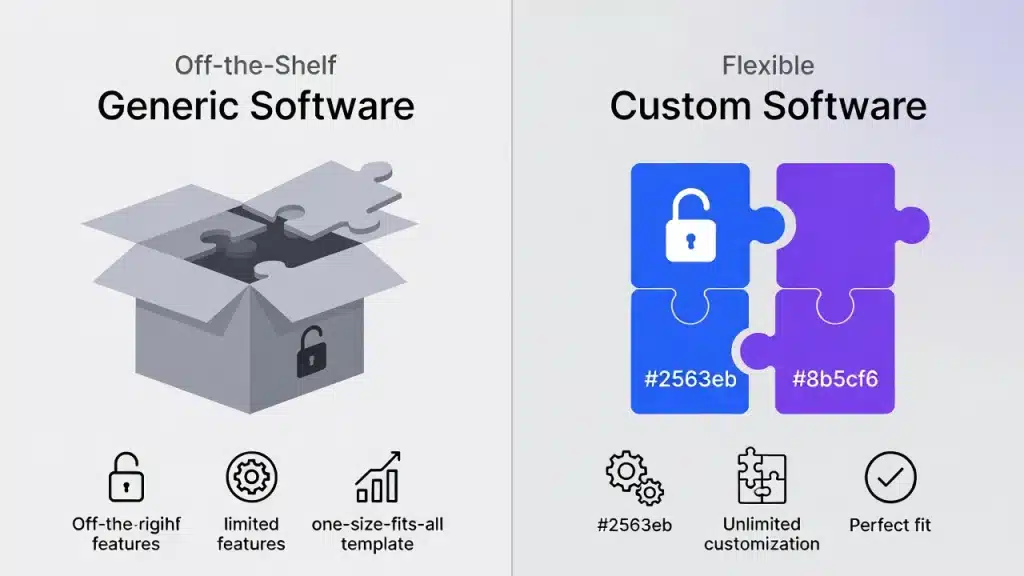
Custom software development for startups means creating digital solutions that are made just for your business. Instead of using generic, ready-made software, custom software is built from the ground up to fit your specific needs, workflows, and goals.
It’s like the difference between buying a suit off the rack and having one made just for you. A custom suit fits better and meets your needs. The same idea applies to custom software for startups.
With custom software development, you team up with developers, designers, and project managers to build an app that solves your specific challenges. This might be a mobile app, a web platform, a SaaS product, or an enterprise system. Every feature and design choice is made to support your business strategy.
Key Characteristics of Startup-Specific Development:
- Custom software is made to fit your business model and processes, so you don’t have to change how you work to fit someone else’s idea.
- It has a scalable design that can grow with your user base, whether you have hundreds or millions of users.
- You fully own your code, data, and intellectual property.
- Custom software is flexible, so you can make changes if your business model shifts.
- It can connect with any third-party tools or services you need.
- There are no licensing fees or restrictions from vendors that could limit your growth.
For example, if you’re starting a food delivery business, you might need real-time order tracking, dynamic pricing, and connections to several payment providers. Off-the-shelf software might cover some of these needs, but not in the way you want. With custom software, you can build exactly what your business needs.
The main difference between custom and ready-made software is control, flexibility, and long-term value. Off-the-shelf software can help you start quickly, but custom solutions set your startup up for lasting growth and a stronger competitive edge.
Why Startups Need Custom Software Development in 2026
The startup world looks very different now. Strategies that worked five years ago are no longer enough. Customers want smooth experiences, investors look for scalable tech, and competitors are moving faster. For startups to succeed, custom software development is now a must.
Scalability and Growth Potential
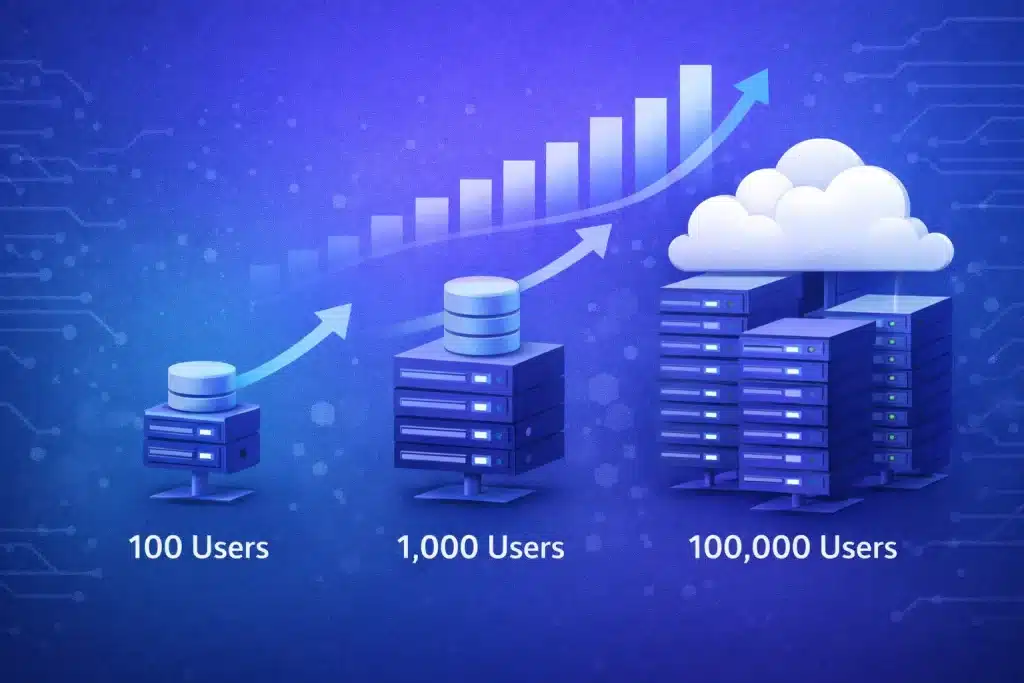
You might have 100 users now, but what if you grow to 10,000 or even 100,000? Off-the-shelf software often struggles as you scale. Pages can load slowly, features may break, and you might need costly upgrades or even a full rebuild.
Custom software is designed to scale from the start. Developers build it to handle more traffic, data, and users without slowing down. This helps you avoid technical debt, which means you won’t have to fix problems caused by rushed or poor decisions later.
Here’s a real example: A health tech startup used a ready-made platform that worked well for 100 users. But when they grew to 1,000 users, the system slowed down a lot. They ended up rebuilding everything, which cost them six months and $200,000. If they had chosen custom software from the beginning, they could have scaled up without these problems.
A scalable setup grows as your business does. With cloud-based systems, load balancing, and optimized databases, you can handle millions of transactions. This means your users get fast, reliable service whether you have 100 or 100,000 customers.
Competitive Advantage
Standing out is important in busy markets. If you use the same software as everyone else, your business looks and works just like your competitors. Custom software lets you offer unique features that make you different.
These special features act as your competitive edge. Competitors can’t easily copy what you’ve built because they would have to start from zero. This gives you more time to grow your brand and win customers.
Custom software also helps you launch faster. By building only what you need, you avoid delays that come with setting up and tweaking off-the-shelf tools. Every week you launch ahead of others gives you an advantage.
For example, a fintech startup built a custom loan approval system that processed applications in minutes instead of days. This one feature brought in thousands of users who were tired of slow traditional lenders. Competitors using standard platforms couldn’t match this speed without spending a lot.
Cost-Effectiveness in the Long Run
Custom software can seem expensive at first. That’s why many startups pick off-the-shelf options, thinking they’ll save money. But this short-term choice often leads to higher costs in the long run.
Off-the-shelf software often has hidden costs. Subscription fees go up as you add more users. Premium features cost extra. Connecting with other tools may need paid plugins or custom work. Training costs rise as staff changes. Support issues grow when the software doesn’t fit your needs.
Custom software costs more upfront but removes ongoing fees. You fully own the software. You choose when to add features and which integrations to build. Over three to five years, custom solutions usually cost 40-60% less than off-the-shelf options.
A break-even analysis shows most startups get back their custom software investment in 18-24 months by saving on fees, avoiding upgrade costs, and working more efficiently. After that, the savings keep growing each year.
The return on investment is even higher when you add in more revenue from a better user experience, faster feature releases, and special features that bring in more customers.
Complete Control and Ownership
One big risk with off-the-shelf software is vendor lock-in. Your business depends on someone else’s platform. If they raise prices, you have to pay. If they remove a feature you need, you must adjust or leave. If they get bought out, you hope the new owner keeps up the quality. You don’t control your most important asset.
With custom software, you have full ownership. You control the source code, database, and all intellectual property. This means you can change anything whenever you want, move to a new hosting provider if it’s better, and even sell or license your software to others for extra income.
Owning your software is also important for raising funds. Investors want to see that you control your main technology and can protect your edge. Full ownership shows you’re committed and lowers their risk.
Data security is another big benefit. With custom software, your customer data stays on your own systems. You decide who can access it, where it’s stored, and how it’s protected. This control is more important as data privacy rules get stricter everywhere.
Perfect Fit for Your Business Model
Every startup works differently. Generic software makes you change your processes to fit its features. This mismatch wastes time, frustrates your team, and lowers efficiency.
Custom software fits your business, not the other way around. It automates your exact workflows, connects smoothly with your current tools, and supports your unique needs without extra steps or workarounds.
This perfect fit saves time and effort. Your team spends less time struggling with software and more time helping customers. Processes run smoothly, and data moves automatically between systems without manual work.
Workflow improvements go beyond your team. Custom software can also make customer experiences better. You can design checkout steps that fit your customer journey, create onboarding that matches your brand, and build support systems that reflect your service style.
Investor-Ready Architecture
When you pitch to investors, your technology is as important as your business plan. Investors check your tech to see if it’s risky. They want to see clean, well-documented code and proof that your software can grow. They need to know you’ve built a strong base.
Custom software built with best practices shows you’re serious about your business. A solid design proves you plan for growth, and good documentation shows you think long-term.
Bad software design can ruin funding chances. Investors leave if they see messy code, missing documentation, or systems that can’t grow. They know fixing these issues later is expensive and slows down progress.
Good custom software is a strong point in investor meetings. You can show off your tech setup, explain how you’ll scale, and prove your technical skills. This builds trust and makes your pitch stronger.
Future-Proof Technology Stack
Technology changes fast. What’s new today can be old tomorrow. Off-the-shelf software locks you into the vendor’s choices and update schedule. You often have to wait years for them to add new features.
Custom software lets you pick the latest tools and frameworks from the start. You get better performance, security, and productivity. When new tech comes out, you can add it right away without waiting for a vendor.
AI and machine learning are great examples. In 2026, businesses need AI to stay ahead. With custom software, you can add AI features like recommendation engines, chatbots, and predictive analytics right into your platform. Off-the-shelf tools make you wait for vendors to catch up, giving your competitors a head start.
Cloud-native development brings the same benefits. Custom software built on modern cloud systems scales on its own, costs less to run, and is more reliable than older setups. You can use the latest services without waiting for vendor approval or paying for big migrations. Discover how we implement RPA services to automate workflows and boost operational efficiency.
Custom Software vs Off-the-Shelf Solutions: What’s Best for Your Startup?
Choosing between custom software development and off-the-shelf solutions is one of the most important decisions your startup will make. Both options can work well, but knowing when to use each one can help you avoid wasted time, extra costs, and frustration
A Closer Look at Both Options
| Initial Cost | Slightly Higher upfront investment | Lower upfront cost |
| Long-term Cost | No recurring fees, 15-20% annual maintenance | Ongoing subscriptions, fees increase with users |
| Customization | Unlimited, built exactly for your needs | Limited to predefined features and templates |
| Scalability | Designed to scale from day one | May hit performance limits at scale |
| Time to Deploy | 3-6 months for MVP, longer for complex systems | Immediate, with setup time of days to weeks |
| Integration | Can integrate with any system or API | Limited to supported integrations and plugins |
| Ownership | Full ownership of code and IP | License-based, vendor controls updates |
| Security | Custom security measures, full data control | Vendor-managed security, shared infrastructure |
| Support | Direct access to development team | Ticket-based support, may have delays |
| Update Control | You decide when and what to update | Forced updates on vendor schedule |
| Best For | Unique business models, scalability needs, competitive differentiation | Standard processes, quick launch, limited budget |
When Custom Development Is the Right Choice
Custom software is a good fit if you have:
- A unique business model that off-the-shelf software cannot support properly
- Complex workflows or processes that require specific automation
- Plans to scale rapidly and need infrastructure that can grow with you
- Competitive advantages that depend on unique features or capabilities
- Multiple systems that need deep integration beyond what plugins offer
- Strict security or compliance requirements specific to your industry
- Long-term vision where software is a core part of your value proposition
- Budget for upfront investment with eyes on long-term cost savings
When Off-the-Shelf Software Is the Better Option
Off-the-shelf software is usually better if:
- Your business uses standard, well-established processes with no unique requirements
- You need to launch immediately and cannot wait for custom development
- Budget constraints make upfront investment impossible right now
- You are testing a concept and need maximum speed to market
- The software handles non-core functions like basic accounting or email marketing
Many successful startups use a hybrid approach. They use off-the-shelf solutions for supporting functions while investing in custom software for core features that drive competitive advantage. This strategy balances speed, cost, and differentiation.
Types of Custom Software Startups Need
Startups need different types of custom software based on their business model, target market, and stage of growth. Knowing your options makes it easier to pick the best fit for your needs.
Minimum Viable Product (MVP)
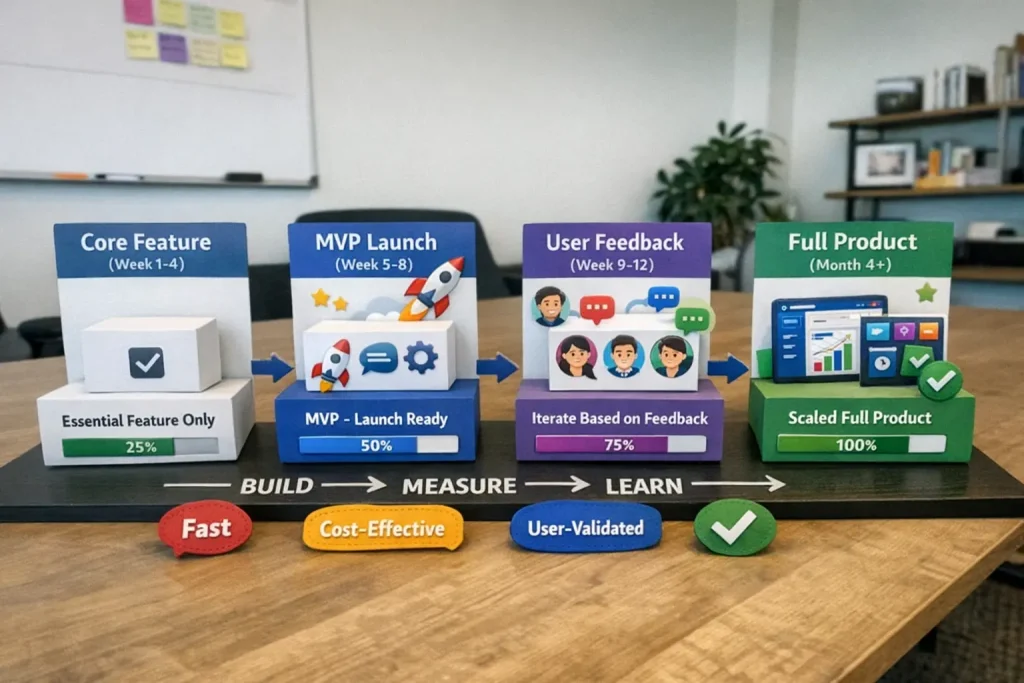
A minimum viable product is the simplest version of your software that gives value to early users. The main goal is to quickly test your main ideas without adding extra features.
When building an MVP, focus on the main features that solve your users’ biggest problem. Only include what you need to get feedback and see if your business model works. Add other features later, based on what real users want.
Typical MVP timeline: 2-4 months
Cost range: $1000-$5000
Success metrics: User engagement, feedback quality, and validation of core assumptions
Building an MVP helps you lower risk and save money. Rather than spending six months on features users may not need, you launch in about three months with the basics and let real users shape what comes next.
Web Applications
Web applications run in browsers and are the backbone of many startups. They work on any device without needing to be installed, so you can reach a wide audience fast.
Common startup use cases for web applications:
- SaaS platforms that provide services through monthly subscriptions
- Marketplace platforms connecting buyers and sellers
- Internal tools and dashboards for team collaboration
- Customer portals for account management and support
- Booking and scheduling systems
Popular frameworks for startup web apps are React.js for dynamic interfaces, Next.js for better SEO and server-side rendering, and Vue.js for simpler projects. The best choice depends on your team’s skills and what your project needs.
Mobile Applications (iOS & Android)
Mobile apps are needed when your users want access on the go, need features tied to their device, or want to use the app offline. Mobile apps can use things like the camera, GPS, and push notifications, which web apps can’t do.
You have three main options. Native development means building separate apps for iOS and Android, which gives the best performance. Cross-platform tools like React Native or Flutter let you write one codebase for both. Progressive web apps mix web and mobile features, but with fewer native functions.
When startups need mobile apps:
- Your core service requires location-based features.
- Users need offline access to features or data.
- Push notifications drive user engagement.
- Your target market primarily uses mobile devices.
- You need access to device hardware, such as a camera or sensors.
Most startups do best by starting with a web app first. You can add mobile apps later if users ask for them. This way, you save money and can test your idea before investing in more platforms.
SaaS Products
Software as a Service (SaaS) is one of the most popular startup models. SaaS products are delivered through the cloud and use subscription pricing. Building SaaS needs some special planning and design.
Key SaaS architecture considerations:
- Multi-tenancy design that serves multiple customers from a single application
- Data isolation ensures each customer’s data stays separate and secure.
- Subscription management and billing integration
- User authentication and role-based access control
- Usage tracking and analytics for pricing tiers
- API access for third-party integrations
SaaS development usually costs more at the start than basic web apps because of these extra needs. Still, the steady income from subscriptions makes SaaS very attractive to investors.
Enterprise Software Solutions
Some startups focus on selling to large businesses that need advanced management tools. Enterprise software can include CRM systems for managing customers, ERP solutions for planning resources, and business intelligence tools for analyzing data.
Building enterprise software means you need to understand complex business processes, connect with many other systems, and keep security strong. It takes longer to develop, but these customers usually pay more and stick around longer.
API and Backend Development
Not every startup needs an app for end users. Some focus on building APIs that other developers use in their own apps. Backend development is about creating the server-side systems that make apps work.
Modern backend architecture approaches:
- Microservices architecture breaks functionality into independent services.
- RESTful APIs using standard HTTP methods for data access
- GraphQL provides flexible data querying.
- Serverless computing eliminates server management overhead.
- Event-driven architecture enabling real-time processing
Strong API development becomes valuable when your startup plans to enable integrations, support mobile apps, or allow third-party developers to build on your platform.
E-commerce Platforms
If your startup sells products online, you’ll need e-commerce features. Choosing between custom development and platforms like Shopify or WooCommerce depends on what your business needs.
Choose custom e-commerce development when you need:
- Unique product configurations or customisation options
- Complex pricing logic, like dynamic pricing or auctions
- Special fulfilment workflows
- Integration with proprietary inventory systems
- Features that differentiate you from competitors
Custom e-commerce platforms can connect to payment gateways, handle secure payments, manage inventory, process orders, and let customers manage their accounts. This investment is worth it if your business needs features that standard platforms don’t offer. Planning an online store? Our eCommerce consulting services help optimize conversions and customer experience.
The Custom Software Development Process for Startups (Step-by-Step)
Knowing how the development process works helps you set realistic expectations, plan your budget, and work well with your team. Here’s how professionals take custom software from an idea to a finished product.
Step 1: Discovery and Requirement Analysis (Week 1-2)
Discovery is the first step to a successful project. Your team will talk with key people to learn about your goals and challenges. They’ll also study your market to spot opportunities and limits, and look at competitors to find areas where you can stand out.
Key activities during discovery:
- Stakeholder interviews with founders, key team members, and potential users
- Market research to validate demand and identify trends
- Competitor analysis to understand what works and what does not
- Feature prioritisation using frameworks like MoSCoW (Must have, Should have, Could have, Won’t have)
- Technical feasibility assessment to identify potential challenges
Deliverable: A detailed requirements document that covers the project’s scope, features, user types, and success measures. This document serves as your roadmap and main reference for decisions throughout the project.
Step 2: Product Strategy and Planning (Week 2-3)
Planning turns your requirements into a clear development plan. The team checks what’s technically possible, chooses the right technology based on your needs and budget, designs the system’s structure, and sets timelines and budgets.
Planning phase outputs:
- Technical feasibility study identifying risks and solutions
- Technology stack selection with justification for each choice
- System architecture design showing how components interact
- Detailed timeline with milestones and dependencies
- Budget breakdown by phase and component
- Resource allocation plan showing who works on what
Deliverable: A full project roadmap that guides the team from beginning to end. It covers timelines, budgets, who does what, and how to handle risks.
Step 3: UI/UX Design (Week 3-5)
Good design is what makes users stick with your software. Designers start with wireframes to show the basic layout, then build interactive prototypes you can try out. They map out how users move through the app and set up a design system with consistent colours, fonts, and elements.
Design process steps:
- Wireframing to establish structure and layout
- Interactive prototyping for user testing
- User journey mapping to optimise flows
- Visual design creates the final look and feel.
- Design system development for consistency
- Usability testing with real users
Deliverable: Interactive prototypes that show how your software will look and function. You can test these with real users before coding starts, which helps you avoid costly changes later.
Step 4: MVP Development (Week 6-12)
Development is where your designs become real software. Teams usually work in two-week sprints, building certain features each time. They meet daily to stay on track and solve issues fast, review code often to keep quality high, and show progress at the end of every sprint.
Development best practices:
- Sprint planning to define what gets built each cycle
- Daily standup meetings for coordination
- Code reviews to catch issues early
- Pair programming for complex features
- Continuous integration automating testing
- Regular demos showing progress to stakeholders
Deliverable: A working MVP with the main features ready for testing. It might not be perfect yet, but it’s good enough to get real feedback from users.
Step 5: Quality Assurance and Testing (Week 12-14)
Testing helps catch problems before your users see them. QA engineers check each part with unit tests, make sure everything works together with integration tests, run user acceptance tests with real people, look for security issues, and test how the software performs under different loads.
Types of testing performed:
- Unit testing, validating individual functions
- Integration testing, checking component interactions.
- User acceptance testing with real users
- Security testing identifies vulnerabilities
- Performance testing under load
- Cross-browser and device testing
- Regression testing after bug fixes
Quality assurance happens alongside development, not just at the end. By testing all the way through, you can catch and fix problems early, saving time and money.
Step 6: Deployment and Launch (Week 14-15)
Deployment is when your software goes live. DevOps engineers set up the production environment with strong security and monitoring, move over any existing data, start with a soft launch for a small group of users, and set up systems to watch for any issues.
Deployment checklist:
- Production environment setup with security hardening
- Database migration and optimisation
- SSL certificate installation
- CDN configuration for performance
- Monitoring and alerting setup
- Backup systems configuration
- Load testing in a production environment
- Soft launch with limited users
- Full launch rollout plan
Launching in phases helps lower risk. You begin with a small group of users, watch for any issues, fix them, and then slowly open up to more people.
Step 7: Post-Launch Support and Iteration (Ongoing)
The launch is only the start. After launch, the team fixes any bugs users find, works to make the software faster and more reliable, and adds new features based on feedback. User input helps guide ongoing improvements.
Post-launch activities:
- Bug fixing with priority-based triage
- Performance monitoring and optimisation
- User feedback collection and analysis
- Feature prioritisation based on data
- Security updates and patches
- Infrastructure scaling as needed
- Regular maintenance and updates
Expect to spend about 15-20% of your original development budget each year on updates and maintenance. This helps keep your software secure, fast, and ahead of the competition.
Technology Stack for Startup Software Development
The technology stack you choose will impact your software’s performance, how well it scales, how quickly you can develop it, and what it costs to maintain over time. Below are the main options and when to use each one.
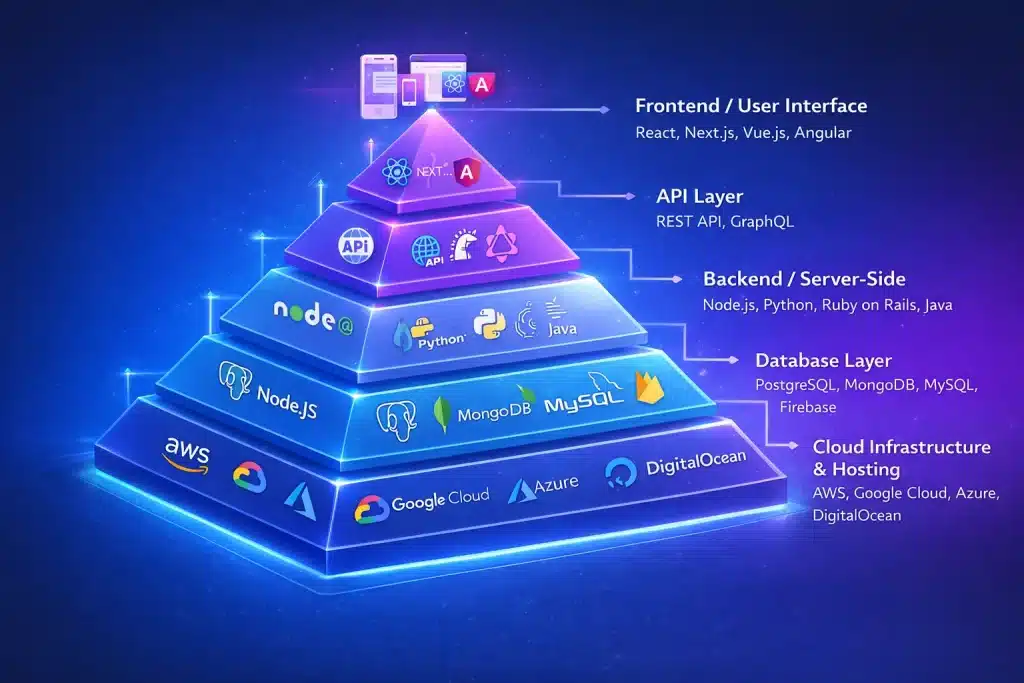
Frontend Technologies
React.js is a top choice for modern web apps. It delivers strong performance, has a large library ecosystem, and is backed by an active community. Choose React if you need dynamic, interactive interfaces that update often. Big companies such as Facebook, Netflix, and Airbnb use React.
Next.js builds on React and adds server-side rendering, which helps with SEO and faster first page loads. Pick Next.js if search engine visibility is important, such as for e-commerce or content-heavy sites. It also manages routing, API routes, and optimization for you.
Vue.js is a simpler option compared to React and is easier to learn. It’s a good fit for smaller teams or projects that don’t need all of React’s features. Vue has great documentation and can be adopted step by step. Choose Vue if you want to get started quickly.
Angular is a full-featured framework from Google. It’s best for enterprise apps with complex needs and big teams. Angular uses TypeScript for strong typing and comes with many built-in tools. Pick Angular if you want structure and consistency in your project.
Backend Technologies
Node.js lets you use JavaScript on the server. It’s great for real-time apps and APIs because it can handle many users at once. This makes it ideal for chat apps, streaming, and collaboration tools. Choose Node.js if you need speed and your team knows JavaScript.
Python, with frameworks like Django and Flask, is a strong choice for data-focused startups and machine learning projects. Django gives you a full set of tools, including authentication and admin panels. Flask is more flexible for smaller apps. Use Python if you work with data, AI, or need to build quickly.
Ruby on Rails is known for helping you build apps fast, thanks to its startup-friendly rules and built-in features. It focuses on convention over configuration. Pick Rails if getting to market quickly is more important than having the latest performance features.
Java and the Spring framework offer reliable, high-performance solutions for big, complex apps. Java is good for handling lots of users and complicated business needs. Use Java and Spring if you’re building enterprise software or need proven stability.
Mobile Development Frameworks
React Native lets you write your app in JavaScript and launch it on both iOS and Android. You can use your web development skills and share code across platforms. For most needs, performance is close to native apps. Choose React Native if you want to build for both platforms with one codebase.
Flutter is Google’s framework that uses the Dart language. It gives you great performance and attractive UI components right away. Flutter compiles to native code for both iOS and Android. Pick Flutter if you care most about design consistency and speed.
Native iOS (Swift) and Android (Kotlin) development means building separate apps for each platform. This gives you the best performance and access to the newest features. It costs more but offers the best user experience. Go native if your app needs the latest device features or top performance.
Database Solutions
PostgreSQL is a powerful open-source relational database. It can handle complex queries, supports JSON for flexibility, and keeps your data safe. Use PostgreSQL for most apps that need relational data.
MySQL is popular, reliable, and easy to find help for. It’s a good choice for web apps with simple data needs. MySQL performs well and is widely supported by hosting providers. Pick MySQL for simpler apps or when you want broad compatibility.
MongoDB is a NoSQL database that stores data as JSON-like documents, which makes it easy to change your data structure as you go. It’s a good fit if your data model changes often or if you need to scale out easily.
Firebase is Google’s real-time database with built-in authentication and hosting. It takes care of the backend for you, so you can focus on the frontend. Use Firebase for real-time apps like chat or collaboration tools, or if you want to spend less time on backend work.
Cloud Infrastructure
AWS (Amazon Web Services) is a leading cloud platform with services for almost any need. It offers computing, storage, databases, AI/ML, and more. AWS’s ecosystem covers nearly every requirement. Pick AWS if you want flexibility and lots of options.
Google Cloud Platform is strong in AI, machine learning, and data analytics. It offers great tools for machine learning, big data, and containers. Choose Google Cloud if AI is central to your product or you work with large amounts of data.
Microsoft Azure works best with Microsoft products and enterprise tools. It’s great for hybrid cloud setups and large business apps. Pick Azure if you already use Microsoft software or are building for enterprise clients.
DigitalOcean is a simple and affordable cloud hosting option for startups. It has clear pricing and is easy to manage. DigitalOcean gives you good performance at a lower cost than bigger providers. Choose DigitalOcean if you want basic cloud services without extra complexity. Learn about our cloud FinOps services to optimize your cloud spending and infrastructure.
DevOps and Deployment
Docker lets you package your app with everything it needs to run. This means your software works the same in development and production. Docker makes it easier to deploy and scale your app. Every modern app should use Docker.
Kubernetes helps you manage containers at scale by handling deployment, scaling, and operations automatically. It’s useful for complex apps with many services. Use Kubernetes if you need to manage lots of containers or want automatic scaling.
CI/CD pipelines automate testing and deployment. Tools like GitHub Actions, GitLab CI, or Jenkins run your tests and deploy code when everything passes. Set up CI/CD from the start to keep your code quality high and release faster.
The best technology stack for you depends on your needs, your team’s skills, your budget, and your timeline. Most startups do better with proven technologies that have strong communities, instead of always going after the newest trends.
Cost Optimisation Strategies
Start with MVP – Build only essential features first. Add capabilities based on user feedback. This approach reduces initial costs by 40-60% while validating your concept.
Be strategic about outsourcing. Keep your main skills in-house, but hire freelancers for tasks like logo design. For bigger projects, consider agencies while you slowly build your own team.
Use free, open-source libraries and frameworks. They offer reliable solutions without extra licensing costs. If you benefit from these tools, try to give back to the projects you use.
Choose cloud hosting to avoid buying expensive hardware upfront. You only pay for what you use, and costs grow as your business grows. Many cloud providers also offer credits for startups.
Agile development helps you avoid waste by building your product step by step. Getting regular feedback means you don’t spend time on features people don’t want. It’s also cheaper to make changes early on.
Build your software with parts that can be reused in different features. This can cut down the time it takes to add new features by 30-40%.
Create clear documentation from the start. It helps new developers get up to speed faster and keeps maintenance costs down.
Choosing the Right Software Development Methodology
Development methodology affects how your team works, how quickly you can adapt, and ultimately whether your project succeeds. Here are the main approaches and when each fits.
Agile Development (Recommended for Startups)
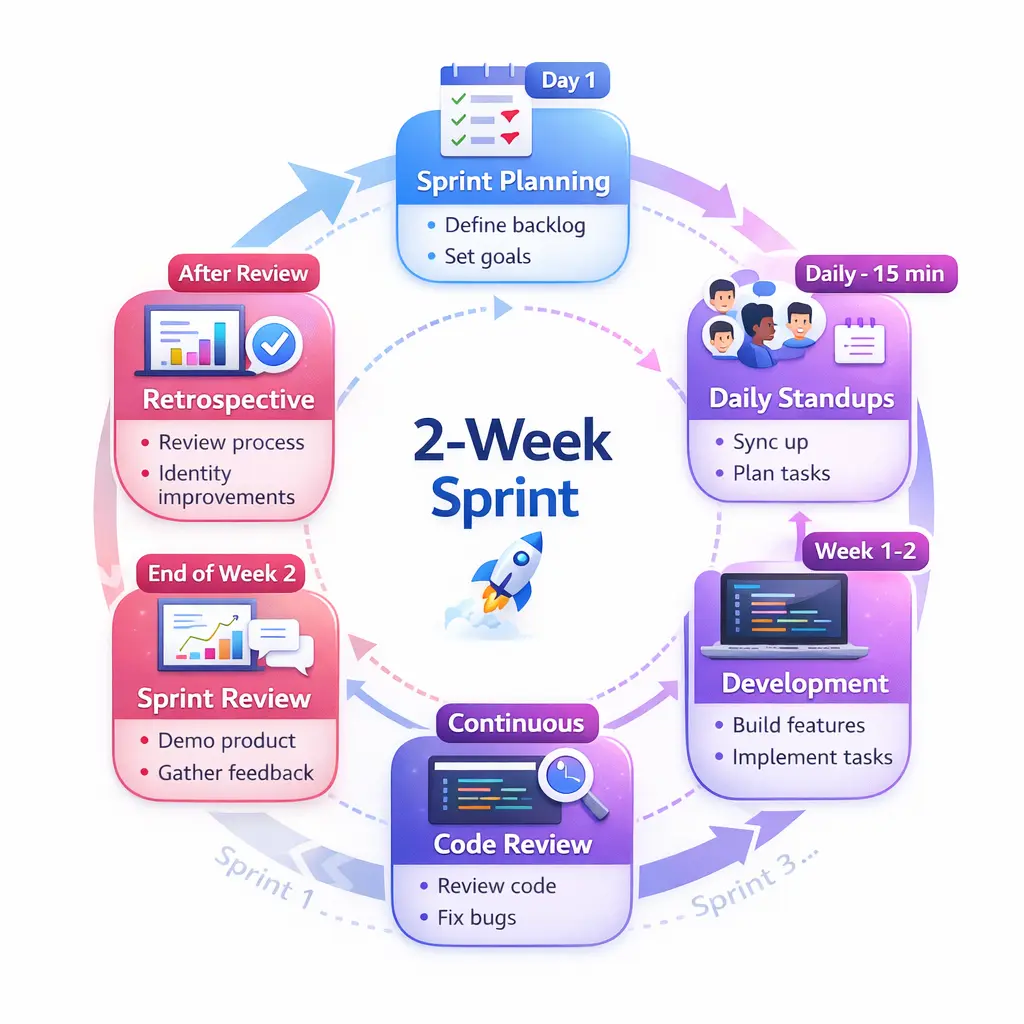
Agile is widely used in modern software development, especially by startups. It focuses on flexibility, quick iterations, and ongoing feedback. Teams work in short cycles called sprints, which usually last about two weeks.
Key Agile advantages for startups:
- Flexibility to change direction based on feedback
- Regular releases showing progress to stakeholders
- Continuous user feedback integration
- Early problem detection and resolution
- Better team collaboration and communication
- Reduced risk through incremental development
How Agile works:
Each sprint begins with planning, where the team picks which features to build. Developers work on these features during the sprint and meet daily to coordinate. At the end, the team shows the working software and discusses what went well and what could be better.
Best for: Startups with changing requirements, a need to adapt quickly, or projects where the final product is not fully defined from the beginning.
Scrum Framework
Scrum is a type of Agile method with clear roles and routines. The Product Owner manages requirements, the Scrum Master helps the process run smoothly, and the Development Team builds the product.
Scrum ceremonies:
- Daily standups (15 minutes) for coordination
- Sprint planning to select work.
- Sprint reviews demonstrating progress.
- Retrospectives improve the process.
Scrum gives teams structure, helping them stay organized and accountable. The clear roles make it easier to understand who is responsible for what and who makes decisions.
Best for: Teams that want the benefits of Agile with clear structure, medium to large projects, or organizations new to Agile that need extra guidance.
Lean Startup Methodology
Lean Startup is about quick experiments and learning what works. It stresses building a minimum viable product, measuring results, and learning from the data. The build-measure-learn cycle shapes every decision.
Lean principles:
- Build minimum viable products to test assumptions.
- Measure actual user behaviour and results.
- Learn from data and pivot when needed.
- Eliminate waste by building only what users want.
- Validate learning before scaling.
Best for: Early-stage startups testing their business model, new product development, or situations where there is a lot of uncertainty about product-market fit.
Waterfall (When It Makes Sense)
Waterfall uses a step-by-step process: requirements, design, development, testing, and deployment. Each phase must finish before the next one starts. Once development begins, making changes is hard and costly.
When Waterfall works:
- Requirements are completely defined and unlikely to change.
- Regulatory compliance requires extensive documentation upfront.
- Integration with complex legacy systems
- Fixed-price contracts with strict scope
- Teams with limited Agile experience
Limitations: The waterfall assumes you know exactly what you need before you start. For startups, this is rarely true. Customer needs can change, markets can shift, and new opportunities can arise. Waterfall’s strict process can become a problem.
Comparison and Recommendation
Most startups are better off using Agile or Lean methods. These approaches accept uncertainty and help teams learn quickly. They cut down on wasted effort by testing ideas early and make it easier to change direction when the data points to a better path.
A waterfall approach only makes sense when requirements are truly fixed, and you need extensive upfront documentation for compliance. Even in these cases, it’s worth considering hybrid methods that add some Agile flexibility to the Waterfall process.
How to Choose the Right Software Development Partner
Choosing a development partner is one of the most important decisions for your startup. The right partner will work closely with your team, while the wrong one can waste money, delay your launch, and lead to poor software.
In-House vs Outsourcing vs Hybrid Model
In-House Development
Pros: Complete control, strong alignment with business goals, easier communication, builds long-term capabilities, and protects intellectual property.
Cons: High salary and benefit costs, difficult recruitment in competitive markets, high office and equipment overhead, and slower to scale up or down.
Best for: Well-funded startups with long-term development needs, when core technology is the competitive advantage, or when building a product company.
Full Outsourcing
Pros: Lower costs, access to specialised skills, faster team assembly, no hiring overhead, easy to scale.
Cons: Less control, potential communication gaps, timezone challenges, quality varies by vendor, knowledge transfer issues.
Best for: MVP development, budget-conscious startups, specialised technical needs, or when speed matters more than control.
Hybrid Model
Pros: Balances cost and control, keeps strategic functions in-house while outsourcing capacity needs, provides flexibility, and builds internal capabilities gradually.
Cons: Coordination complexity, potential culture clashes, requires strong management, and split responsibilities can create gaps.
Best for: Growing startups building internal teams, projects mixing strategic and tactical work, or when optimising cost while maintaining control.
Key Criteria for Selecting a Development Company
Technical Expertise
Take a close look at their portfolio. Find projects that match yours in size and complexity. See which technologies they have used well. Make sure they have real expertise in the tools you need, not just basic knowledge.
If you can, ask to see real code samples. Good developers write clean, well-documented code. Messy code often means rushed work or bad habits, which can cause trouble down the road.
Look at their technology blog or GitHub activity. Companies that share knowledge often have stronger technical teams and keep up with best practices.
Industry Experience
Industry experience helps speed up development. Companies that know your field understand common needs, usual integrations, and any rules you must follow. They also ask better questions and make fewer guesses.
But don’t put industry experience above technical skill. Good developers can learn your business fast. Developers who lack skill will still make bad software, even if they know your industry.
Communication and Transparency
Clear communication helps avoid misunderstandings that can ruin projects. Pay attention to how they communicate from the start. Do they ask good questions? Do they explain things clearly? Do they listen to what you need?
Check their project management approach. They should use tools like Jira, Asana, or similar platforms that provide visibility into progress. Ask about reporting frequency and formats.
Talk about how they handle problems. Good teams admit challenges early and suggest solutions. Teams that hide issues or make excuses often cause bigger problems later.
Development Process
Learn about their development process. Agile is a good fit for most startups, but ask them to explain how they use it. Find out how long their sprints are, how they run review meetings, and how they handle changes.
Ask about their quality assurance steps. They should have QA engineers or use automated tests. If there’s no testing, the software will likely have bugs.
Check how they handle documentation. Good teams write down architecture choices, API details, and how to deploy the software. This makes it easier to share knowledge and maintain the product later.
Post-Launch Support
Ask what maintenance and support they offer. Software will need updates, bug fixes, and improvements over time. The team that built it usually knows the code best and can help quickly.
Find out what their support agreements cover. How fast do they fix urgent bugs? When are they available? What does support cost after the warranty ends?
Discuss knowledge transfer procedures. If you eventually build an internal team, you will need to transfer technical knowledge smoothly. Professional companies provide documentation, training, and transition support.
Pricing Structure
Compare fixed price and time-and-materials contracts. Fixed price gives you a set budget but needs very detailed plans upfront, and changes will cost more. Time-and-materials is more flexible but needs trust and close tracking.
Many projects work best with hybrid pricing. Fixed price for clearly defined phases, time and materials for exploration or changing requirements. This balances predictability with flexibility.
Choose milestone-based payments that match the value delivered. Don’t pay too much at the start. Paying as work is finished helps protect your investment.
Make sure billing is clear. For time-and-materials projects, you should get detailed timesheets showing who did what. Watch out for hidden costs or unclear invoices.
Red Flags to Avoid
Unrealistic promises: Watch out for companies that offer very low prices, super fast timelines, or guaranteed results. Good software takes time and costs what it should.
Lack of portfolio: If a company can’t show past work, they probably don’t have enough experience. Even new firms should have founder portfolios from earlier jobs.
Poor communication: If it’s hard to communicate during the sales process, it will only get worse later. Clear communication is a must.
No contract clarity: Good companies give you clear contracts that spell out what will be delivered, when, how you’ll pay, and who owns what. Vague contracts often lead to disputes.
Missing testimonials: Happy clients give references. If a company can’t show real client feedback, they may have unhappy customers.
Pressure tactics: If a company uses high-pressure sales, they care more about closing deals than building partnerships. Good firms let you take your time to decide.
Lack of questions: If they don’t ask detailed questions about your needs, they probably don’t understand them. Good developers always ask lots of questions.
No methodology: Companies without a clear process often deliver messy results. They should be able to explain their approach in simple terms.
Questions to Ask Before Hiring
About Their Experience:
- Can you show me three similar projects you have completed?
- What challenges did you face on those projects, and how did you solve them?
- Do you have experience with our specific technology requirements?
- What is your team’s expertise in our industry?
- Can you provide references from similar startups?
About The Process:
- What development methodology do you use and why?
- How do you handle changing requirements?
- What project management tools do you use?
- What deliverables will we receive and when?
About Quality:
- What is your testing process?
- How do you ensure code quality?
- What documentation do you provide?
- How do you handle bugs found after launch?
- What is your approach to security?
About Communication:
- Who will be our main point of contact?
- What timezone is your team in?
- How do you handle time-sensitive issues?
- What language do team members speak?
- How do you handle communication gaps?
About Business Terms:
- What is your pricing structure and what does it include?
- Who owns the code and intellectual property?
- What happens if we need to end the contract early?
- What support do you provide after launch?
- How do you handle scope changes?
Use their answers to build a decision matrix that scores each company on what matters most to you. This helps you avoid emotional choices and pick the best partner objectively.
Essential Features for Startup Software
Choosing the right features at the right time can make or break a startup. Below are the key features most startups need and when to add them.
User Authentication and Security
All applications need user authentication. Make sure users can create accounts, log in securely, and manage their profiles. Add these features from the start.
Core authentication features:
- Email and password registration
- Social login (Google, Facebook, Apple)
- Password reset functionality
- Email verification
- Two-factor authentication for sensitive applications
OAuth and SSO integration: As your company grows, enterprise customers may ask for single sign-on with their identity providers. Design your authentication system to support OAuth and SAML, even if you do not add them right away.
Role-based access control: Users need different permissions. Build a flexible system that supports roles like admin, manager, and user. Make it easy to add new roles as your needs change.
Data encryption: Encrypt sensitive data both when stored and when sent. Use SSL certificates for all traffic. Hash passwords with modern algorithms like bcrypt. Never store credit card data yourself; always use payment processors.
Scalable Architecture
The architecture you choose now affects your ability to scale later. Plan for growth, even when building your MVP.
Load balancing: Spread traffic across several servers to handle growth. Most cloud platforms offer easy-to-set-up load balancers. Set this up from the start, even if you only have one server at first.
Microservices readiness: You do not need microservices at first, but design your app so you can split it up later. Keep different parts separate and avoid connecting them too closely. This makes it easier to scale certain features when needed.
Database optimisation: Design your database schema for efficiency. Use indexes on frequently queried fields. Plan for read replicas to handle growing query load. Consider caching strategies for frequently accessed data.
Caching layers: Use caching to lower database load and speed up responses. Tools like Redis or Memcached store data that is used often. Content delivery networks keep static files close to your users.
Analytics and Reporting
Making decisions based on data helps startups succeed. Add analytics early to help guide your plans.
User behavior tracking: Watch how users interact with your software. See which features they use most, where they get stuck, and what leads to conversions. Tools like Mixpanel, Amplitude, or Google Analytics can help.
Performance metrics: Keep an eye on your app’s performance at all times. Track things like page load speed, API response times, error rates, and uptime. Set up alerts if any numbers go above your limits.
Business intelligence: Create dashboards that show important business numbers. Track things like new users, engagement, retention, and revenue. Make sure everyone on your team can see the data, not just technical staff.
Custom reporting: Different people need to see data in different ways. Build reports that users can customize. Let them export data to spreadsheets or business intelligence tools for deeper analysis.
Third-Party Integrations
No startup can do everything alone. Integrations let you use existing services instead of building every feature from scratch.
Payment gateways: Stripe, PayPal, and Square offer secure payment processing. They are tested, compliant, and affordable. Do not build your own payment system; the risks and compliance work are huge.
CRM systems: Connecting with Salesforce, HubSpot, or similar tools helps sales teams track leads and customers. APIs keep customer data in sync automatically.
Marketing tools: Link your app to email marketing platforms like Mailchimp or SendGrid. Add social media integration for sharing and login. Connect analytics tools for complete tracking.
Communication APIs: Use Twilio for SMS and voice features. SendGrid or Mailgun can send transactional emails. Integrate Slack for team notifications.
Admin Dashboard
Admin interfaces let you manage your app without needing to write code for every task.
Content management: Admins should be able to update content, manage pages, and change settings through user interfaces. Use a content management system or a custom admin panel for this.
User management: Let admins view all users, manage permissions, handle support, and check account health. Add search and filter tools to help manage more users as you grow.
System monitoring: Display system health, performance metrics, error logs, and usage statistics. Visibility into system status helps catch problems before users notice.
Configuration management: Store application settings in admin interfaces rather than in code. This lets you change behaviour without deploying new code. Feature flags enable gradual rollouts.
Mobile Responsiveness
Users access applications from phones, tablets, and computers. Your software must work well on all devices.
Responsive design: Design that adapts to different screen sizes automatically. Mobile-first design starts with mobile constraints, then expands to larger screens.
Touch-friendly interactions: Make buttons and interactive elements big enough for fingers, not just mouse clicks. Gestures like swipe and pinch should feel natural.
Progressive web app features: PWAs combine web and app capabilities. They work offline, load quickly, and can be installed on home screens. Consider PWA features for web applications.
Performance optimisation: Mobile users often have slower connections and less powerful devices. Optimise images, minimise code, and lazy-load content for mobile performance.
Latest Trends in Startup Software Development
Technology changes quickly. Knowing the latest trends helps you create software that stays competitive and uses new features.
AI and Machine Learning Integration
Artificial intelligence is now a practical tool for businesses, not just science fiction. Startups use AI to offer smarter and more personalized experiences.
Chatbots and virtual assistants: AI chatbots help with customer service, answer questions, and guide users through tasks. They are available all day and can handle many users at once. Newer chatbots use advanced language models to have more natural conversations that people enjoy.
Predictive analytics: Machine learning analyses patterns in user data to predict behaviour. E-commerce platforms predict which products users want. SaaS applications predict which customers are likely to churn. These predictions enable proactive interventions.
Personalisation engines: AI can tailor content, suggestions, and experiences for each person. Netflix suggests shows based on what you’ve watched, and Spotify makes custom playlists. Your startup can use similar personalisation.
Automated workflows: AI automates repetitive tasks that previously required human judgment. Document processing, data entry, scheduling, and categorisation all benefit from AI automation.
No-Code/Low-Code Platforms
No-code and low-code tools let people who aren’t developers build apps using visual tools. These tools speed up development, but they also have some limits.
When to use them with custom development: Try no-code tools for quick prototypes before spending time on custom code. They work well for internal tools and simple tasks.
Rapid prototyping benefits: No-code platforms help you test ideas fast, without needing to write code. You can build prototypes in days, not months, and check if your idea works before full development.
Limitations: No-code platforms struggle with complex needs, custom connections, or high performance. They can also lock you into a vendor and add monthly costs. Use them wisely, not as a full replacement for custom development.
Blockchain for Startups
Blockchain is useful for more than just cryptocurrency. Many startups use distributed ledger technology for different applications.
Use cases beyond crypto: Blockchain helps with supply chain tracking, digital identity checks, automated smart contracts, decentralized storage, and clear audit trails.
Smart contracts: Self-executing contracts enforce agreements automatically. They enable trusted transactions between parties without intermediaries. Real estate, legal services, and financial services explore smart contracts.
Decentralised applications (dApps) run on blockchain networks rather than centralised servers. They give users more control, transparency, and freedom from censorship. More dApps are appearing in gaming, social media, and finance.
Consider blockchain when: You need transparent, tamper-proof records. Multiple parties need to verify transactions. Trust between parties is limited. Intermediaries add high cost.
Cloud-Native Development
Today’s applications are built for the cloud from the start, not moved there later. Cloud-native design offers many benefits.
Serverless architecture: With Functions as a Service, you can run code without handling servers. You only pay for the time your code runs. Services like AWS Lambda, Google Cloud Functions, and Azure Functions make this possible. This method lowers costs and reduces work.
Container orchestration: Kubernetes helps manage apps in containers at large scale. It takes care of deploying, scaling, balancing loads, and recovering automatically. Containers also keep things consistent from development to production.
Edge computing: Processing happens closer to users, which means better performance and less delay. This is great for IoT, real-time tasks, and delivering content quickly.
API-First Development
APIs are now the main way products interact, with user interfaces built on top of them. This makes your product more flexible and ready for the future.
Headless architecture: The backend and frontend are fully separate. The backend gives APIs, and different frontends use them. This setup lets you support web, mobile, voice assistants, and new interfaces all from one backend.
Omnichannel experiences: Users interact through multiple channels—web, mobile, voice, chat, email. API-first design lets you provide consistent experiences across all channels.
Partner ecosystems: Strong APIs enable partners to build integrations. This extends your platform’s capabilities without internal development. Successful platforms like Stripe, Twilio, and Shopify built ecosystems through great APIs.
Cybersecurity Focus
Security threats grow more sophisticated. Modern applications need robust security from day one, not bolted on later.
Zero-trust architecture: Never trust, always verify. Users and services verify their identities for every request. Micro-segmentation limits damage from breaches. Zero-trust prevents many modern attack vectors.
Compliance requirements: Laws like GDPR in Europe and CCPA in California require data protection. Healthcare must follow HIPAA, and finance needs PCI-DSS. Make sure your system meets these rules from the beginning.
Regular security audits: Professional penetration testing finds vulnerabilities before attackers do. Schedule security audits every 6-12 months. Fix discovered issues quickly. Automated security scanning continuously catches common problems.
Bug bounty programs: These programs pay security researchers who find problems in your app. Services like HackerOne and Bugcrowd let experts test your software. This can catch issues that regular testing might miss.
Common Mistakes Startups Make in Software Development
Learning from others’ mistakes saves time and money. Here are the most common errors startups make and how to avoid them.
Mistake 1: Building Too Many Features at Once
The Problem: Startups try to build comprehensive products with dozens of features before launch. They assume users need everything. Development takes 12-18 months. By launch, the market has changed, money has run out, or competitors have seized the opportunity.
The Solution: Build a minimum viable product with 3-5 core features that solve the main problem. Launch quickly, gather feedback, and iterate based on real user data. This approach reduces initial costs by 60% and gets you to market in 3-4 months, rather than a year.
Focus on one user workflow done well rather than ten workflows done poorly. You can always add features. You cannot get back time wasted building the wrong things.
Mistake 2: Choosing Technology Based on Trends
The Problem: Startups chase the latest frameworks, languages, or architecture patterns because they seem cool or cutting-edge. They ignore whether those technologies fit their needs. Trendy tech often lacks mature tooling, documentation, and developer availability.
The Solution: Choose proven, stable technologies that match your requirements and your team’s skills. The boring, mature solution usually works better than the exciting new one. React, Python, and PostgreSQL are popular because they work well, not because they are trendy.
Evaluate technologies based on your specific needs: Does it solve your problem? Can you hire developers who know it? Is documentation comprehensive? Does it have long-term support? Will it scale to your needs?
Mistake 3: Ignoring Scalability
The Problem: Startups build for current needs without considering growth. They make architectural decisions that work for 100 users but break at 10,000. Rebuilding costs more than building correctly in the first place.
The Solution: Design a scalable architecture from day one, even if you do not implement all scaling features initially. Use a cloud infrastructure that scales horizontally—design databases for optimisation. Write clean, maintainable code. These practices cost barely more upfront but enable growth without rebuilding.
Consider tomorrow’s needs in today’s design decisions. You do not need to handle a million users on day one, but your architecture should make reaching a million possible without fundamental changes.
Mistake 4: Poor Communication with the Development Team
The Problem: Startups provide vague requirements, rarely check progress, and expect perfect results. They assume developers read minds. Misunderstandings lead to the wrong features being built. Problems hide until late in development when fixing them costs the most.
The Solution: Maintain regular communication with your development team. Schedule weekly or biweekly review meetings. Provide clear, detailed requirements. Ask questions when something is unclear. Review progress frequently.
Use collaboration tools that provide visibility into development. Track progress in project management software. Test features as they become available, not just at the end. Early feedback prevents expensive late changes.
Mistake 5: Skipping the Testing Phase
The Problem: Rushing to launch, startups skip thorough testing. They assume developers tested as they coded. Users discover bugs immediately after launch. Reputation suffers. Fixing live bugs costs more and causes more user disruption than proper testing.
The Solution: Integrate quality assurance throughout development, not just at the end. Employ dedicated QA engineers or implement automated testing. Test every feature as it completes. Conduct comprehensive testing before launch, covering functionality, security, performance, and usability.
Remember that the cost of fixing bugs increases exponentially over time. Bugs found during development cost little to fix. Bugs found by users cost 100 times more to fix and damage your reputation.
Mistake 6: No Post-Launch Strategy
The Problem: Startups focus entirely on launch without planning what comes after. They assume the work ends when the software goes live. Users report bugs, but no one is available to fix them. Feature requests accumulate with no plan for implementation.
The Solution: Plan post-launch support before launching—budget 15-20% of initial development cost annually for maintenance, updates, and improvements. Establish a bug fixing process with clear priorities and response times.
Create a product roadmap for the next 6-12 months—Prioritise new features based on user feedback and business goals. Maintain a relationship with your development team for ongoing work.
Mistake 7: Underestimating Timeline and Budget
The Problem: Startups budget for best-case scenarios. They assume everything will go perfectly, with no surprises, changes, or challenges. Real projects exceed estimates. Money runs out before completion. Quality suffers as corners are cut to finish within budget.
The Solution: Add a 20-30% buffer to time and budget estimates. Software development always takes longer than expected. Requirements change. Problems arise. Extra time and money protect against these realities.
Use milestone-based payments and iterative development. If the budget becomes tight, you can launch with fewer features rather than incomplete development. Prioritise ruthlessly to ensure core features get completed first.
Success Stories: Startups That Scaled with Custom Software
These real-life examples show how custom software can help startups succeed. The following three companies gained an edge by building solutions designed just for them.
Case Study 1: FinTech Startup – FastLoan
The Challenge:
FastLoan set out to change small business lending by approving loans in just minutes, not days. Traditional lenders took 5 to 10 days to process applications, which left business owners waiting for the funds they needed.
Off-the-shelf lending platforms could not support FastLoan’s unique approval algorithm, which combined traditional credit scoring with alternative data sources such as social media presence, online reviews, and cash flow patterns.
The Solution:
FastLoan spent $80,000 over four months to develop custom software. They created:
- Custom loan application processing that gathered data from multiple sources automatically
- Proprietary risk assessment algorithm using machine learning
- Automated document verification using OCR technology
- Real-time bank account integration for cash flow analysis
- Mobile-first application experience
- Integration with multiple funding sources
The Results:
Within six months of launch:
- Processing time reduced from 5 days to 8 minutes, on average.
- Approval rates increased by 40% with the use of alternative data.
- Customer acquisition cost dropped 60% through word-of-mouth referrals.
- Processed $12 million in loans
- Attracted $2 million in Series A funding
- Custom algorithm became their primary competitive advantage.
The custom software cost $80,000 upfront, but it made growth possible in ways generic platforms could not. Investors pointed to the technology as a main reason for their support.
Case Study 2: HealthTech Startup – CareConnect
The Challenge:
CareConnect wanted to link patients with specialized healthcare providers for online consultations. They also needed to follow HIPAA rules and offer smooth video calls.
Other telemedicine platforms charged per call, which would have made CareConnect’s business model too expensive. They also did not offer the customization CareConnect needed for its focus on specialties.
The Solution:
CareConnect invested $120,000 over six months to build their own telehealth software:
- HIPAA-compliant video conferencing
- Electronic health record integration
- Speciality-specific intake forms
- Insurance verification and billing integration
- Provider scheduling with speciality matching
- Prescription writing and sending to pharmacies
- Secure messaging between patients and providers
- Mobile apps for iOS and Android
The Results:
After 12 months:
- 15,000 patients completed consultations
- 800 specialised providers joined the platform
- 92% patient satisfaction score
- $3.2 million in revenue
- Secured $5 million Series A led by a healthcare-focused VC
- Gross margins of 68% compared to 30-40% with third-party platforms
- Expanded to 12 medical specialities
The custom platform costs more at first, but it removes per-call fees that would have added up to over $400,000 in the first year. Having full control, let CareConnect add features that set them apart from competitors.
Case Study 3: E-commerce Startup – CustomFit
The Challenge:
CustomFit sold personalized vitamin supplements based on health assessments. Their customization process was complex because each customer got a unique formula based on their health goals, needs, and preferences.
Standard e-commerce platforms like Shopify could not support the flexible product setup, subscription management, and manufacturing links that CustomFit needed.
The Solution:
CustomFit spent $95,000 to build custom e-commerce software:
- Interactive health assessment generating personalised recommendations.
- Dynamic pricing based on selected vitamins and quantities
- Subscription management with flexible schedules
- Direct integration with the manufacturing partner’s systems
- Automated reorder predictions based on usage patterns
- Nutritionist consultation portal
- Referral program with custom reward tiers
- Advanced analytics tracking, which formulations performed best
The Results:
Within 18 months:
- 25,000 active subscribers
- Average customer lifetime value of $840
- 78% subscription retention rate
- $18 million annual recurring revenue
- Raised $8 million Series B
- Launched in 3 additional countries
- Manufacturing efficiency improved 45% through direct system integration.
The custom platform cost $95,000 up front and $15,000 a year to maintain. Standard platforms would have charged $35,000 to $50,000 a year for fewer features. The custom solution paid for itself in two years and made growth possible that generic platforms could not support.
Maintaining and Scaling Your Custom Software
Launching your software is just the start. To succeed over time, you need to keep maintaining and scaling it with a clear plan.
Regular Updates and Patches
To keep your software secure, useful, and ahead of the competition, you need to monitor it regularly. If you ignore it, updates, new security risks, and changing user needs will cause it to fall behind.
Security updates: Operating systems, frameworks, libraries, and other dependencies often release security patches. Apply these updates quickly to stay protected from known threats. Make sure to deploy critical patches within 48 hours.
Feature enhancements: Add new features in response to user requests and market needs. Focus on changes that improve the experience, keep users coming back, or open new revenue streams. Roll out features in small steps instead of all at once.
Bug fixes: After launch, users will find problems. Use a bug-tracking system to sort issues by severity. Fix the most urgent bugs right away, handle high-priority ones within a week, and address minor bugs during regular updates.
Dependency updates: The libraries and frameworks you use will receive updates that can boost performance, add features, or fix bugs. Update these regularly, but always test thoroughly before deploying changes to production.
Performance Monitoring
You need to measure your system to identify areas for improvement. Good monitoring helps you see how healthy your system is and what users experience.
Key Performance Indicators to track:
- Response time for pages and API endpoints
- Error rates across different features
- Database query performance
- Server CPU and memory utilization
- Network latency and bandwidth usage
- User session duration and engagement
- Feature usage and adoption rates
Monitoring tools: Use tools like New Relic, Datadog, or Application Insights to get real-time data on how your system is performing. Create dashboards that let you quickly see the most important metrics.
Alert systems: Set up alerts when your metrics exceed certain thresholds. This way, you’ll know right away if error rates jump, things slow down, or services stop working. Fast alerts help you fix problems before they affect many users.
Regular performance reviews: Review your performance data every month. Look for patterns, catch problems early, and decide what to improve first. Share what you find with your whole team.
User Feedback Integration
User feedback is more helpful for product development than guessing. Establish a clear process for collecting and using feedback.
Feedback loops: Use different ways to get feedback. In-app surveys reach users while they’re using your product. Email surveys can reach more people. Interviews give you detailed insights, and support tickets show where users struggle.
A/B testing: Try out changes with small groups of users before rolling them out to everyone. Compare different versions of features, designs, or workflows. Use the results to make data-driven decisions, not just opinions.
Feature prioritisation: Use frameworks like RICE or MoSCoW to sort feedback and decide what to build next. Weigh users’ wants against your business goals and technical constraints.
Close the loop: Follow up with users who give feedback. Tell them you listened and explain how their input shaped your decisions. This helps build loyalty and keeps feedback coming.
Technical Debt Management
Technical debt builds up when teams take shortcuts or make quick decisions. Just like with money, you need to pay it off regularly by refactoring and making improvements.
Code refactoring: Regularly clean up your code to make it clearer, faster, and easier to maintain, without changing its behaviour. Set aside 15-20% of your development time for this.
Documentation updates: Keep your documentation up to date as your system changes. Old docs can confuse developers and slow things down. Update them whenever you make a big change.
Architecture evolution: As your needs change and your system grows, you’ll need to adjust your architecture. Plan any migrations carefully and test thoroughly. Consider using microservices if some parts need to scale independently.
Testing debt: Keep increasing your test coverage. Add automated tests for new features and for older ones as you update them. Try to reach about 80% code coverage.
Scaling Strategies
Growth is a positive sign, but it can also create new challenges. Plan how you’ll scale before you actually need to.
Horizontal scaling: Spread the load by adding more servers. Cloud platforms make this easy. Build your app so it can run on several servers right from the start.
Database scaling: Use read replicas to handle increased query load. Split up data if tables get too big. For high-volume needs, consider NoSQL databases. Cache data that gets used a lot.
Content delivery: Use CDNs to deliver static files from servers near your users. This lowers the load on your main servers and speeds things up for everyone.
Async processing: Shift time-consuming tasks to background jobs. This way, users don’t have to wait for things like emails, reports, or data processing. Use queue systems like RabbitMQ or Redis to handle these jobs.
Microservices migration: Sometimes it makes sense to break a large app into smaller services. These can scale and deploy independently, letting teams focus on different parts. Only switch to microservices if the benefits clearly outweigh the added complexity.
Getting Started with Custom Software Development
If you are ready to start custom software development, these steps will help you get off to a strong beginning.
Step 1: Define Your Vision and Goals
Having a clear vision is important for successful development. Set your goals and understand why they matter.
Business objectives checklist:
- What problem does your software solve?
- Who experiences this problem most acutely?
- How do they currently solve it?
- What makes your solution better?
- What business model will sustain your startup?
- What are your revenue goals for years 1-3?
- How will you measure success?
Figure out who your target users are by making detailed user profiles. Include things like age, habits, challenges, goals, and how comfortable they are with technology. This helps you build features people actually want.
Write a simple vision statement that explains what you want your software to be in two or three years. Use it to help make decisions when you are unsure about priorities.
Step 2: Research and Shortlist Development Partners
Choosing the right development partner takes time, but it pays off in the long run.
Selection criteria:
- Technical expertise in your required stack
- Experience with projects of similar scope
- Strong communication and responsiveness
- Transparent development process
- Reasonable pricing for your budget
- Positive client testimonials
- Cultural fit with your team
Keep track of possible partners in a spreadsheet. Score them based on your criteria, and add notes from your talks and links to their work.
Talk to at least three to five companies before you decide. More interviews give you a better sense of quality, price, and how each company works. Take your time to make the right choice.
Step 3: Request Proposals and Estimates
Ask each company for a detailed proposal. This makes it easier to compare your options and see what each team will deliver.
RFP essential elements:
- Detailed project description and goals
- Required features and functionality
- Technical requirements and preferences
- Timeline expectations and constraints
- Budget range (provide an accurate estimate)
- Delivery expectations
- Support requirements
- Success criteria
Ask every company for the same information so you can compare them fairly. Request that they break down their pricing by project phase or feature.
Look at each proposal for both the technical plan and the price. The cheapest option is not always the best. Focus on companies that really understand what you need.
Step 4: Start with the Discovery Phase
Start with a discovery phase before you commit to full development. This step lowers your risk and makes sure everyone is on the same page before you invest a lot.
Discovery phase benefits:
- Validates requirements and identifies gaps.
- Uncovers technical challenges early
- Establishes a working relationship with minimal commitment
- Produces detailed specifications and estimates
- Creates a shared understanding of goals
Set aside $3,000 to $10,000 for the discovery phase, depending on how complex your project is. Spending this now can help you avoid expensive mistakes later.
Step 5: Plan Your MVP
Work on a minimum viable product that lets you test your main ideas, instead of trying to build every feature right away.
Feature prioritisation framework:
List every feature you want. For each, answer:
- Is this essential to solve the core problem?
- Could we launch without this?
- Can we add this in version 2?
- What assumptions does this validate?
Put any features you do not need right away on a version 2 list. Keep your MVP focused on just the features that give value and prove your idea works.
Be ready to make changes as you go. Your MVP will not be perfect and will have some limits, and that is fine. Launch it, learn from users, and keep improving.
Custom software development transforms startups from ideas into scalable businesses. It provides competitive advantages, perfect-fit solutions, and foundation for growth.
Whether you need a minimum viable product to validate your concept or a complete platform to scale your business, custom software development offers the flexibility and control to succeed.
The startups that thrive in 2026 and beyond will be those that invest in technology that scales with their ambitions. Off-the-shelf solutions may seem easier initially, but custom development positions you for long-term success.
Ready to start your custom software development journey?
Take the first step today. Define your vision, research partners, and begin the discovery process. Your future success starts with the decisions you make right now.
Ready to build your custom software solution? Contact our team for a free consultation and project estimate. We’ll help you choose the right technology stack and development approach for your startup’s success.
What is the difference between MVP and full product?
An MVP has just the basic features needed to solve the main problem and test your business idea. It puts function before looks, uses simple design, supports one or two main user tasks, and often relies on manual steps instead of automation. The main goal is to learn, not to be perfect.
A full product offers a wide range of features for different situations, has a polished design and user experience, runs smoothly and can handle growth, includes strong security, goes through thorough testing, has complete documentation, and provides ongoing support. Full products are made for larger audiences and can deal with special cases that MVPs do not address.
Most successful startups start with an MVP, collect feedback from users, check if there is a real market, and then build out a full product using real data instead of guesses. This way, they avoid spending time on features people do not want and can launch faster.
Can I add features after the initial launch?
Adding features after launch is common and a good idea. Software development works best as an ongoing process, not a one-time event. Developing new features after launch lets you use real user feedback, focus on what matters most, manage costs over time, and keep your product competitive.
Most development contracts offer support and options for ongoing work after launch. It’s smart to set aside 15-20% of your initial budget each year for maintenance, updates, and new features. Use analytics and feedback from users to decide what to add next. Agile methods help you improve your product step by step with regular updates.
It’s important to keep working with your development team or have in-house developers who know your code well. If you bring in new developers, they will need time to learn the code before they can work quickly and effectively.
How do I protect my software idea?
There are a few ways to protect your intellectual property. Start by using non-disclosure agreements (NDAs) when you talk about your idea with developers, investors, or partners. Most professional development companies are willing to sign NDAs. Next, make sure your development contract clearly states that you own all code and intellectual property created. Put this in writing. If you have a unique algorithm or process, you might look into provisional patents, but keep in mind that software patents can be hard and costly to get.
You should also trademark your company and product names to protect your brand. Copyright your original content, designs, and documentation. For extra protection, treat important code and proprietary algorithms as trade secrets by limiting who can access them.
It’s important to remember that ideas by themselves aren’t worth much. What really counts is how well you execute. Most successful startups have competitors with similar ideas. Your real advantage comes from how well you build your product, how quickly you launch, and the relationships you build with customers—not from keeping your idea secret. Put your main effort into creating great software instead of worrying too much about secrecy.
Do I own the code after development?
Make sure your development contract clearly defines who owns the code. Most standard agreements say you own all code, IP, and assets once you make the final payment. This is known as “work for hire.” The contract should also say that developers give you all rights and cannot use your specific code for other clients.
However, developers usually keep ownership of their own tools, frameworks, and libraries that they use in your project. Your code may use these tools, but you do not own them. This is standard practice. If your project uses open-source libraries, you do not own them either, but you have the right to use them.
Read the IP clauses carefully before you sign anything. Watch out for contracts that let the company reuse your code, do not clearly transfer ownership to you, claim rights to your business idea or data, or are unclear about IP rights. Good development companies will include clear IP transfer terms and will not object to them.
What is agile software development?
Agile is a way of developing software that focuses on flexibility, teamwork, and making progress in small steps. Instead of planning everything at the start and building it all at once, Agile divides work into short cycles called sprints, which usually last one or two weeks. At the end of each sprint, you have working software that can be tested and reviewed.
Some key Agile principles are delivering working software often, being open to changing requirements, having daily collaboration between business and developers, building projects with motivated people, measuring progress by working software, and keeping a steady, manageable pace.
For startups, Agile offers flexibility to adjust as you learn, regular updates on progress, early spotting of problems, ongoing user feedback, and lower risk by building in small steps. Agile is a good fit when you don’t know all the requirements at the start, the market changes quickly, or you want to launch fast and improve as you go.
In contrast, the Waterfall method involves planning everything at the beginning, building the whole product, and testing only at the end. Waterfall can work when requirements are clear and unlikely to change, but it usually doesn’t suit the fast-changing needs of startups.
Should I build for web or mobile first?
Most startups are better off starting with a web application, unless their main features depend on mobile-only functions. Web apps can reach more people, cost less to develop, launch faster, and are easier to update since users don’t need to download anything new.
Choose mobile first if your main features need device hardware like the camera or GPS, if offline use is crucial, if push notifications are key, or if your users and competitors are mostly on mobile. Still, think about making a mobile-friendly web app or a progressive web app before building native apps.
Many top startups started with a web app and added mobile apps later, once there was demand. Instagram, Pinterest, and Airbnb all took this path. This way, you can test your idea before spending a lot on building for multiple platforms. You can always add mobile apps after you know people want your product.
What is the best technology stack for my startup?
The right technology stack depends on your needs, your team’s skills, your timeline, and your budget. There isn’t one solution that fits everyone. Some popular choices for startups are React.js with Node.js and PostgreSQL for web apps, React Native with Node.js and MongoDB for mobile-focused products, Python with Django and PostgreSQL for data-driven projects, and Next.js with Serverless and Firebase for quick launches.
When deciding, think about what your team already knows, what your app needs to do, how fast you want to launch, your budget, how much performance matters, what integrations you need, and how you plan to scale.
For most startups, it’s better to use mature, well-documented technologies instead of the newest options. Popular tools usually have more developers, better documentation, more libraries, and proven scalability. Try not to pick something just because it’s trendy.
Talk to experienced developers about your situation. The best choice depends on your specific needs and goals.
How do I scale my software as I grow?
Scaling requires both technical and organizational approaches. On the technical side, you can add more servers, optimize your database with indexing, caching, and read replicas, use content delivery networks for static files, handle time-consuming tasks asynchronously, and consider microservices if they fit your needs.
For organizational scaling, grow your development team step by step, set clear coding standards, use thorough testing, document your architecture and decisions, and rely on project management tools to keep everyone coordinated.
Think about scaling strategies early. Building a scalable system from the start costs about the same as a non-scalable one, but it saves you from costly rebuilds later. Choose cloud services that can scale on their own, and keep an eye on performance metrics to spot problems before users notice them.
Most scaling problems come from databases and backend processing, not the frontend. Put your optimization efforts where they will have the biggest impact. Not everything needs to scale, so use monitoring data to find your real bottlenecks.
How do I choose between custom and off-the-shelf?
When deciding, consider the total cost over 3 to 5 years, how well off-the-shelf options fit your needs, whether the software gives you a competitive edge, if it can scale as your business grows, how much customization you need, what systems it must connect with, and how quickly you need to launch.
Choose custom development if you have needs that off-the-shelf software cannot meet, if the software gives you a competitive advantage, if you expect to scale up a lot, or if custom solutions are cheaper in the long run. Go with off-the-shelf software if you need to launch quickly, your needs are standard, your budget is tight, or the software is for non-core tasks.
Many startups use both approaches, choosing off-the-shelf software for support functions and custom solutions for their main competitive features. This helps balance speed, cost, and the need to stand out.
What security measures should be included?
Key security steps are using SSL/TLS to encrypt data in transit, hashing passwords with modern tools like bcrypt, setting up role-based access control, validating inputs to block injection attacks, and making sure authentication and authorization protect sensitive actions. Also, keep systems updated, design APIs securely with proper authentication, and encrypt sensitive data when stored.
For sensitive applications, add two-factor authentication, monitor and log security events, run regular penetration tests, use DDoS protection, scan for vulnerabilities, and set up backup and disaster recovery plans. Make sure you also follow any required regulations, such as HIPAA, PCI-DSS, or GDPR.
Security is essential. Include it in your application from the start. The cost of a security breach, both financially and to your reputation, is much higher than doing things right from the beginning. Choose developers who make security a priority and follow best practices.
What is the role of UI/UX in startup success?
User interface (UI) and user experience (UX) design play a big role in whether people enjoy your software or stop using it. Good design makes software easy, efficient, and pleasant to use. Even if your features are strong, poor design can frustrate users.
UI and UX affect many areas: professional design helps you earn trust and attract users, easy onboarding turns signups into active users, a good experience keeps people coming back, happy users recommend your software, and a great experience sets you apart from competitors.
Set aside 15-25% of your development budget for professional design. This should cover user research, wireframing, prototyping, visual design, and usability testing. Try out your designs with real users before you start building. It’s much cheaper to make changes before any code is written.
Some startups try to save money by spending less on design, but this often leads to problems. People form opinions about software in just a few seconds. If the design is poor, it creates a bad first impression that’s hard to fix, even if your features are great.
How do I measure ROI of custom software?
To measure return on investment, track both costs and benefits. Costs cover the initial development, ongoing maintenance and hosting, adding new features, and the time staff spend managing the software.
Benefits can include new revenue from the software, savings from automation, time saved for employees, fewer errors, a stronger competitive position, and the software’s own asset value.
You can calculate basic ROI with (Total Benefits – Total Costs) divided by Total Costs. For instance, if software costs $60,000 and brings in $200,000 in revenue over three years, the ROI is 233%. Remember to also think about less measurable benefits, such as better competitive positioning, higher customer satisfaction, and more strategic flexibility.
Most custom software investments pay for themselves in 18 to 36 months, thanks to higher revenue, lower costs, and competitive gains. Track your key metrics before and after you launch to measure the real impact.
Related Services at Tecveq
Looking to bring your startup idea to life? Explore our specialized services:
- Web Development – Custom web apps and SaaS platforms
- Mobile App Development – iOS & Android applications
- AI-Powered Solutions – Intelligent features and automation
- Cloud Services – Scalable infrastructure and support
- Digital Marketing – SEO and growth strategies