What Are Custom ERP Software Development Services and Who Needs Them?
Custom ERP software development services are exactly what the name says we design and build enterprise resource planning systems from the ground up, built specifically around how your business operates. Not generic platforms like SAP or Microsoft Dynamics that require you to restructure your workflows to match their templates. We build the system around you instead.

Here’s what that looks like on the ground. Finance stops spending 14 hours pulling data from four different systems to close the books every month. Warehouse inventory updates in real time the moment a sale happens no more relying on spreadsheets that were already outdated the day someone created them.
And your operations manager finally has a dashboard showing what’s actually happening across departments right now, not reports that were compiled two weeks ago from data that was already wrong.
We’ve built custom ERP systems for manufacturers whose production scheduling requirements are too complex for any off-the-shelf platform to handle properly. For distributors managing vendor relationships across five, ten, or fifteen warehouses who can’t get the inventory visibility they need from generic enterprise resource planning software.
For healthcare companies that need HIPAA-compliant patient data integration built into every module from the start. And for growing businesses that have already spent $80,000 trying to customize SAP or Oracle and are still fighting the system every single day
You’re in the right place if your business has outgrown spreadsheets and disconnected tools. If your workflows are different enough from standard business templates that forcing them into generic software creates more problems than it solves. If you need industry-specific compliance FDA lot tracking, SOX financial controls, HIPAA patient data requirements that most platforms handle poorly or expensively.
Or if you’ve already gotten quotes for off-the-shelf ERP system customization and discovered you’d be spending nearly custom development prices for a system you still don’t own or fully control
We’ve completed over 200 ERP implementations in the past 12 years for companies ranging from $10 million manufacturing operations to $500 million distribution businesses. Most of our clients come to us after getting burned by providers who promise unrealistic timelines or disappear after launch. We position ourselves as an ERP development partner rather than simply a vendor, staying involved from discovery and implementation through ongoing support and future system improvements.
Most of our clients reach us after spending months sometimes years and significant budget trying to make SAP or Dynamics work for operations those platforms weren’t designed to handle. What they needed wasn’t more customization of a platform that wasn’t built for them. They needed business management software designed around how their business actually runs.
If you’re running a company with 50 to 500 employees and your current systems genuinely can’t keep pace with your growth, contact us for a free consultation. If your team is spending more time working around the software than actually using it to run the business that’s the exact problem custom ERP development exists to solve.
Not every business needs custom development, and we’ll be the first to tell you that. Sometimes NetSuite or Microsoft Dynamics genuinely is the right answer for where your company is right now and we’ll tell you honestly in our first conversation rather than push you toward a solution that doesn’t fit.
But when your operations are genuinely complex, your industry has specific compliance requirements, or you’re scaling past what standard platforms were built to handle, custom ERP development stops being optional.
That’s what we build. Custom ERP software designed around how your business actually works not the other way around.
Is Custom ERP Right for Your Business? (When It Makes Sense and When It Doesn’t)
Most ERP development companies won’t say this, but custom development isn’t always the right answer. We’ll tell you honestly in our first conversation which path actually fits your situation, even when the answer costs us the project
Sometimes buying NetSuite or Microsoft Dynamics makes more sense for your business right now. And we’ll tell you honestly which path fits your situation even if it means you don’t hire us today.
Here’s the framework we use when a company calls us asking whether they should build custom or buy off-the-shelf.
When Off-the-Shelf ERP Makes More Sense
Choose SAP, Oracle ERP, Microsoft Dynamics, or NetSuite if your budget is under $50,000 total. Custom ERP development starts making strong financial sense around $75,000 and up. In that $50,000 to $75,000 range, the decision comes down to how unique your workflows are if you can adapt your processes to standard templates, off-the-shelf is fine; if you can’t, you’ll end up spending more on platform customization than you expected anyway.
Go with off-the-shelf if you need the system running in under three months. Custom development for even a small ERP takes four to six months minimum, and that’s not a timeline we can compress without cutting corners we won’t cut. If speed matters more than fit right now, a pre-built platform gets you operational faster — and we’ll say that even though it means you don’t hire us today.
Team under 25 users with standard workflows? ERP software for small business operations usually works fine with NetSuite or Dynamics configured to industry standard settings. Small teams running straightforward processes don’t need the customization depth that justifies building from scratch.
And here’s the advice most companies never hear before they spend money they didn’t need to spend. If your business is still working out its permanent processes still evolving how departments hand off work, still deciding which metrics actually matter, still growing into a stable operational model start with off-the-shelf now and come back to custom development in 18 to 24 months. Building a custom ERP system around workflows that are still changing is the most expensive way to learn what your business needs.
When Custom ERP Development Is the Right Investment
Build custom when your business processes genuinely don’t fit standard templates and forcing them into SAP or Dynamics creates operational friction your team never stops complaining about. Our custom software development for startups approach applies the same principle: build what fits your business, not the other way around. Custom development lets the ERP reflect how your teams actually work instead of forcing your business processes into a predefined platform structure.
We’ve worked with companies that spent $60,000 customizing Microsoft Dynamics to handle their production scheduling and ended up with a system that still requires three manual workarounds every single day. That’s not a software limitation. That’s the wrong tool for the job
Choose custom development when you’re scaling past 100 to 150 users and the per-user licensing costs on platforms like NetSuite or Dynamics start compounding. Off-the-shelf ERP cost structures scale with headcount. Custom systems have a higher upfront cost but the ongoing expense stays relatively flat as you add people.
Go custom if you need industry-specific compliance that off-the-shelf platforms don’t handle natively. HIPAA-compliant patient data workflows for healthcare. FDA lot tracking and chain of custody for pharmaceutical distribution. SOX financial controls with custom audit trails. These requirements usually mean expensive platform customization that approaches the cost of building custom anyway.
Build from scratch when you’ve already gotten quotes for off-the-shelf ERP system customization and the numbers are hitting $80,000 to $100,000 or more. At that point you’re paying custom development prices but you still don’t own the system and you’re locked into one vendor’s upgrade cycle.
Custom makes sense when you have complex integrations with proprietary systems that platforms like SAP or Oracle struggle to connect with cleanly. If your business runs on tools you built in-house or industry-specific software that doesn’t have standard API connections, custom ERP development gives you full control over how everything talks to each other.
And choose custom when you’ve already tried adapting your business to fit Dynamics or NetSuite and your team is spending more time working around the software than using it. That’s the signal that the cost of conforming to generic templates is higher than the cost of building something that matches how you actually operate.
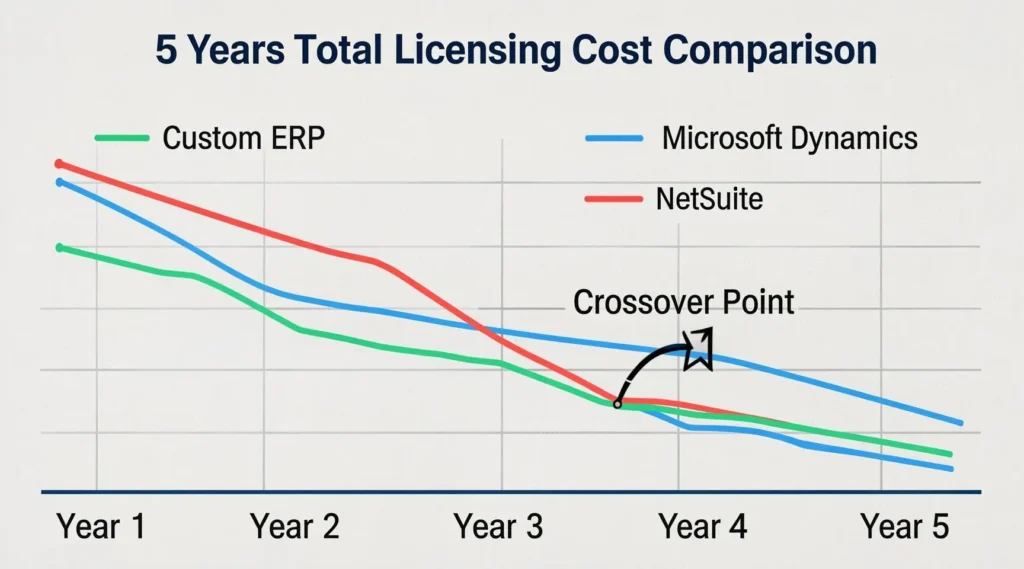
5-Year Total Cost Comparison: Custom vs. Off-the-Shelf
Here’s what most companies miss when they compare sticker prices. Custom ERP has a higher upfront cost but off-the-shelf platforms have ongoing expenses that compound over time.
Let’s walk through real numbers for a mid-sized company with 75 users needing financial management, inventory control, CRM integration, and custom reporting.
Off-the-shelf path with Microsoft Dynamics:
- Initial setup and configuration: $45,000
- User licenses (75 users at $800 per year): $60,000 per year
- Required customization to fit your workflows: $35,000
- Integration with existing systems: $15,000
- Annual support and maintenance: $12,000 per year
- Year 1 total: $167,000
- 5-year total: $407,000
Custom ERP development path:
- Discovery and requirements: $18,000
- System design and architecture: $22,000
- Development and testing: $95,000
- Integration and data migration: $28,000
- Training and deployment: $12,000
- Year 1 total: $175,000
- Annual support and hosting: $22,000 per year
- 5-year total: $263,000
The custom system costs $8,000 more in year one. But by year three the total cost of ownership crosses over and custom becomes less expensive. By year five you’ve saved $144,000 compared to the off-the-shelf licensing and customization path.
And here’s what those numbers don’t show. With the custom ERP system you own the code. You’re not paying per-user fees that increase every time you hire someone. You’re not stuck waiting for the vendor to add features you need. You control the roadmap.
The off-the-shelf route makes sense when you need to minimize year-one cash outlay or you’re not confident you’ll still be using this system in five years. Custom makes sense when you’re planning long term and the total cost of ownership matters more than the initial price tag.
Not sure which path fits your situation? Schedule a free consultation and we’ll give you an honest assessment based on your actual workflows, team size, and budget. Even if the answer is start with off-the-shelf for now and build custom later when you’ve scaled. We’d rather tell you the truth than sell you something that doesn’t fit.
The Real Cost of Disconnected Systems (Why Growing Companies Seek Custom ERP)
Your finance team closes the books every month by spending 14 hours pulling data from QuickBooks, three different spreadsheets, your CRM, and whatever tracking system operations decided to use this week. They reconcile the numbers by hand. They hunt down errors manually. They fix discrepancies that shouldn’t exist in the first place and then they do the whole thing again next month
And they do it again next month.
That’s not a software problem. That’s a hidden payroll cost that compounds every single month your business operates on disconnected business management software.
We see this exact pattern in nearly every company that calls us. The warehouse runs inventory on spreadsheets that don’t update when a sale happens in the online store. Sales oversells products that ran out two days ago because nobody told them. Or the warehouse is sitting on $40,000 in stock that nobody in purchasing knew about because the spreadsheet hasn’t been updated since last Tuesday.
Your sales team can’t tell a customer when their order will ship without calling operations. Operations can’t give an answer without checking three systems and texting the warehouse manager. The customer waits on hold. Your competitor who invested in proper ERP system integration answers that question in 15 seconds and gets the repeat order.
These disconnected systems create hidden costs that most companies never track because nobody’s job is to add up the total damage. HR enters PTO in their system. Payroll runs from a different platform that doesn’t talk to HR. Someone gets paid for days they didn’t work.
Someone else doesn’t get paid for leave they earned. Fixing one payroll error costs three hours of management time plus you’re managing an employee who now questions whether your company actually has its act together
And here’s the cost nobody calculates until an auditor is sitting at the conference room table. Your compliance data is scattered across six different systems with no consistent record of what actually happened.
When the auditor asks for a complete trace of a transaction from quote to delivery to payment, your team spends two days reconstructing a paper trail that should take 30 seconds to pull from one unified system. And while they’re doing that, nobody’s running the business
Business process automation built into your custom ERP eliminates these hidden costs by connecting every department’s data in one unified system. A sale happens inventory updates instantly across every channel, accounting posts the transaction, and the warehouse gets the fulfillment notification, all without anyone lifting a finger. An employee submits a time-off request the system checks their available balance, approves it against the policy you set, and updates payroll automatically.
Finance starts the month-end close with data that’s already consolidated and reconciled in real time, not waiting for six people to send spreadsheets
Executives at companies running on disconnected systems make decisions based on reports that were already two weeks old when someone finally compiled them manually. Markets shift while the data is being assembled. Opportunities close before the numbers confirm what someone already suspected. Problems compound because nobody could see them clearly until they’d grown past the point where the fix was easy. All because the business management software couldn’t show what was happening in the business right now.
We’ve watched operations managers refresh spreadsheets hourly trying to keep up with what’s actually in the warehouse versus what the system thinks is there. That’s not management. That’s data entry with a fancy title.
Training a new employee at a company with five disconnected systems takes a week longer than it should. They learn QuickBooks. Then the inventory system. Then the CRM. Then the internal order tracking tool someone built in Excel in 2015. Then the shipping platform. Then whatever custom database IT set up that one time. Each system has its own login, its own logic, and its own way of breaking when something goes wrong.
One system means one training process. One login. One place where all the data lives and updates automatically.
That’s what drives companies to finally invest in proper ERP system integration or custom development. Not because disconnected tools stop working. Because the hidden costs of making them work become more expensive than fixing the problem permanently.
How Custom ERP Software Development Services Solve These Challenges
Custom ERP software development services replace the daily frustration of disconnected systems with one unified platform where all your business data connects, updates, and becomes immediately visible to whoever needs it. Your team stops managing six different logins and reconciling numbers manually. They work from one system that was designed around how your business actually operates — not the other way around
Finance closes the books in three hours instead of fourteen. The custom ERP pulls data from sales, inventory, operations, and payroll automatically. Everything reconciles in real time. No manual data entry. No spreadsheet gymnastics. No staying late on the last day of every month trying to find where the numbers don’t match.
Warehouse inventory updates the moment a sale happens anywhere in your system. Online store, phone orders, walk-in customers. The stock count adjusts instantly. Your sales team never oversells products that ran out yesterday because they’re working with live data, not last week’s spreadsheet.
Sales reps answer customer questions in fifteen seconds. Order status, shipping updates, delivery estimates, product availability. Everything appears on one screen because the ERP system integration connects your sales, warehouse, shipping, and customer data in real time. No more putting customers on hold while you call three departments.
And here’s what makes the biggest difference for executives. You see what’s happening in your business as it happens, not two weeks after it’s too late to do anything about it. Revenue, margins, inventory levels, production bottlenecks, cash flow. The dashboard updates every hour with real data from every department.
Business process automation handles the manual tasks that eat up your team’s time. Employee PTO requests automatically check available balances and update payroll without human intervention. Purchase orders trigger when inventory hits reorder points. Invoice approvals route to the right manager based on dollar amount and department. Your team focuses on decisions that grow the business instead of data entry that software should handle.
Compliance audits become straightforward because all transaction data lives in one auditable system with proper access controls. When the auditor wants to trace a sale from quote to payment, the ERP shows the complete record in thirty seconds. No more scrambling through six systems trying to reconstruct what should be a simple data trail.
Training new employees takes half the time when they learn one system instead of six. One login. One interface. One way that all your business data connects and flows. They become productive faster because they’re not switching between QuickBooks, three spreadsheets, your CRM, and whatever custom database IT built in 2018.
The ERP software benefits extend beyond just connecting your existing tools. We build the system around your workflows and business processes instead of forcing you to change how you operate to fit generic software templates. Your custom system scales as your business grows without per-user licensing fees that compound every time you hire someone, while faster access to accurate information and more efficient operations can give your company a competitive advantage.
Which means you control your own roadmap. When you need new features or integrations, we add them to your system instead of waiting for a vendor to maybe include what you need in their next release. The platform grows with your business because you own the code.
Custom ERP Modules We Build for Your Business
We design custom ERP systems with modular architecture — meaning you select exactly the capabilities your business needs and pay only for functionality that solves real operational problems, not forced packages stuffed with features you’ll never touch. Every module we build through our ERP module development process gets configured to match your specific workflows, not generic industry templates
Each module we build gets configured to match your specific workflows, not generic industry templates. The financial management module for a construction company handles job costing and progress billing differently than the same module for a manufacturer tracking production costs. ERP module development means building capabilities that fit how your business actually operates.
Here are the core ERP system features we build most often for our clients.
Financial Management and Accounting
Our financial management module eliminates the monthly nightmare of pulling data from QuickBooks, spreadsheets, and your CRM to close the books. General ledger, accounts payable and receivable, budgeting, financial reporting, multi-currency support, and tax management all connect to your sales and operations data automatically.
You get real-time financial visibility instead of waiting two weeks for manually compiled reports. Budget tracking happens in real time so you see cost overruns as they happen, not after they’ve blown past your limits. Multi-location businesses get consolidated financial reporting without manually combining data from different systems.
Inventory and Supply Chain Management
Supply chain management through our ERP module means your inventory count updates the moment a sale happens anywhere in your system. Real-time inventory tracking, purchase order management, vendor management, warehouse management, demand forecasting, and reorder automation eliminate both stockouts and overstocking.
Cash flow improves because you’re not sitting on $40,000 in inventory nobody knew you had or rushing expensive overnight shipments because stock ran out yesterday. The system triggers purchase orders automatically when inventory hits your reorder points and tracks vendor performance so you know which suppliers deliver on time and which ones create problems.
Human Resources and Payroll
Human resources management through our ERP system connects employee records, recruitment and onboarding, time and attendance tracking, payroll processing, benefits administration, and performance reviews in one place. No more HR data silos where PTO gets entered in one system and payroll runs from another.
Business process automation means employee PTO requests check available balances automatically and update payroll without manual intervention. Onboarding new employees takes half the time because their information only gets entered once and flows to payroll, benefits, IT access, and department management automatically.
Sales, CRM, and Customer Management
Your sales team gets a complete customer view in one system through our customer management module. Customer database, sales pipeline, quote and order management, contact history, and customer communication tracking all connect so your sales rep knows the complete relationship history when a customer calls.
ERP system integration means when someone places an order the inventory updates immediately, the warehouse gets notified, shipping prepares the label, and finance sees the revenue. No more putting customers on hold while you check three systems to answer “when will this ship?”
Manufacturing and Production Management
ERP software for manufacturing includes production scheduling, bill of materials management, work order management, shop floor tracking, quality control, and machine and equipment tracking. Production efficiency improves because the system schedules work based on actual capacity and material availability, not wishful thinking.
Downtime gets reduced because the system tracks machine maintenance schedules and alerts you before equipment breaks down. Quality control data connects to customer orders so if a quality issue appears you can trace exactly which products might be affected and which customers need to be contacted.
Project Management and Resource Tracking
Our ERP project management module handles project planning, task assignment, time tracking, resource allocation, project costing, and milestone tracking. You get visibility into project profitability in real time instead of discovering three months later that a project ate up all its margin.
Resource utilization improves because the system shows you which team members are overloaded and which ones have capacity for new work. Project costing tracks not just labor and materials but also the indirect costs that most companies don’t capture until it’s too late.
Business Intelligence and Analytics Dashboards
Business intelligence turns your ERP data into actionable insights through real-time KPI dashboards, custom report builders, data visualization, trend analysis, predictive analytics, and automated report distribution. Executives see what’s happening in the business as it happens instead of making decisions based on two-week-old spreadsheets, while predictive analytics can help identify emerging trends and potential operational issues before they become larger problems.
Dashboard customization means each manager sees the metrics that matter for their department. Sales managers see pipeline and conversion rates. Operations managers see production efficiency and quality metrics. Finance sees cash flow and margin trends. All updated hourly with real data.
Compliance, Audit, and Document Management
Our compliance module includes audit trail logging, compliance reporting for regulations like HIPAA, SOX, or FDA requirements, document version control, electronic signatures, and automated compliance workflows. Regulatory compliance becomes straightforward instead of a nightmare when audit time arrives.
Document management means contracts, policies, procedures, and compliance documentation live in the ERP system with proper version control and access permissions. When an auditor asks for documentation you produce it in minutes, not days.
Vendor and Procurement Management
Vendor and procurement management streamlines your entire purchasing process through vendor database management, RFQ and RFP management, purchase requisitions, contract management, and vendor performance tracking. You improve vendor relationships by having complete visibility into order history, delivery performance, and payment terms.
Procurement automation means purchase requisitions route to the right approver based on dollar amount and department, purchase orders generate automatically from approved requisitions, and vendor payments get scheduled according to your cash flow preferences and early payment discount opportunities.
Each module connects seamlessly with all the others because we design the custom ERP system as one integrated platform, not separate tools forced to work together. That’s how you get real business process automation instead of just digitized versions of your current manual processes.
How Our Custom ERP Development Process Works (From Discovery to Go-Live)
Our ERP development process runs on a defined software development lifecycle with specific deliverables and realistic timelines assigned to every phase before we start. Most custom ERP software development services take four to eighteen months depending on scope, and we give you honest timeline ranges in our proposal instead of the optimistic numbers that make signing easy but make project delivery painful.
Here’s exactly what happens and what we need from your team at each step. This is an agile software development approach with regular checkpoints, not months of development in a black box before you see anything working.
Total timeline ranges by project size:
- Small ERP (3-5 modules, under 50 users): 4 to 6 months
- Mid-size ERP (6-10 modules, 50-200 users): 6 to 10 months
- Enterprise ERP (10+ modules, 200+ users, multi-location): 10 to 18 months
Timeline factors that extend these ranges include complex data migration from legacy systems, extensive third-party integrations, industry-specific compliance requirements, and the depth of customization needed to match your unique workflows.
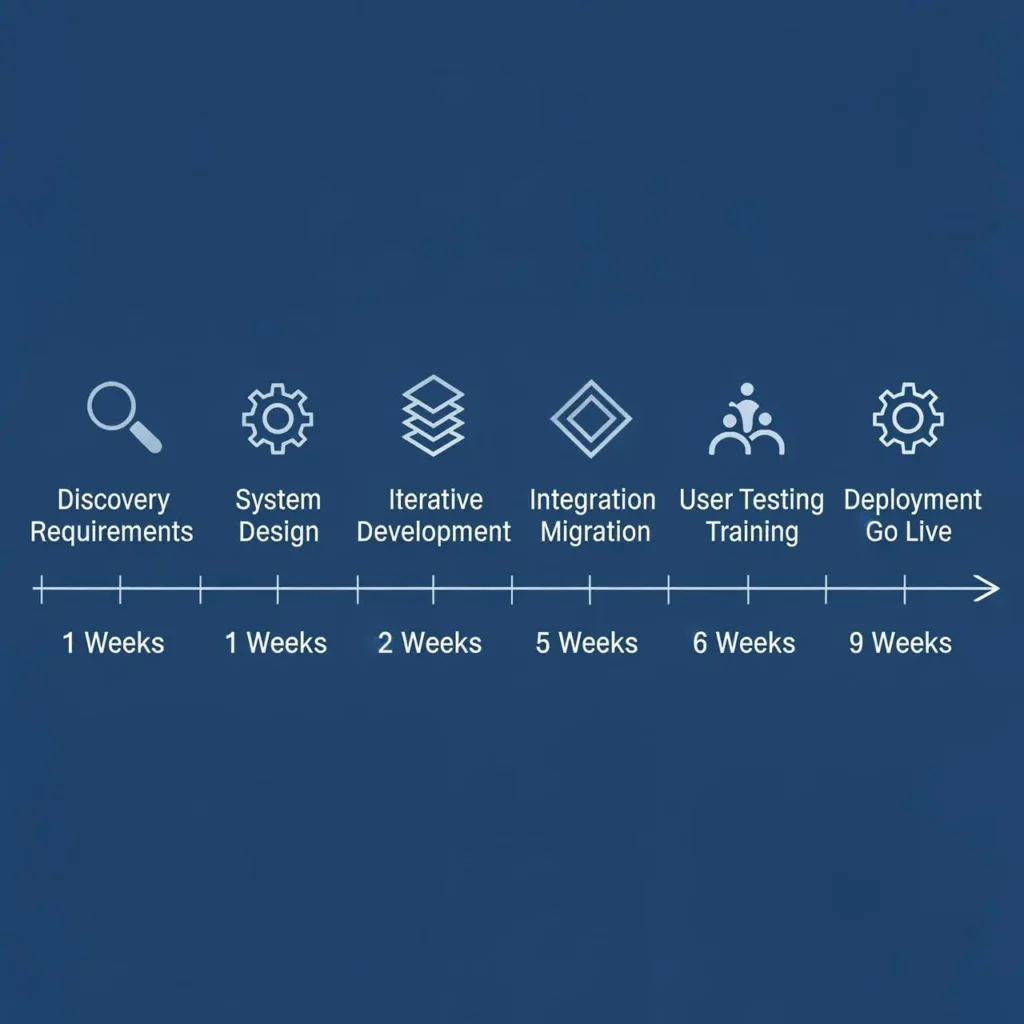
Phase 1 — Discovery and Requirements Gathering (Weeks 1-3)
What we do: Conduct stakeholder interviews across all departments affected by the ERP development, document your current workflows, analyze pain points and inefficiencies, map data flows between existing systems, and create a system architecture proposal tailored to your business.
What you do: Provide 5 to 10 hours per week from department leads in Finance, Operations, Sales, and HR for interviews and workflow reviews. No technical preparation required on your end. We just need to understand how your business operates today and where the problems occur.
Deliverable: Requirements document, system architecture proposal, preliminary timeline and budget breakdown for your approval before any development begins.
Phase 2 — System Design and Architecture (Weeks 4-6)
What we do: Design the database structure, create detailed module specifications, develop UI and UX mockups, plan integration strategies with your existing systems, and establish the security architecture for data protection and user access controls.
What you do: Review and approve all design documents and mockups, requiring about 3 to 5 hours per week from your project lead. This approval checkpoint ensures we build exactly what you need before we write any code.
Deliverable: Technical architecture document, database schema design, user interface mockups, and integration planning document.
Phase 3 — Iterative Development and Testing (Weeks 7-20, varies by size)
What we do: Build ERP modules in 2-week agile software development sprints, conduct continuous testing throughout development, and provide working demos every two weeks so you see progress regularly instead of waiting months for the first glimpse of your system.
What you do: Attend bi-weekly sprint reviews, provide feedback on each completed module, and test features as we deliver them. Expect to invest 5 to 8 hours per week during this phase for reviews and testing.
Deliverable: Working ERP modules demonstrated and delivered every two weeks, with full functionality testing completed before moving to the next sprint.
This phase takes the longest but you see constant progress. No waiting for months wondering if the development is on track.
Phase 4 — Integration and Data Migration (Weeks 21-24)
What we do: Connect the custom ERP system with your existing tools like CRM, accounting software, eCommerce platforms, and any other systems you want to keep. We handle historical data migration, set up API connections, and ensure data flows correctly between all systems.
What you do: Provide access to existing systems, validate that migrated historical data is accurate and complete, and help us understand any data quality issues in your current systems. This requires 8 to 12 hours per week during the migration period.
Deliverable: Fully integrated custom ERP system with all historical data migrated and all existing system connections working properly.
Phase 5 — User Acceptance Testing and Training (Weeks 25-28)
What we do: Conduct comprehensive user acceptance testing with your end users, fix any issues discovered during testing, create training materials customized for each user role, and provide hands-on training sessions for your team.
What you do: Coordinate your end-user testing team across departments, participate actively in training sessions, and document any workflow adjustments needed. This is the most intensive phase for your team, requiring 15 to 20 hours per week during ERP software implementation.
Deliverable: Tested and verified system, fully trained user base, and complete user documentation and training materials.
And here’s what most companies don’t plan for. User acceptance testing often reveals small workflow adjustments that make the system work even better for your team. We build in time for these refinements.
Phase 6 — Deployment and Go-Live Support (Weeks 29-30)
What we do: Deploy the system to your production environment, monitor system performance closely during the first week, and provide on-call support during your go-live period to handle any urgent issues that appear with real-world usage.
What you do: Coordinate internal communication about the system launch, manage change management across departments, and work with us to address any immediate post-launch adjustments needed.
Deliverable: Live ERP system with performance monitoring, documentation package, and transition to ongoing support services.
What to Expect in Your First 90 Days After Signing
Here’s the week-by-week breakdown of what happens immediately after you sign the contract, because most ERP development companies never tell you what actually happens in those first critical months.
Days 1-7: Kickoff meeting with full project team introductions, review of all existing documentation you can provide, setup of project communication channels, and access setup for any systems we need to examine during discovery.
Weeks 2-4: Discovery workshops with each department, current workflow documentation sessions, pain point analysis meetings, and preliminary system architecture design based on what we learn about your business.
Weeks 5-8: Design approval meetings for system architecture and UI mockups, first development sprint kickoff, and initial user interface demonstrations so you can see how the system will look and feel.
Weeks 9-12: Working prototype demonstration of your first core module, feedback and refinement cycle, and delivery of second and third sprint results with additional working modules.
This 90-day transparency eliminates the anxiety most companies feel after signing a major software development contract. You see progress immediately, not months later.
Want to see how this ERP development process would work for your specific project? Schedule a discovery call and we’ll walk through preliminary timeline and scope based on your current systems and requirements. No obligation to move forward, just honest assessment of what your project would involve.
Why Businesses Choose Us as Their ERP Software Development Company
We’ve completed over 200 ERP implementations in the past 12 years for companies ranging from $10 million manufacturing operations to $500 million distribution businesses. Most of our clients come to us after getting burned by providers who promise unrealistic timelines or disappear after launch.
Here’s what makes us different as an ERP solutions company, and why our average client relationship lasts 4.2 years instead of ending at project completion.
Our Credentials and Certifications
We maintain ISO 27001 certification for information security management and ISO 9001 for quality management systems. Our team holds current technology partnerships with Microsoft, SAP, and AWS, which means we stay current with the platforms your ERP system needs to integrate with as they evolve.
We’ve built custom ERP systems for manufacturing, healthcare, distribution, professional services, and retail companies. Our enterprise software development experience spans compliance-heavy industries like pharmaceutical distribution (FDA requirements) and financial services (SOX compliance) as well as fast-moving sectors like eCommerce and logistics.
Our longest client relationship is 8 years. They started with a 5-module ERP system for 75 users and we’ve expanded it to 12 modules serving 300 users across 4 locations as their business scaled.
Meet Our ERP Development Team
David Chen, Lead ERP Architect — 15 years of ERP development experience with SAP Certified Development Associate and Microsoft Dynamics 365 certifications. David has led 40+ enterprise ERP implementations across manufacturing and healthcare sectors, specializing in production planning and compliance systems.
Sarah Rodriguez, Senior Project Manager — PMP certified with Agile Master certification and 12 years managing complex software projects. Sarah has managed ERP implementations from $150K to $2M in scope and maintains a 98% on-time delivery record.
Marcus Thompson, Quality Assurance Lead — 10 years of enterprise software testing with ISTQB Advanced certification. Marcus developed our testing methodology that catches 94% of issues before user acceptance testing begins. He personally reviews every module before client demonstration.
Jennifer Walsh, Lead Systems Architect — Microsoft Certified Azure Solutions Architect with 13 years designing scalable database systems. Jennifer handles the technical architecture that ensures your ERP system can grow from 50 users to 500 users without performance degradation.
This is your dedicated development team from discovery through ongoing support. We don’t shuffle projects between different teams or hand off support to a separate company after launch. The same ERP software developers who build your system maintain it long term, so the people responsible for development understand the architecture, integrations, and business requirements behind your system.
What Makes Our Approach Different
Timeline honesty upfront. We provide realistic timeline ranges with our proposals, not optimistic promises designed to win contracts. Our ERP development process timelines account for the reality that user acceptance testing takes longer than planned and data migration from legacy systems usually reveals data quality issues that need cleanup.
Anti-sell advisory approach. We’ll tell you honestly if off-the-shelf ERP makes more sense for your current situation than custom development. About 30% of our discovery calls end with us recommending NetSuite or Microsoft Dynamics instead of custom ERP development. Those companies often come back to us 18 to 24 months later when they’ve outgrown the off-the-shelf limitations.
Modular phased implementation. Start with 3 to 5 core modules and expand as you see value instead of building everything at once. This reduces your initial investment and lets you validate that the ERP approach works for your team before committing to the full scope.
Dedicated team continuity. The same project manager, lead architect, and QA lead work on your project from discovery through support. You’re not explaining your business to new people every phase or wondering if the support team understands the system they didn’t build. That continuity gives your team a stronger foundation for long term success because the people supporting the ERP already understand its architecture, workflows, and business requirements.
Transparent pricing structure. We provide cost ranges upfront and explain what factors affect final pricing instead of forcing you through a sales process to get basic budget information. No hidden fees for standard features like user training or post-launch bug fixes.
90-day post-launch warranty. All critical and high-priority bugs discovered in the first 90 days after go-live get fixed at no additional cost. This isn’t buried in contract fine print. It’s our standard practice because we stand behind the systems we build.
What Our Clients Say
Michael Torres, Operations Director at Precision Manufacturing Corp — “We evaluated 8 ERP development companies and chose them because they were the only ones who told us honestly that we should try Microsoft Dynamics first and come back if it didn’t fit our production scheduling needs. Eighteen months later we did come back, and they built us a custom system that reduced our average setup time by 35% and eliminated scheduling conflicts completely.”
Lisa Chen, CFO at Regional Distribution Partners — “The ERP system they built eliminated 16 hours of manual work from our month-end close process. We used to have three people working until 9 PM on the last day of every month reconciling data from different systems. Now the close happens automatically and we’re done by 3 PM. The system paid for itself in labor savings within 14 months.”
Robert Mitchell, CEO at Healthcare Supply Solutions — “What impressed us most was their response when we discovered a data integration issue six months after launch. Their team had a fix deployed within 24 hours and implemented additional monitoring to prevent similar issues. Most vendors would have charged us for a change request. They treated it as their responsibility to make sure our system worked properly.”
These clients represent typical outcomes from our ERP implementation services. Better operational efficiency, reduced manual work, and long-term partnership that extends beyond the initial project completion.
Most ERP software development companies disappear after launch or hand you off to a different support team. We maintain the same team relationship because ERP systems evolve as your business grows, and continuity matters more in year three than it does in month three.
Our ERP Integration Strategy and Data Migration Approach
Your custom ERP system needs to connect with the existing tools you want to keep running, not replace everything you’ve invested in already. We plan ERP system integration during the discovery phase and test every connection throughout development, not as an afterthought when the ERP is already built.
Most integration problems happen because they’re addressed at the end of the project when it’s too late to change the architecture if something doesn’t work properly. Our approach prevents those costly surprises by designing integrations from day one.
Common Systems We Integrate With Your ERP
We’ve connected custom ERP systems with most of the popular business tools companies use today. CRM platforms like Salesforce, HubSpot, and Zoho connect to share customer data and sales pipeline information. Accounting software including QuickBooks, Xero, and NetSuite financial modules integrate for automated transaction posting and financial reporting.
eCommerce platforms such as Shopify, WooCommerce, and Magento sync inventory levels and process orders automatically. Many of our clients run WordPress-based eCommerce sites, and if you need help optimizing your WordPress platform before ERP integration, our SEO services for WordPress ensure your site performs well both technically and in search rankings.
HR systems like BambooHR and Workday share employee data for payroll and benefits management. Marketing automation tools including Mailchimp and HubSpot connect for customer segmentation and campaign tracking.
Payment processors like Stripe and PayPal integrate for transaction processing and reconciliation. Shipping systems such as ShipStation and FedEx API connections automate label generation and tracking updates. Warehouse management systems, point-of-sale platforms, and industry-specific tools all connect through API integration or custom connector development.
We use RESTful APIs for modern cloud-based systems, middleware platforms for complex multi-system integrations, and custom connectors for legacy systems that don’t have standard API access. Real-time data synchronization happens through webhook listeners that update information instantly when changes occur in any connected system.
Which means when a sale happens in your eCommerce store, inventory updates immediately in the ERP, the accounting system posts the transaction automatically, and the shipping system prepares the order for fulfillment without manual intervention.
Our Data Migration Process
Data migration from your current systems follows a five-step process designed to guarantee no data loss during the transition to your new ERP system. We start with a complete data audit to identify what information exists in your current systems, assess data quality issues that need cleanup, and determine what data to migrate versus what to archive.
Step 1: Data audit and quality assessment. We examine all your current data sources to understand what information you have, where it lives, and what condition it’s in. Customer records scattered across different systems, duplicate entries in your CRM, inventory data with inconsistent naming conventions, financial data with missing categories. We document everything before proposing a migration strategy.
Step 2: Data mapping and transformation planning. We map how data from your old systems will fit into the new ERP structure. Customer information from three different sources gets consolidated into one customer record. Product data from spreadsheets gets standardized with proper categories and specifications. Historical financial data gets mapped to the new chart of accounts structure.
Step 3: Test migration in staging environment. We migrate a subset of your data to a test version of the new ERP system and validate that everything transfers correctly. You review the test data to confirm accuracy before we touch your production systems. Any issues get resolved in the staging environment where mistakes don’t affect your daily operations.
Step 4: Parallel system operation. For two to four weeks, your old systems and new ERP system run simultaneously with data syncing between them. This ensures business continuity while we validate that the new system handles your actual daily workflows correctly. If any problems appear, your old systems are still running normally.
Step 5: Final cutover and system retirement. We migrate any remaining historical data, shut down data sync from old systems, and retire the legacy platforms. Complete backups of all historical data remain available even after old systems are decommissioned.
This ERP system migration approach has never resulted in data loss for any client because we maintain multiple backups throughout the process and validate accuracy at every step. Your business continues operating normally while the migration happens in the background, and you maintain access to all historical information after the transition is complete.
Custom ERP Development Cost and 5-Year Total Cost of Ownership
Most ERP development companies avoid discussing ERP software cost until you’ve been through their entire sales process. We provide transparent pricing ranges upfront because you need to know if custom ERP development fits your budget before investing time in discovery calls and proposals.
Here are our actual cost ranges, what’s included, and how custom ERP compares to off-the-shelf licensing costs over five years.
What You Can Expect to Invest by Project Size
Small ERP Systems (3-5 modules, under 50 users): $75,000 to $150,000
Includes financial management, inventory, basic CRM, and HR modules with 2-3 system integrations. Timeline: 4 to 6 months from discovery to go-live. Best for growing businesses that need to connect their core operations but don’t require complex industry-specific features.
Mid-size ERP Systems (6-10 modules, 50-200 users): $150,000 to $300,000
Includes comprehensive module suite with advanced reporting, multiple integrations, custom dashboards, and mobile access. Timeline: 6 to 10 months. Best for established businesses with complex workflows that need extensive customization but operate from one or two locations.
Enterprise ERP Systems (10+ modules, 200+ users, multi-location): $300,000 to $500,000+
Includes full ERP suite, advanced automation, business intelligence, compliance modules, extensive integrations, multi-currency support, and complex reporting. Timeline: 10 to 18 months. Best for large organizations with multiple locations, complex compliance requirements, or unique industry needs.
Every price range includes discovery and requirements gathering, system design and architecture, full development and testing, all necessary integrations, complete data migration from existing systems, deployment and go-live support, comprehensive user training, and 90 days of post-launch support with bug fixes.
Payment structure is milestone-based to reduce your cash flow impact. Typically 30% at contract signing, 30% at design approval, 30% at user acceptance testing completion, and 10% at go-live. For larger projects we can structure payments by completed module delivery instead.
Factors That Affect Your Total Investment
Industry compliance requirements add $20,000 to $80,000 depending on complexity. HIPAA compliance for healthcare, SOX financial controls, FDA tracking for pharmaceuticals, or other regulatory requirements require specialized development and testing.
Number of system integrations affects cost significantly. Two to three integrations (QuickBooks, Salesforce, Shopify) are included in base pricing. Additional integrations cost $5,000 to $15,000 each depending on complexity and API availability.
Legacy system complexity can increase data migration costs. Clean, well-structured data migrates easily. Data spread across multiple old systems with quality issues requires cleanup and transformation that adds time and cost.
Custom reporting and dashboard requirements beyond standard business intelligence. Complex financial reporting, regulatory compliance reports, or executive dashboards with advanced visualizations require additional development.
Mobile application development for field workers or executives. Native mobile apps with offline capability add $25,000 to $60,000 depending on functionality required.
AI-powered automation and advanced AI features like demand forecasting, predictive maintenance scheduling, or intelligent document processing can add $30,000 to $100,000 depending on scope. These capabilities can automate complex business processes and help your ERP system make better use of the data it collects.
Multi-location and multi-currency support for businesses operating across geographic regions. Currency conversion, location-specific reporting, and data consolidation require additional architecture complexity.
And here’s what most people don’t consider upfront. ERP development cost varies based on how much customization you need versus how much you’re willing to adapt your processes. The more your workflows match standard business practices, the lower the cost.
5-Year Total Cost Comparison: Custom vs. Off-the-Shelf
Here’s the analysis most companies never see until after they’ve already committed to off-the-shelf ERP and discovered the hidden costs three years later.
Custom ERP Development Path (Mid-size example):
- Year 1: $200,000 development cost
- Years 2-5: $28,000 per year for support and hosting
- 5-year total: $312,000
Microsoft Dynamics Off-the-Shelf Path (Same scope):
- Year 1: $60,000 setup and initial customization
- Years 2-5: $75,000 per year for licensing (100 users @ $750/year each), additional customization as needs change, and ongoing support
- 5-year total: $360,000
NetSuite Off-the-Shelf Path (Same scope):
- Year 1: $45,000 setup and configuration
- Years 2-5: $85,000 per year for licensing, user additions as company grows, custom development for features not included in base platform
- 5-year total: $385,000
The crossover point where custom ERP becomes more economical than off-the-shelf typically occurs in year 3. By year 5, custom ERP saves $50,000 to $75,000 compared to SAP, Oracle ERP, or Microsoft Dynamics when you account for licensing fees that scale with your growth, customization costs that accumulate over time, and upgrade fees that reset your customizations.
But here’s the bigger difference. With custom ERP, you own the system and control the roadmap. With off-the-shelf solutions, you pay licensing fees forever, you’re locked into the vendor’s upgrade schedule, and adding features you need requires expensive customization that may not survive the next platform update.
For companies planning to operate the ERP system longer than four years, or businesses that expect to grow beyond 150 users, custom development typically provides better total cost of ownership and significantly more control over functionality.
Want a detailed cost estimate specific to your requirements and current systems? Share your project details and we’ll provide a comprehensive breakdown within 48 hours. No sales pressure, just honest numbers so you can make an informed decision about whether custom ERP development makes financial sense for your situation.
Industry-Specific Custom ERP Solutions We Build
Different industries need different ERP capabilities, and we’ve learned that a manufacturing ERP system requires fundamentally different modules than a healthcare practice management system or a construction project accounting platform. We don’t build one-size-fits-all custom ERP systems and then try to make them work for your industry.
Instead, we design each ERP system around the specific workflows, compliance requirements, and operational challenges of your industry. This approach allows us to customize ERP solutions around the processes that matter most to each business instead of forcing every company into the same predefined structure. Here’s how we approach ERP system customization for the industries where we have the deepest experience.
Manufacturing ERP Systems
ERP software for manufacturing starts with production scheduling that accounts for machine capacity, labor availability, and material delivery timelines all in one integrated view. Our manufacturing systems include bill of materials management that tracks component costs in real time, shop floor tracking with barcode or RFID integration for work order progress, and quality control modules that link quality data directly to customer orders for instant traceability.
Machine maintenance tracking prevents costly downtime by scheduling preventive maintenance based on actual machine usage rather than calendar dates. Supply chain management integration means your production schedule automatically adjusts when supplier deliveries are delayed, and inventory levels trigger purchase orders based on actual production demand rather than historical averages.
The biggest manufacturing challenge we solve is connecting production data with financial reporting so you know the true cost of each job as it happens, not three weeks after it ships.
Healthcare and Medical ERP Solutions
Healthcare ERP development requires HIPAA compliance built into every module from the ground up, not added as an afterthought. Our healthcare custom ERP systems integrate patient data management with medical inventory tracking that handles lot numbers, expiration dates, and recall management automatically.
Claims processing automation connects patient care records with insurance billing to reduce denials and speed collections. Provider credentialing modules track license renewals, continuing education requirements, and compliance deadlines to prevent accreditation issues.
Medical inventory presents unique challenges because expired medications can’t be sold like other inventory, recalls must be tracked down to individual patients who received specific lot numbers, and DEA-controlled substances require special handling and reporting. Our healthcare ERP systems handle these compliance requirements automatically rather than relying on manual tracking.
Retail and eCommerce ERP
Retail operations need multi-location inventory management where stock levels update instantly across warehouse, physical stores, and online platforms. Our retail ERP systems integrate point-of-sale systems with eCommerce platforms like Shopify and WooCommerce so inventory, pricing, and promotions stay synchronized automatically.
Customer loyalty programs track purchase history and reward point balances across all channels. Retail analytics provide insights into which products sell best at which locations, seasonal demand patterns, and customer buying behavior that helps with purchasing and markdown decisions.
The retail challenge we solve most often is preventing overselling when the same product is available in stores, online, and through third-party marketplaces. Our ERP system integration ensures that when the last item sells in any channel, it becomes unavailable everywhere instantly.
Distribution and Wholesale ERP
Distribution companies need multi-warehouse inventory management that tracks stock across multiple locations while optimizing fulfillment to minimize shipping costs. Our distribution ERP systems include vendor management modules that track supplier performance, delivery reliability, and cost variations over time.
Purchase order automation triggers orders when inventory hits reorder points but adjusts quantities based on supplier minimum orders and bulk pricing tiers. Shipping integration with FedEx, UPS, and freight carriers provides real-time delivery tracking and automatically selects the most cost-effective shipping method based on weight, destination, and delivery time requirements.
Demand forecasting uses historical sales data and seasonal patterns to predict inventory needs and prevent both stockouts and excess inventory that ties up working capital. These systems help distributors maintain the delicate balance between having enough inventory to fill orders immediately while not carrying so much stock that cash flow suffers.
Professional Services ERP
Professional services firms need project-based billing systems that track time and expenses by client, project, and task to ensure accurate invoicing and profitability analysis. Our professional services ERP systems include resource allocation modules that prevent overcommitting team members and identify capacity for new projects.
ERP project management capabilities track project milestones, deadlines, and deliverables while connecting project progress to billing and cash flow projections. Client portals allow customers to view project status, approve deliverables, and access historical project documentation without requiring staff time.
Project profitability tracking is crucial for professional services because labor is the primary cost, and understanding which types of projects and clients generate the best margins helps firms focus their business development efforts on the most profitable opportunities.
Construction and Real Estate ERP
Construction companies need job costing systems that track labor, materials, equipment, and subcontractor costs against project budgets in real time. Our construction ERP development includes project budgeting modules that handle change orders and track cost variations as projects evolve.
Equipment tracking manages rental, maintenance, and utilization across multiple job sites. Subcontractor management handles contract terms, payment schedules, insurance requirements, and performance tracking. Progress billing connects project completion percentages with invoice generation and cash flow management.
The construction industry challenge we address most often is providing accurate project profitability reporting while projects are still in progress, not just after completion. Real-time job costing helps project managers make decisions that keep projects profitable rather than discovering losses after it’s too late to correct them.
Each industry presents unique operational challenges that generic ERP modules can’t address effectively. That’s why we design custom ERP system solutions specifically around the workflows, regulations, and profitability drivers that matter most in your industry rather than trying to force your business to adapt to generic software capabilities.
How We Prevent Common ERP Implementation Failures
We’ve seen ERP projects go sideways. Budget overruns. Delayed launches. Teams that refuse to use the new system. You’ve probably heard the horror stories, and honestly, some of them are true.
Here’s what actually goes wrong and exactly how we prevent it.
Scope Creep and Budget Overruns
Requirements keep expanding. The budget balloons. We lock down your requirements after discovery phase approval. Any change after that goes through a formal request process where you see the cost impact and timeline shift before anything moves forward. Our milestone-based payments tie to deliverables, not dates, so you pay for completed work.
User Adoption Resistance
Employees resist the new system and keep using old workarounds. We involve your end users during requirements gathering and testing. They help build it, so they trust it. Our role-based training shows each person exactly what they need, and we phase the rollout so early wins build confidence across your team.
Data Migration Issues
Historical data gets lost or corrupted during the switch. We audit your data quality before migration starts, create a detailed mapping plan you approve, and run test migrations in a staging environment. We keep your old system running parallel during transition and maintain complete backups with a rollback plan.
Integration and Technical Failures
Your ERP doesn’t connect properly with existing systems. Data gets trapped in silos. We plan integrations during discovery, test API connections throughout development instead of hoping everything works at launch, and coordinate directly with your third-party vendors. Every critical integration gets a fallback mechanism.
Timeline Delays and Project Overruns
The project drags on months past the promised deadline. We give you realistic timeline estimates from day one, not optimistic sales promises. Our agile development process allows course correction when delays appear. We build in buffer time for user testing and training, and you get regular status reports with early warnings if anything shifts.
Post-Launch ERP Support and Maintenance: What’s Included
Your ERP support relationship with us doesn’t end at launch. Most of our client partnerships last years, not weeks. We provide ongoing erp support and maintenance because your business keeps evolving and your system needs to keep up.
Here’s exactly what our support includes and what you can expect after your ERP goes live.
Our Bug Fix and Response Time Commitments
We categorize every support request by priority and respond accordingly. Critical issues like system downtime, data loss risk, or security breaches get a 4-hour response with a 24-hour resolution target. High priority problems where a major function is broken and users are impacted get a 24-hour response and 3-day resolution target.
Medium priority issues with workarounds available get a 3 business day response. Low priority items like cosmetic fixes or feature requests get addressed within one week. You’re never left wondering when we’ll get back to you.
What’s Included in Standard Support vs. Additional Development
Our standard erp support and maintenance package covers bug fixes, monthly security patches, performance monitoring, and minor UI improvements that keep your system running smoothly. You get technical support through a dedicated channel and infrastructure maintenance to prevent problems before they start.
But some requests go beyond maintenance. New module development, major feature additions, and new third-party integrations are billed separately because they’re development work, not support. The same goes for custom reporting development, mobile app builds, and major architecture changes. We’ll tell you upfront which category your request falls into.
Long-Term Partnership and Team Continuity
The same dedicated development team that built your ERP handles your ongoing support. We don’t hand you off to a different vendor or offshore support center after launch. Our senior architect reviews every feature request to make sure new additions integrate cleanly with your existing system instead of creating technical debt.
This continuity matters because our team knows your system deeply. They built it. When you call with a question or problem, you’re talking to someone who understands exactly how your ERP works and why we designed certain features the way we did.
Frequently Asked Questions About Custom ERP Development
How long does it actually take to build a custom ERP system?
Small systems take 4 to 6 months, mid-size projects run 6 to 10 months, and enterprise builds take 10 to 18 months. You’ll see working modules every 2 weeks during our custom erp software development process, not wait months wondering what’s happening.
How much should we budget for custom ERP development?
Small systems start around $50,000, mid-size projects run $100,000 to $300,000, and enterprise builds can reach $500,000 or more. Share your requirements and we’ll provide a detailed estimate of your erp software cost within 48 hours.
Should we build custom ERP or buy SAP/Oracle/Microsoft Dynamics?
Build custom if you have unique workflows, need complex integrations, or find that customizing SAP or Microsoft Dynamics is approaching $100,000 anyway. We’ll help you make the right choice even if the answer is off-the-shelf, because our job is to solve your problem.
What happens after the ERP launches do you provide ongoing support?
Yes, we provide ongoing erp support and maintenance with specific SLA commitments, and the same dedicated development team that built your system handles your support. Most of our client relationships last multiple years because systems need to evolve as businesses grow.
Can you integrate our ERP with our existing software?
Yes, erp system integration is core to every project we build, connecting your ERP to Salesforce, QuickBooks, Shopify, and whatever else you’re using. Integration planning happens during discovery and we test API connections throughout development, not just at the end.